Straight2Bank Pay
Straight2Bank Pay is a payment gateway for powering our client's online collections at the point of payment checkout by buyer / consumer. It aggregates multiple payment methods via partnerships with leading players (PSP - Payment Service Provider) in the payments space across our footprint markets. The purpose of this document is to provide technical guidance for Client (Merchant) to integrate with Straight2Bank Pay.
- Version: 8.0
- Update: January, 2021
If you have any questions that are beyond the scope of this documentation, Please feel free to contact us.
Integration Options
Merchant can choose any one of the following Integration Options to present the Payment Method for their buyer on the checkout/payment page.
- Java Script Plugin Integration
- Re-direct integration
- Payment Link Integration
- API Integration
Java Script Plugin Integration
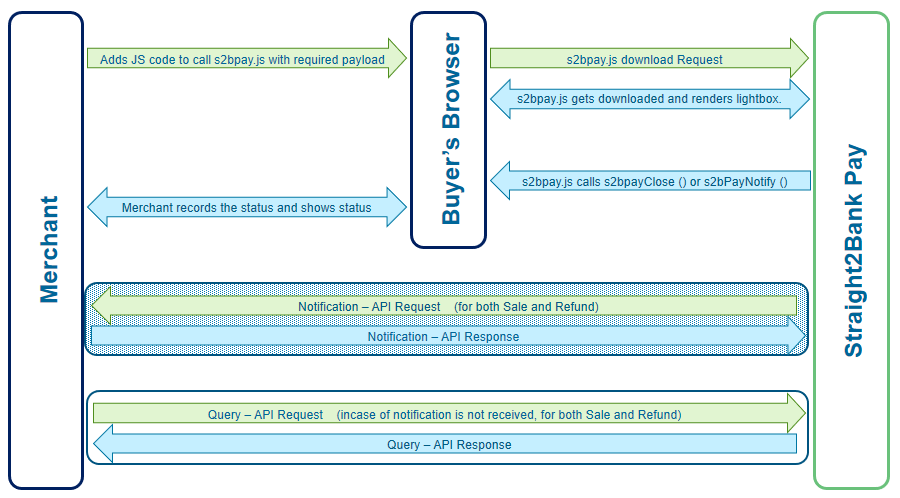
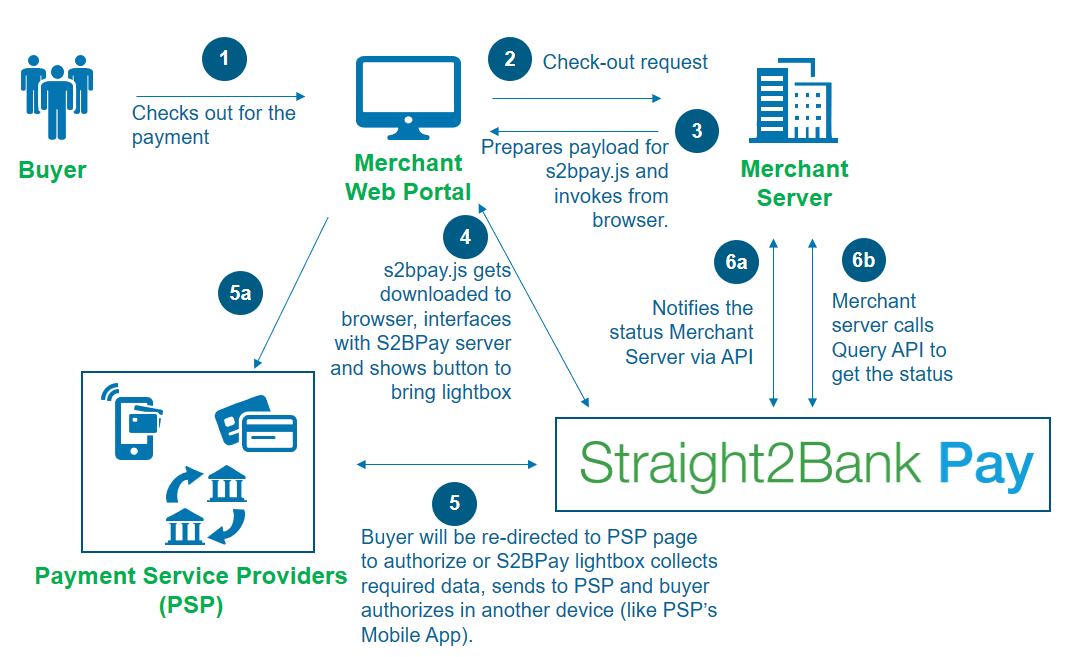
In this integration type, UI (User Interface) will be taken care of by Straight2Bank Pay Java Script. Merchant needs to make a call to s2bpay.js (resides in Straight2Bank Pay's server) from buyer's browser, s2bpay.js will get downloaded, takes care of rendering the button to bring up lightbox (overlay popup) with the enabled Payment Methods, facilitates buyer to choose preferred Payment Method till payment authorization, then shows the final status, passes control back to Merchant's page with the status at end of buyer's user journey. The following diagram depicts the minimum integration required for this type.
API Integration
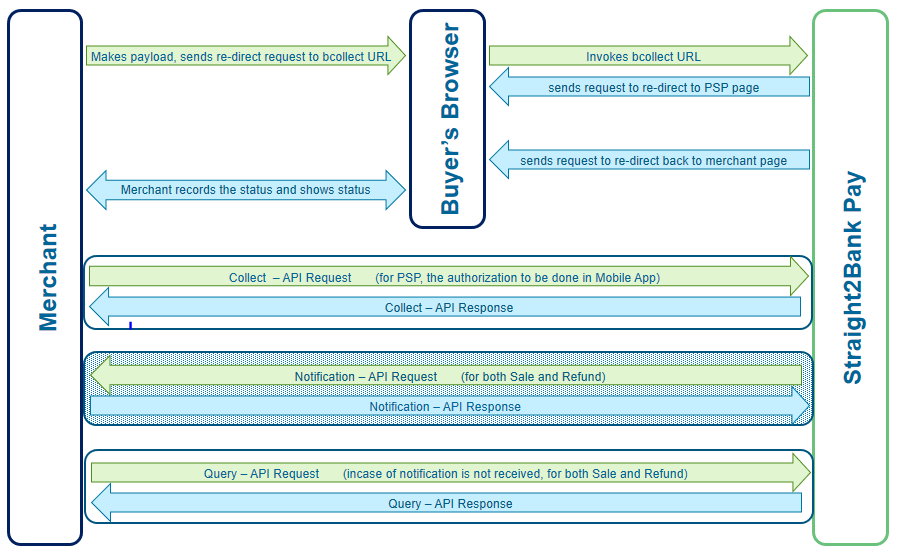
In this integration type, Straight2Bank Pay is not involved in rendering UI on merchant page, but offers API services for Payment Method which is not required to re-direct the buyer to PSP page. Merchant to invoke API of Straight2Bank Pay as server-to-server call (collect) to perform on-line collection. For such Payment Method, buyer authorizes the payment in Mobile App, eg. UPI for India, PayNow for Singapore, etc. In case, PSP offers their service only via browser re-direction (eg. eNETS, BillDesk, etc), then Merchant needs to re-direct the user to Straight2Bank Pay URL (bcollect) with the payload as part of https FORM via buyer's browser, Straight2Bank Pay does another re-direction to PSP page which allows the buyer to authorize the payment on PSP page. The following diagram depicts the minimum integration required for this type.
Pre-requisites
- 'Straight2Bank Pay - Corporate Profile' form to be filled-up and submitted to Implementation Manager to setup a profile. Profile form contains all the configurations related to customize light box, list of PSPs to be enabled, any merchant data required to interface with each PSP, report scheduling and account to which the collected fund to be credited. Other mandatory data to be provided in the form:
- Merchant needs to generate RSA-2048 key pair as given in section key pair generation and share public key to Bank. Merchant required to keep private key securely. Public key value needs to be populated in the form.
- Merchant portal's URL (Domain name) to be filled in the form. If Straight2Bank Pay JavaScript (s2bpay.js) is requested from different URL, then the Straight2Bank Pay button will not be shown on the page.
- If Merchant wants to receive real-time notification, then Merchant needs to host a REST API. API end-point URL and SSL certificate (root, intermediary) to be submitted to Bank.
- Implementation Manger will submit the form internally and arrange to create a profile and assign a 'Corp ID' (Corporate Id). As part of Profile creation, Straight2Bank Pay will send a secret key to Merchant via email. Two emails will be sent containing: (Merchant required to keep Secret key securely)
- PDF attachment (PDF is protected with a password)
- Password to access the PDF
Once a profile has been successfully setup, then merchant can start the testing.
Java Script Plugin integration
Java Script Plugin integration requires Merchant Server to construct the payload and send to buyer's browser which in turn calls s2bpay.js from Straight2Bank Pay server. As a result, s2bpay.js will get downloaded and will be part of merchant page, shows the button to bring lightbox and takes care of remaining user journey. Once the buyer has authorized or rejected the payment, s2bpay.js will pass the control back to merchant page by calling either s2bPayClose() or s2bPayNotify().
How it works
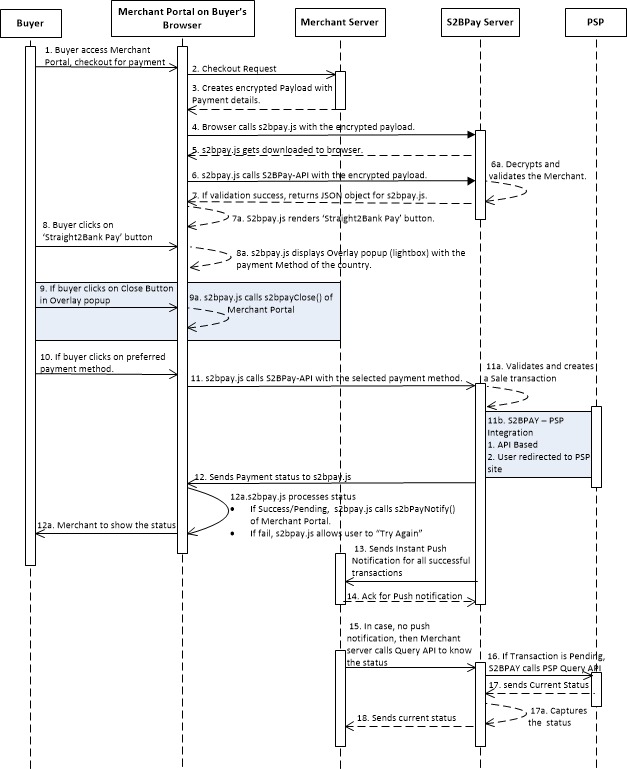
Buyer checks out
While loading merchant's payment page, s2bpay.js is called with the required parameters which will render Straight2Bank Pay Button if all validation is successful. Refer to s2bpay.js for more details.
Buyer clicks on Straight2Bank Pay button
While loading merchant's payment page, s2bpay.js is called with the required parameters which will render Straight2Bank Pay Button if all validation is successful. Refer to s2bpay.js for more details.
- The lightbox will have the details of the transaction such as amount and other details passed by merchant.
- Based on the country and currency provided, the buyer will be shown various payment methods that are enabled in the profile.
- If buyer closes the lightbox without choosing any payment method, then s2bpay.js will call a function, named as 's2bPayClose()' with an object containing the status and unique reference number. The Merchant can define the function 's2bPayClose()' on their webpage and taken appropriate action, if required. Refer s2bPayClose
Buyer selects a 'Payment Method' from the lightbox
Straight2Bank Pay connects with the respective PSPs via one of the following options:
- Redirects the buyer to PSP's page by passing the required details as part of browser redirection.
- Makes an API call and then redirects the buyer to PSP's page.
- Prompts the required details from the buyer and makes an API call with the PSP. No redirection for this option
Redirection to the PSP's page will happen in the child window. The parent window (Merchant page) will be in "Processing" state when the child window is open and no change is permitted on the parent window. Once the child window is closed, the parent window will show the appropriate status to the buyer.
Straight2Bank Pay provides the payment status to Merchant via the following options:
If buyer closes the lightbox after payment method selected, s2bpay.js will call a JavaScript function 's2bPayNotify()' with an object containing the status and unique reference number of the payment. The Merchant is expected to define the function 's2bPayNotify' on their webpage and take appropriate action based on the payment status. Refer s2bPayNotify
- Straight2Bank Pay notifies successful payment status to Merchant's server in real-time via reverse API. Refer Notifications
- Merchant can call Query API of Straight2Bank Pay to get the status of the transaction. Refer Query
Sequence Diagram
s2bpay.js
Merchant needs to construct payload as described in this section at Merchant's server at the point of checkout and send this payload to Buyer's browser page, so that browser downloads s2bpay.js from Straight2Bank Pay server.
To construct payload, server needs to have Merchant's private key and shared Secret Key, hence the payload needs to be constructed only at Merchant's server, sensitive data (private and secret key) should not be sent to the browser.
URL
| Production | https://s2bpay.sc.com/s2bpay/resources/merchant/js/s2bpay.js |
|---|---|
| Test | https://test-s2bpay.sc.com/s2bpaysit/resources/merchant/js/s2bpay.js |
Sample Java Script snippet to be constructed in Merchant's server and sent to browser page.
							<!-- calling s2bpay.js from merchant's page-->
<script id="s2bpay-button-script" class="s2bpay-button"
   src="https://s2bpay.sc.com/s2bpay/resources/merchant/js/s2bpay.js"
   src="https://s2bpay.sc.com/s2bpay/resources/merchant/js/s2bpay.js"
   data-corpid="CN000002" data-encstr=" s+1BOZb+mVwx6l9IbYH2iYjzkc15sT4zAPhKP0Lu8L5HV272C6jJ6yzTwrYlGpbXvsMJAj/q/diA1MMdYpw6Q6jRNJLKA6XkxSEQGxrwt2OfQQY9B45PmbEncYb7o1zWBB1VIyXiao9b3kq2k7bJMDLjVxw1CbZ6R200gly0paVkzDGwQ6myfOSmnA2oVuyecyuZJrre8W+LeCRL9EavUmMgnCjou8XuhikxejP0nVuRiyYhza8CBeSBoyT0uTHUzTpdtNoU8+xN2bPqC3G+9JNn7UIon3HfYaFymkjfh8XqlQtNFexYGp7qfhX0Wa0RvOBe3H8+I1fMnuBx3+0x7TT2mRUDbU3teLtKr8lofOoDGGmWdlgzG/sbE5ROr+WH83QmklWzUuFiINLosbrZAS8f8vwXcl/EW05F0Dgn7hxhRKO5KoTi3fFue1K58DSubiin/ZO/sGxYa870EHLIGNPQ/V6mP9CW2gVkNJCJxYc2CUYV7s0AbwO0m9fAhKa+qj/Lg/V52LP/TDZz5E7037XBB9tHjdkXIwUjFopN8A8LBGEYPMqVU/xFdkrnu9YVGbeZ2uUzfqMhSWvynDiJhQ==">
</script>
The value in data-encstr is AES-256 CBC encrypted using the secret key and base64 encoded. Refer AES256 encryption/decryption The plain string looks like below: Refer to Request Parameters for description of each field of payload
amt=1&corpid=CN000002&country=SG¤cy=SGD&datetime=23072018150241&ref1=23072018145641&sign=pDW/SIqZstGY5xwE3zGPSUn/E3iXK15Nh9RXNlsMmis/4skng4BMniv+bNgVKLlsWB3EoeNctCKqZeONoIYMQL7zgpJZZoLqJ5AwzJ5Ug8CheTYt3lTizIx13CK3QHS4mIoT2J8h4KMkrSjaRLFQ9AprnTs6nQ3J5TTAx7HxZzySuTic5M0Z2NdEv5mwTf9GQybd6LNToXRkFPKzym5dkiC67VbWCMcmVYLBaPFgFToYlJONcjEx2UNnw92Im+1rimibSD9yAASM5JaoJl3dpPfOyhOkommCVFbLm9j4yjSLCwb7x6et/1wASBcUGa+k/vrVQqKk6O+QEMpjSB7H1Q==
Request Parameters
| Seq Num | Key Name | M/O/C | Type & Length | Remarks |
|---|---|---|---|---|
| P1 | corpid | M | X(8) | Corp ID of Merchant |
| P2 | amt | M | N(16,3) | 13 integer digits and a precision of 2 decimals |
| P3 | country | M | X(2) | 2 character country code |
| P4 | currency | M | X(3) | 3 character currency code. Only domestic currency is supported. |
| P5 | ref1 | O | X(100) | Reference Number 1. This value can be shown in lightbox with the configured label.Please refer 'Unique Reference' rule. |
| P6 | ref2 | O | X(100) | Reference Number 2. This value can be shown in lightbox with the configured label.Please refer 'Unique Reference' rule. |
| P7 | ref3 | O | X(100) | Reference Number 3. This value can be shown in lightbox with the configured label.Please refer 'Unique Reference' rule. |
| P8 | ref4 | O | X(100) | Reference Number 4. This value can be shown in lightbox with the configured label.Please refer 'Unique Reference' rule. |
| P9 | ref5 | O | X(100) | Reference Number 5. This value can be shown in lightbox with the configured label.Please refer 'Unique Reference' rule. |
| P10 | datetime | M | N(14) | Format: DDMMYYYYHH(24)MMSS (GMT+08:00) The encrypted string is valid only for 5 minutes from the created time. |
| P11 | pspid | C | X(8) | PSP for which payment is being initiated. Eg: BDSSLNET,
BDSSLCRD, BDSSLNET. PSP IDs to be obtained from Implementation Manager. Mandatory for bcollect URL & collect API and not applicable for s2bpay.js. |
| P12 | rurl | C | X(1000) | Return URL needs to be populated if Merchant portal does
not want Straight2Bank
Pay
to open another Browser Window to re-direct the buyer to PSP page
but instead wants to use the current browser window to be used to
re-direct the buyer to PSP page. On this user journey, Straight2Bank Pay
uses this URL to re-direct the buyer back to merchant page, as part
of this re-direction, Straight2Bank
Pay
includes the payload to provide the status. Payload parameters will
be same as described in section Notification Request Merchant may need to populate rurl value for their mobile app integration with Straight2Bank Pay since opening multiple pages on a webview instance is not recommended. Mandatory for bcollect URL, Optional for s2bpay.js, qrCollect and not applicable for collect API. |
| P13 | sign | M | X(5000) | Signature of entire key-value pair using Merchant's Private
key. Algorithm to be used : RS256 Refer to Generation of Digital Signature |
Unique Reference Rule
Any one of the fields ref1 to ref5 can be chosen to be configured as 'Unique Reference' in Profile. This reference should be unique across for all transaction including refunds and should be maximum 16 characters long. Straight2Bank Pay will reject a transaction if any transaction contains same unique reference that was used earlier for a successful transaction. This duplicate check is performed based on last 365 days data. The assigned 'Unique Reference' field's value will be populated in 'corpref' field of messages that will be sent from Straight2Bank Pay to Merchant (eg. Notification, Query Response, etc). In case, 'Unique Reference' rule is not configured in profile, then 'corpref' will carry the value of Straight2Bank Pay generated transaction ID.
Customization of Straight2Bank Pay Button
To customize, Straight2Bank Pay button on merchant page which is rendered by s2bpay.js, Merchant can pass height, width, and label as part of parameter to s2bpay.js. The parameters are as follows:
| Data Attributes | Remarks |
|---|---|
| data-s2bpay-button-text | Button Label to be displayed. Default Label is "Straight2Bank Pay" |
| data-s2bpay-button-height | Height of button. Unit is in number of pixels. |
| data-s2bpay-button-width | Width of button. If label requires more width than specified pixels, label length takes the priority. Unit is in number of pixels. |
JS snippet with additional attributes:
							<script id="s2bpay-button-script" class="s2bpay-button"
   src="https://s2bpay.sc.com/s2bpay/resources/merchant/js/s2bpay.js"
   data-corpid="CN000002"data-encstr="vcFiGsEJafwoeVco//CgVCLMAE9/wJKQfz4oi4UllNdRwDFM2cf+1T/yHr11PXMxwzZKRXLPcKCZvN2dtjuFbasLrAOh7DK0ZIgPC221C99zKltQfUnCYsnPYdFh6iCgTsLIbGzLJ4Ep6NTJEpRjTbN/Y43Au88l2v0EZObve21EmuXDHn4rMt5Lv8DHGj46TA5DKWDWxTTRsUBqKITWHUlPB7Kf+636nZQF8u7hrjXzQa8QZLJgT59q51n2Gy9exm+iLN+AvrOn4ZhWWxIEQ4jtl1PDtJ9GVdgxQT4gWdDPVf93QxwzwoVJZcfX3V72X2mryP71EPNdiy4phR9qTA=="
   data-s2bpay-button-text="Proceed with Payment"data-s2bpay-button-height="50" data-s2bpay-button-width="50">
</script>
JS Functions
s2bPayClose ()
Once s2bpay.js has displayed Straight2Bank Pay button on Merchant Page, s2bpay.js brings up lightbox if buyer clicks on the button. There might be a situation that buyer can close the lightbox without proceeding with the payment by choosing the payment method shown on the lightbox. This event will be notified back to merchant page by this callback function, called as s2bPayClose.
Merchant can implement JavaScript function with the name 's2bPayClose' to receive 'paymentCloseStatus' object from s2bpay.js and decide what kind of messages or next step to be shown to the buyer.
s2bpay.js calls s2bPayClose function of merchant page only if buyer closes the lightbox without selecting any Payment Method, otherwise s2bpay.js will call the function s2bPayNotify function (please refer next section).
The 'paymentstatus' object will have following attributes:
| Seq Num | Key Name | M/O/C | Type & Length | Remarks |
|---|---|---|---|---|
| 1 | status | M | X(10) | Possible values:
|
| 2 | corpref | M | X(100) | The unique ref field value will be populated here. |
Sample:
{status: "closed", corpref: "12345678"}
Sample Code for Developer reference - s2bPayButtonClose ()
								function s2bpayClose(paymentCloseStatus) {
// paymentCloseStatus.status, paymentCloseStatus.corpref
         if (paymentCloseStatus.status === "closed") {
               // TODO- Merchants Business logic in case of closed
         } else {
               // TODO- Merchants Business logic in case of failure
         } }
s2bPayNotify ()
The Merchant page which calls 's2bpay.js' must implement a JavaScript function with the name as 's2bPayNotify'.
This function will be called by 's2bpay.js' when event occurs to pass the control back to Merchant page. s2bpay.js passes an object with the name of 'paymentstatus' as parameter to 'S2bPayNotify' function, this object contains the following data.
| Seq Num | Key Name | M/O/C | Type & Length | Remarks |
|---|---|---|---|---|
| 1 | status | M | X(10) | Possible values:
Note: 'pending' status provided via s2bPayNotify may not be the final status. For certain PSP e.g. UPI, the user may close the lightbox first, which returns pending status, and then authorize the payment later in mobile device using UPI app. PSP which supports collection from Corporate Banking portal, 'pending' status will be sent once Maker has created the payment, 'success' status will be sent to Merchant server via API once checker has approved the payment in Corporate Banking portal. |
| 2 | scbTxnId | M | X(16) | Straight2Bank Pay generated unique transaction ID for this transaction. |
| 3 | corpref | M | X(100) | The unique ref field value will be populated here. |
| 4 | dateTime | M | X(8) | Datetime stamp when the transaction is made. Format:DDMMYYYYHH(24)MMSS (GMT+08:00) |
| 5 | hash | M | X(200) | HMAC Hash value of entire key-value pair string. Straight2Bank Pay uses HMACSHA256 algorithm by passing Secret key. Merchant needs to verify this Hash usingVerification of Hash Valueat Merchant Server, it should not be performed in Browser for security reason. If computed Hash value does not match with the hash value in the message, then Merchant Server needs to reject the message. |
| 6 | partnerTxnId | O | X(100) | PSP assigned Transaction ID if available. |
Sample for Pending status
								{corpref:"8000083522", dateTime:"02012018123535",
hash:"9e3ce1b5d5d0bb83dae10ca2480529ec3efcf4735e200213f6b09b80ab895749", partnerTxnId:undefined,
scbTxnId:"8000083522", status:"pending"}
Sample for Success status
								{corpref:"8000083524", dateTime:"02012018125517",
hash:"3b3e983ed1c8c9f9894a52b62bbfc86677d24915e51fe312ffac4070c8ef2f2c", partnerTxnId:"1",
scbTxnId:"8000083524", status:"success"}
Sample for Fail status
								{corpref:"8000083525", dateTime:"02012018125932",
hash:"a389501270772168a55fb877efc83fdf8de298235cf27214a45b2b6e2e527497", partnerTxnId:"0",
scbTxnId:"8000083525", status:"fail"}
Sample Code for Developer reference - s2bPayNotify
								function s2bPayNotify(paymentstatus) {
// paymentstatus.status, paymentstatus. scbTxnId, paymentstatus.corpref, paymentstatus. partnerTxnId, paymentstatus.hash, paymentstatus.dateTime
         if (paymentstatus.status === "success") {
               // TODO- Merchants Business logic in case of success
         } else {
               // TODO- Merchants Business logic in case of failure
         } }
Try it out
Re-direct Integration
In this integration type, the payment method option needs to be on the merchant portal. Once payment method is selected, Merchant needs to re-direct the user to Straight2Bank Pay URL (bcollect) with the payload as part of https FORM via buyer's browser, Straight2Bank Pay shows payment page or does another re-direction to PSP page which allows the buyer to authorize the payment. The following diagram depicts the minimum integration required for this type.
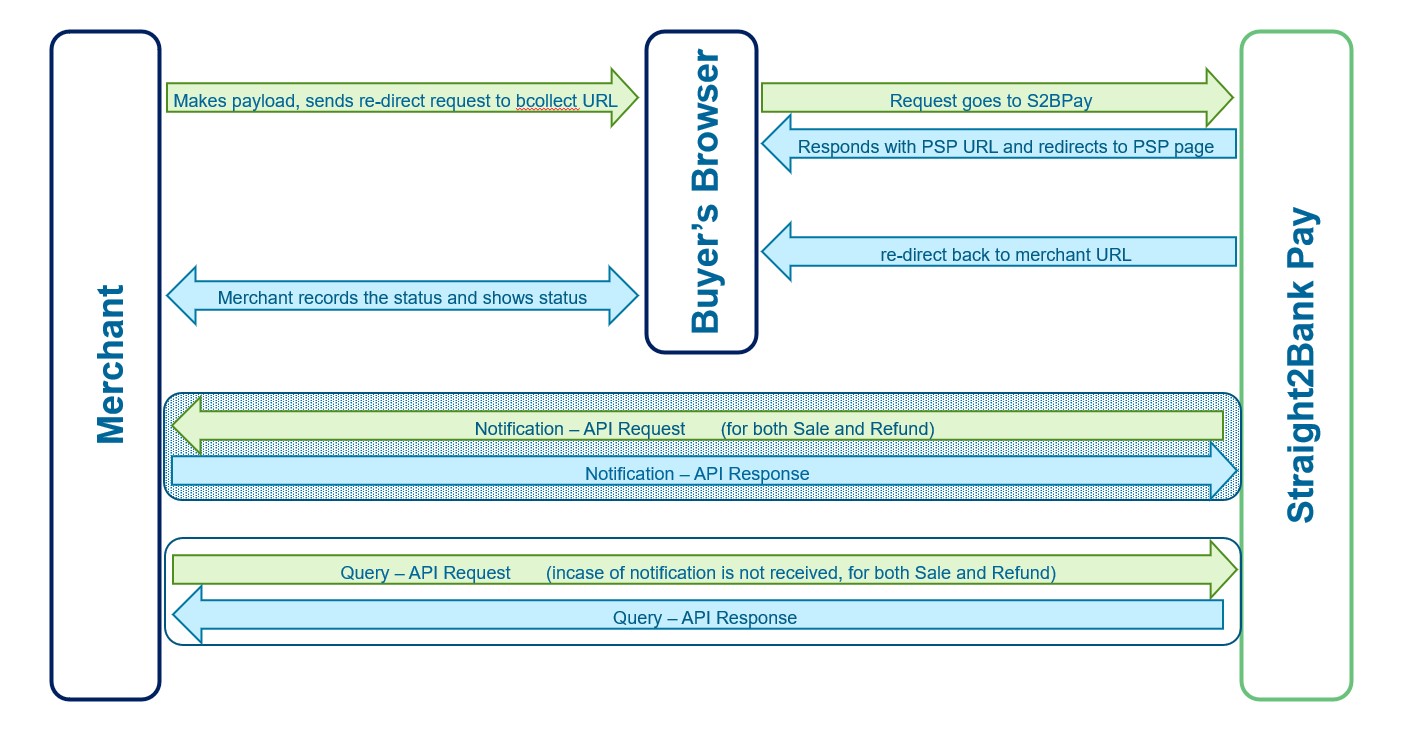
bCollect
Merchant can re-direct the buyer to bcollect URL of Straight2Bank Pay with the payload as part of https FORM. Straight2Bank Pay does the following:
- Validates the request, records it and re-directs the buyer to PSP page based on PSP ID sent in the payload.
- Buyer will be authorizing or rejecting the payment in PSP page.
- PSP re-directs the buyer back to Straight2Bank Pay registered URL along with the payment status.
- Straight2Bank Pay records the status and re-directs the buyer back to Merchant's URL that was provided as part of bcollect. Straight2Bank Pay sends Notification message in HTTP FORM variable, notification message structure is described in section Notification Request
- bCollect supports Instant Payment QR / RTP (Request to Pay) payment methods (like PayNow QR for Singapore, FPS QR for Hong Kong, UPI QR & UPI RTP for India, Thai QR for Thailand, VNPAY QR for Vietnam, etc) where there is no PSP involved. Straight2Bank Pay page shows QR or prompt data for RTP and takes care to show the final status.
bCollect Request (Merchant Server to Straight2Bank Pay via user's browser)
| Protocol |
HTTPS POST (Browser re-direction) |
Message Format |
FORM |
|
|---|---|---|---|---|
| Communication Layer level security |
TLSv1.2 |
|||
| Security Algorithm |
Request: RS256 Signature , AES-256 CBC encryption Response: HMAC-SHA256 hashing, AES-256 encryption, RSA2048 Encryption |
|||
| URL |
Test: https://test-s2bpay.sc.com/s2bpaysit/bcollect Prod: https://s2bpay.sc.com/s2bpay/bcollect |
|||
| Event |
Whenever Merchant needs to re-direct the user to PSP page to authorize. |
|||
Message Specification
| Seq Num | Key Name | M/O/C | Type & Length | Remarks |
|---|---|---|---|---|
| X1 | corpid | M | X(8) | Corp ID of Merchant |
| X2 | bcollect_req | M | X(2000) |
Key-value payload needs to be constructed as described in section Request Parameters, then payload needs to be AES-256 CBC encrypted using shared secret key, encrypted string needs to be base64 encoded and populated here. Refer to AES256 encryption/decryption section to view the sample code to perform AES encryption. |
Each key-value pair used to construct payload string for 'bcollect_req' tag is concatenated using & (ampersand) character.
bCollect Response (Straight2Bank Pay to Merchant Server via user's browser)
Straight2Bank Pay receives bCollect request, decrypts, validates the signature and stores the transaction if request is valid, then re-directs the buyer to PSP page to allow the buyer to authorize the payment. PSP redirects the buyer back to Straight2Bank Pay along with the status. Straight2Bank Pay server saves the status and then re-directs the buyer to Merchant URL that was provided in bcollect request message. As part of this re-direction back to Merchant URL, https FORM will have the following payload.
Message Specification
Message and Payload specification are same as Notification Request, will be sent as part of HTTPS FORM.
Exception Scenarios
Straight2Bank Pay gets any of the following error during the validation of bCollect request, then buyer will be shown with error.jsp of Straight2Bank Pay with the details of the error and will not be re-directed back to Merchant page since Straight2Bank Pay does not correct URL of Merchant.
| Error | Error Message shown in error.jsp |
|---|---|
| If corpid is invalid | Invalid Corporate Id |
| If bcollect_req is empty or unable to decrypt | Invalid Request |
| If sign does not match | Invalid Request |
| If rurl is empty or invalid URL or URL is not registered in Profile | Invalid Return URL |
For remaining validation error, Straight2Bank Pay will re-direct the buyer to Merchant's URL (as mentioned in rurl tag) with the payload. Following error message is possible to send statusdesc field.
- Invalid Amount
- Currency code invalid
- Country code invalid
- Invalid Date time in Request
- UniqueId invalid
- PSPid invalid
- Server Error Occurred. Please try again Later
Request and Response Samples
bCollect Request - Sample Message
Clear-text value for 'bcollect_req' tag:
amt=1&corpid=CN000002&country=BD¤cy=BDT&datetime=18012019125809&ref1=18012019125809&rurl=https://test-s2bpay.sc.com/s2bpaysit/testredirect&sign=gvudGHnQd6MgS4jmNutZ0nU4jcQrJrQO4PAsY7FReGMooQ5bJe/xDZhy2jtRdbLTmRfgZP9MnFjffOLq61rg81zuL2yeH+ISRPCxVoidwo0VBQizKWxmUNWaV7ntqiUuGZfCrszp4LPcYvUV4AKxDqgyQxmvapGzF/KyC7XCUeM2SyAzzzOTHLYF0Bw8MebnPfFpuHrZz481RXzdVJ5Ca03RR9kgO7d8RIcXeU5z2rzyPbaviZ9d42NwLcNtChn5keO69bgQDx5eoSENffU/60z5+oMyczOdweEpU0OX06ns2lUtzVzAibCgs+ON8JPBjYvL8wtD6A2uRyS2frrgyw==
Sample FORM:
								<form id="s2bpay-bcollect-form" name = "s2bpay-bcollect-form" action="https://test-s2bpay.sc.com/s2bpaysit/bcollect" method="post">
<input name="corpid" type="hidden" value="CN000002"/>
<input name="bcollect_req" type="hidden"
value="K2cZTduF8sX/oOX68nKd8xalYj13N/uotrzRpZCyMugikBHGVVZwwV7IhfZWhk1sDBjpg=="/>
</form>
bCollect Response - Sample Message
Clear-text value for 'notifyreq' tag for SUCCESS status:
amt=1.00&ccy=BDT&corpid=CN000002&corpref=18012019134643&ctry=BD&date=18012019135039&optxnid=19011811512712XcIqZw6DbQvdO&ref1=18012019134643&status=SUCCESS&txnid=9000114697&txntype=NEW&hash=2CC3605474A8D5B4669FDAB5AB47F672F9BB8B979A61B66BAF52FDE39030EB04
Clear-text value for 'notifyreq' tag for REJECTED status:
amt=1&ccy=SGD&corpid=CN000002&corpref=18012019112152&ctry=SG&date=18012019132220&ref1=18012019112152&status=REJECTED&statusdesc=Invalid Date time in Request&txntype=NEW&hash=F0CEA40FF1ABEC5545BF9BDD0B6DE34DE87806C6E4B598D4155986CCC212598A
Sample HTTP Form:
								<form id="s2bpay-notify-form" method="post"  action="<merchant rurl>" >
<input type="hidden" name="corpid" value="CN000002" />
<input type="hidden" name="notifyreq" value="GVevAY3SkH0o17RA9gIX8zGb1q5EW1K/CQCg6pmfWM7ppyiIyIX1f/fGACAGtbdPtU4wrMHBi9MtfEvHS/BFC0SQFhQ9qVbi7pml8Dzi7Z03WADFWo3i/6EZi2WVgUTlcAx2etq65Q0CLMNQqIWl7bon6bTeIBWlLnluQR+Io5ve9uBWigtDoPPbjsm6tvbxPcBKZUAfLt6klEr3Njf3PXlZZRLlPFVyUvTFSRRrsWrmovfhiOSPHpZlKUugaBUSND8fvF7wCBupvIZpi6jHkGN5+K74lbcq3oJAn6nWHaSIZ+tX9x4DpP3Xi9P5oR/dDPbe0sQpqsisJ73mYMbSgA==" />
<input type="hidden" name="enc_key" value="UqIbevGgjNMHkWON9c2nd6gYys2QA84HeT2LFrLtvx1e157UONQ4ycePH8b+abxUmJrY5S64LNTX1PIrasH9hUrPzWjOC/ixnnNA/XS33arFJbD84YivPojj3y21U6LU6J0a5l5Cc8qzvCjUR1ZLSI8wZeCIEkfuxQ41XwPaQORBPGnG8am4cUahNB3MyELPxdSoHsPffODn5nRlJ4m24oy5dyGXwIPe9FKno7Ulmq5M5bgzaHdUiz3otzNFeiGWlKhpbt3fa1OyBV5aaqM4eQ+aEDf0BoPl7SjdeshlT1MrB4a2ApfwaE3YT16Er8R7jQX9Vjo+DYhUksaFRnSrEw==" />
</form>

Merchant will receive the values as URL encoded key=value pair
enc_key=GVevAY3SkH0o17RA9gIX8zGb1q5EW1K%2FCQCg6pmfWM7ppyiIyIX1f%2FfGACAGtbdPtU4wrMHBi9MtfEvHS%2FBFC0SQFhQ9qVbi7pml8Dzi7Z03WADFWo3i%2F6EZi2WVgUTlcAx2etq65Q0CLMNQqIWl7bon6bTeIBWlLnluQR%2BIo5ve9uBWigtDoPPbjsm6tvbxPcBKZUAfLt6klEr3Njf3PXlZZRLlPFVyUvTFSRRrsWrmovfhiOSPHpZlKUugaBUSND8fvF7wCBupvIZpi6jHkGN5%2BK74lbcq3oJAn6nWHaSIZ%2BtX9x4DpP3Xi9P5oR%2FdDPbe0sQpqsisJ73mYMbSgA%3D%3D&corpid=CN000002¬ifyreq=UqIbevGgjNMHkWON9c2nd6gYys2QA84HeT2LFrLtvx1e157UONQ4ycePH8b%2BabxUmJrY5S64LNTX1PIrasH9hUrPzWjOC%2FixnnNA%2FXS33arFJbD84YivPojj3y21U6LU6J0a5l5Cc8qzvCjUR1ZLSI8wZeCIEkfuxQ41XwPaQORBPGnG8am4cUahNB3MyELPxdSoHsPffODn5nRlJ4m24oy5dyGXwIPe9FKno7Ulmq5M5bgzaHdUiz3otzNFeiGWlKhpbt3fa1OyBV5aaqM4eQ%2BaEDf0BoPl7SjdeshlT1MrB4a2ApfwaE3YT16Er8R7jQX9Vjo%2BDYhUksaFRnSrEw%3D%3D
Try it out
bMandate
Merchant can re-direct the buyer to bMandate URL of Straight2Bank Pay with the payload as part of https FORM. Straight2Bank Pay does the following:
- Validates the request, records it and re-directs the buyer to PSP page based on PSP ID sent in the payload.
- Buyer will be able to chose the bank or redirect to psp page to create mandate.
- PSP re-directs the buyer back to Straight2Bank Pay registered URL along with the payment status.
- Straight2Bank Pay records the status and re-directs the buyer back to Merchant's URL that was provided as part of bmandate. Straight2Bank Pay sends Notification message in HTTP FORM variable, notification message structure is described in section Notification Request
bmandate Request (Merchant Server to Straight2Bank Pay via user's browser)
| Protocol |
HTTPS POST (Browser re-direction) |
Message Format |
FORM |
|
|---|---|---|---|---|
| Communication Layer level security |
TLSv1.2 |
|||
| Security Algorithm |
Request and Response: JWE String (RS-256 Sign, AES-256 GCM encryption) SCB RSA Public Key: https://test-s2bpay.sc.com/s2bpaysit/devguide#idocs_pubkey |
|||
| URL |
Test: https://test-s2bpay.sc.com/s2bpaysit/bmandate Prod: https://s2bpay.sc.com/s2bpay/bmandate |
|||
| Event |
Whenever Merchant needs to re-direct the user to PSP page to authorize. |
|||
Message Specification
| Seq Num | Key Name | M/O/C | Type & Length | Remarks |
|---|---|---|---|---|
| X1 | corpid | M | X(8) | Corp ID of Merchant |
| X2 | bmandate_req | M | X(2000) |
This tag can either contain JWE string / AES-256 encrypted string as BAU. JWE format string which contains this following parts separated by .(dot) JWE Header.JWE encrypted Key.Initialization Vector.Ciphertext.Authentication Tag |
The JWE String table lists the details used to construct the value for 'bmandate_req' tag.
Payload Attributes
The payload to be constructed as below Request Parameters
Request Parameters
| Seq Num | Key Name | M/O/C | Type & Length | Remarks |
|---|---|---|---|---|
| P1 | corpid | M | X(8) | Corp ID of Merchant |
| P2 | country | M | X(2) | 2 character country code |
| P3 | currency | M | X(3) | 3 character currency code. Only domestic currency is supported. |
| P4 | ref1 | O | X(100) | Reference Number 1. This value can be shown in lightbox with the configured label.Please refer 'Unique Reference' rule. |
| P5 | ref2 | O | X(100) | Reference Number 2. This value can be shown in lightbox with the configured label.Please refer 'Unique Reference' rule. |
| P6 | ref3 | O | X(100) | Reference Number 3. This value can be shown in lightbox with the configured label.Please refer 'Unique Reference' rule. |
| P7 | ref4 | O | X(100) | Reference Number 4. This value can be shown in lightbox with the configured label.Please refer 'Unique Reference' rule. |
| P8 | ref5 | O | X(100) | Reference Number 5. This value can be shown in lightbox with the configured label.Please refer 'Unique Reference' rule. |
| P9 | datetime | M | N(14) | Format: DDMMYYYYHH(24)MMSS (GMT+08:00) The encrypted string is valid only for 5 minutes from the created time. |
| P10 | pspid | C | X(8) | PSP for which payment is being initiated. Eg: BDSSLNET,
BDSSLCRD, BDSSLNET. PSP IDs to be obtained from Implementation Manager. Mandatory for bcollect URL & collect API and not applicable for s2bpay.js. |
| P11 | rurl | C | X(1000) | Return URL needs to be populated if Merchant portal does
not want Straight2Bank
Pay
to open another Browser Window to re-direct the buyer to PSP page
but instead wants to use the current browser window to be used to
re-direct the buyer to PSP page. On this user journey, Straight2Bank Pay
uses this URL to re-direct the buyer back to merchant page, as part
of this re-direction, Straight2Bank
Pay
includes the payload to provide the status. Payload parameters will
be same as described in section Notification Request Merchant may need to populate rurl value for their mobile app integration with Straight2Bank Pay since opening multiple pages on a webview instance is not recommended. Mandatory for bcollect URL, Optional for s2bpay.js, qrCollect and not applicable for collect API. |
bmandate Response (Straight2Bank Pay to Merchant Server via user's browser)
Straight2Bank Payreceives bCollect request, decrypts, validates the signature and stores the transaction if request is valid, then banklist will be displayed/re-directs the buyer to PSP page to for creating mandate.
Message Specification
Message and Payload specification are same as Mandate Notification [JWE Format] Request, will be sent as part of HTTPS FORM.
Exception Scenarios
Straight2Bank Pay gets any of the following error during the validation of bmandate request, then buyer will be shown with error.jsp of Straight2Bank Pay with the details of the error and will not be re-directed back to Merchant page since Straight2Bank Pay does not correct URL of Merchant.
| Error | Error Message shown in error.jsp |
|---|---|
| If corpid is invalid | Invalid Corporate Id |
| If bmandate_req is empty or unable to decrypt | Invalid Request |
| If sign does not match | Invalid Request |
| If rurl is empty or invalid URL or URL is not registered in Profile | Invalid Return URL |
For remaining validation error, Straight2Bank Pay will re-direct the buyer to Merchant's URL (as mentioned in rurl tag) with the payload. Following error message is possible to send statusdesc field.
- Invalid Amount
- Currency code invalid
- Country code invalid
- Invalid Date time in Request
- UniqueId invalid
- PSPid invalid
- Server Error Occurred. Please try again Later
Request and Response Samples
bmandate Request - Sample Message
Clear-text value for 'bmandate_req' tag:
{ "corpid": "CN000002", "country": "SG", "currency": "SGD", "datetime": "18012019125809", "ref1": "18012019125809", "rurl": "https://test-s2bpay.sc.com/s2bpaysit/testredirect" }
Sample FORM:
								<form id="s2bpay-bmandate-form" name = "s2bpay-bmandate-form" action="https://test-s2bpay.sc.com/s2bpaysit/bmandate" method="post">
<input name="corpid" type="hidden" value="CN000002"/>
<input name="bmandate_req" type="hidden"
value="eyJlbmMiOiJBMjU2R0NNIiwiYWxnIjoiUlNBLU9BRVAtMjU2In0.Vzme9s5j7hafsG90Dy8Ya9Ex91Gim07m0lIYS8c7gC1BNj29jSos-ctCpUoEdBOVkn9q0lDxNVBM-roTT-RNEVCbQ-CL2fiwjlSvEBQ1SZ19ocOq-y70H4H6X9jI4sx6ilU3JSI7oHMhAzyr2JT1gc0EzKOR4qpQNuGWxPpb8Th3LpVfQ-97tazXdfyOaPbikgDUcJs2nc_jjWFPSRricE_tbzx0ML0HFdMdP2O7ZDH-GUAZfZJ1NbQ3f3tbLujIq3RUp5gzXxyI-7LQC9hHpSMMD99uV3kMugxB70llhNIFlaf4F47HSOSEZdJlgFd8vSuUawj5hmeNk37e0V8-dw.D_40VlttIrQs6OnQ.ZLwI3h7VFWhKOkrd6Nud3EUMgaN_Exk9nkEAReLsZoaLlxZ2twPLaw-wuyO-uDXFPmFlF0VKh073Ksmve8GYfm6pd_DMCPAYnNdk1uHb2fJWsxG_ljmrw69Z7dH3NhtotYVWT8kzN0FUsAdtKKlUk-wSk-wRdl852sq4HIyebX7K3fLD3c-eHg-zWsh2xnPhYxlkoptd97gVI7hrpq3pYip3n2D5hzjhJER3E5SPPgTxfbtq1tIxXQGxBRiqxPde3E2Pb6_5KruT3Ppp_p4GY5dTgIcEqqzIWzYIZrTOYIhY90qYIYmKPRHKvQ0LLsyvbDVqPjno9PQtAuZcVFbeCIN4dYh4l7i8y1qcVZ1S53zq27yohE47pLi33CGT2fVMzRMSupAEMQzVlYlVV4DH4fi2FL971EIDaYrOZ80ClfRiI3burCAV00qqX1jySfz9xphBjXfn7kolijFvKgIV0GKe_sRnqqq5fyo3kpa4G6l4vDoPWqP6qkbtUsfNc6qdjnLWF9qMulLBnQ366ZUilV4UW61TneLrmIcp-43aGboS0vY883exuWNlwV_s_IP5aFL6uxpIHSldlEB_sls4IboBKsEO1EerYk1FyLAHgzFo6pFitVlu.oJ7PSOMoqBVd7O1ceKC_Yw"/>
</form>
bmandate Response - Sample Message
Clear-text value for 'mndt_notifyreq' tag
{ "ackref": "8900064789", "date": "13092016181800", "status": "SUCCESS", "txnid": "6000064687"}
Sample HTTP Form:
								<form id="s2bpay-mndt-notify-form" method="post"  action="<merchant rurl>" >
<input type="hidden" name="corpid" value="CN000002" />
<input type="hidden" name="mndt_notifyreq" value="eyJlbmMiOiJBMjU2R0NNIiwiYWxnIjoiUlNBLU9BRVAtMjU2In0.Vzme9s5j7hafsG90Dy8Ya9Ex91Gim07m0lIYS8c7gC1BNj29jSos-ctCpUoEdBOVkn9q0lDxNVBM-roTT-RNEVCbQ-CL2fiwjlSvEBQ1SZ19ocOq-y70H4H6X9jI4sx6ilU3JSI7oHMhAzyr2JT1gc0EzKOR4qpQNuGWxPpb8Th3LpVfQ-97tazXdfyOaPbikgDUcJs2nc_jjWFPSRricE_tbzx0ML0HFdMdP2O7ZDH-GUAZfZJ1NbQ3f3tbLujIq3RUp5gzXxyI-7LQC9hHpSMMD99uV3kMugxB70llhNIFlaf4F47HSOSEZdJlgFd8vSuUawj5hmeNk37e0V8-dw.D_40VlttIrQs6OnQ.ZLwI3h7VFWhKOkrd6Nud3EUMgaN_Exk9nkEAReLsZoaLlxZ2twPLaw-wuyO-uDXFPmFlF0VKh073Ksmve8GYfm6pd_DMCPAYnNdk1uHb2fJWsxG_ljmrw69Z7dH3NhtotYVWT8kzN0FUsAdtKKlUk-wSk-wRdl852sq4HIyebX7K3fLD3c-eHg-zWsh2xnPhYxlkoptd97gVI7hrpq3pYip3n2D5hzjhJER3E5SPPgTxfbtq1tIxXQGxBRiqxPde3E2Pb6_5KruT3Ppp_p4GY5dTgIcEqqzIWzYIZrTOYIhY90qYIYmKPRHKvQ0LLsyvbDVqPjno9PQtAuZcVFbeCIN4dYh4l7i8y1qcVZ1S53zq27yohE47pLi33CGT2fVMzRMSupAEMQzVlYlVV4DH4fi2FL971EIDaYrOZ80ClfRiI3burCAV00qqX1jySfz9xphBjXfn7kolijFvKgIV0GKe_sRnqqq5fyo3kpa4G6l4vDoPWqP6qkbtUsfNc6qdjnLWF9qMulLBnQ366ZUilV4UW61TneLrmIcp-43aGboS0vY883exuWNlwV_s_IP5aFL6uxpIHSldlEB_sls4IboBKsEO1EerYk1FyLAHgzFo6pFitVlu.oJ7PSOMoqBVd7O1ceKC_Yw;" />
</form>
Try it out
Payment Link Integration
In this integration type, Merchant is expected to generate Payment Link and redirect the buyer to the Payment Link. The Payment Link will present the landing page with the enabled Payment Methods, facilitates buyer to choose a preferred Payment Method till payment authorization, then shows the final status (can be disabled), re-redirect the buyer back to Merchant's page with the status at end of buyer's user journey. The following diagram depicts the minimum integration required for this type.
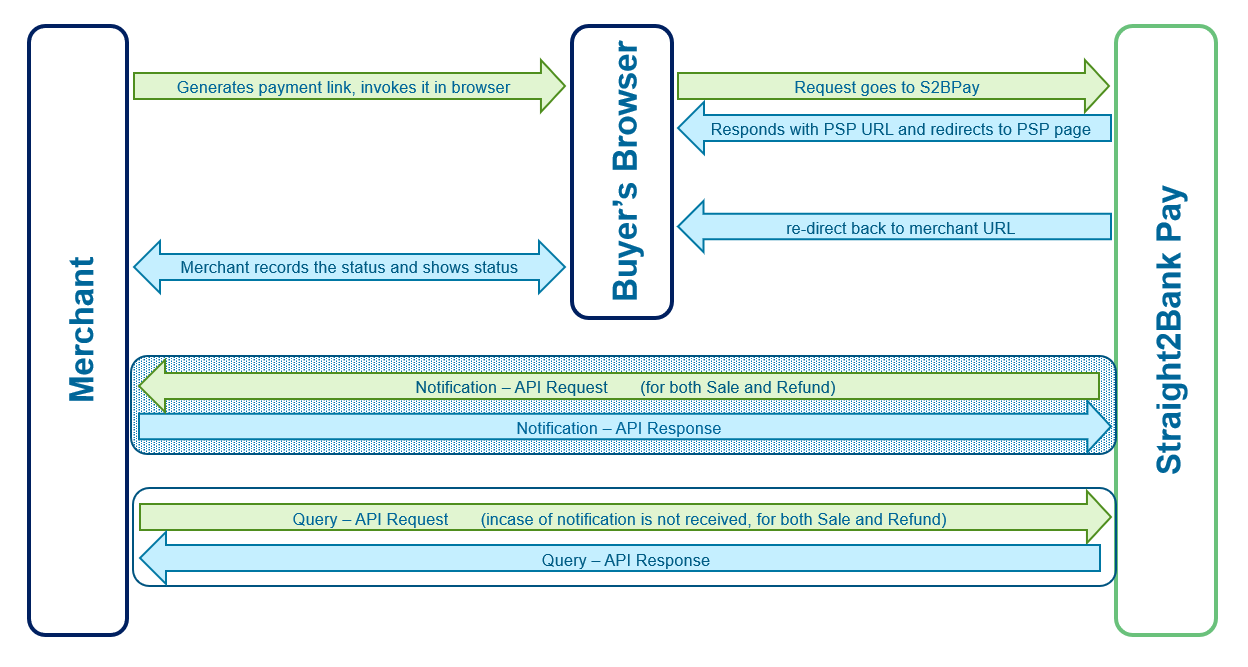
billCollect - Straight2BankPay QR / Payment Link
Straight2Bank Pay QR (aka Payment link) option can be utilized by Merchant for the following scenarios:
- Merchant does not have any web portal and want to collect via Straight2Bank Pay payment gateway.
- Merchant does have a portal but does not want to integrate with Straight2Bank Pay in real-time, due to some reason (no IT team to work on this immediately).
Merchant will be provided with a Payment Link URL as part of on-boarding process, Merchant can send this URL or convert into QR image and send it to the Payer using any of the following channels:
- Printing QR in physical invoice / Bill
- Sending URL or clickable QR code in any electronic medium (like email, SMS, portal, social media, etc)

Fraud Awareness
Payer to scan the QR code using built-in camera app of any smart phone or using any QR reader app or using Google Lens or Bixby Vision options or click on the URL. The payment link will be accessed via browser and Straight2Bank Pay shows the payment page and allows the payer to complete the payment.
Straight2Bank Pay offers 4 features via Payment Link solution:
- Static Payment Link
- Semi-dynamic Payment Link
- Dynamic Payment Link
- Static Payment Link with Bill Presentment
If the URL is invoked via QR reader or invoked from Payment link, then the request will reach to Straight2Bank Pay server and does the following:
- Decrypts the URL query-string and validates the Corp ID. If
it is valid, then it shows the input page to prompt the user to
key-in certain data. What data to be prompted to the payer is
configurable at Corp ID level.
- For 'Dynamic Payment Link', step 1 (input page) is not applicable, it goes to payment page directly which does not required any data input by payer.
- On Clicking on 'Submit' button in input page, Straight2Bank Pay
shows the payment page with the enabled payment methods at Corp ID
level.
- For 'Static Payment Link with Bill Presentment', Straight2Bank Pay makes an API call to Merchant server to fetch the Bill details (refer Bill Fetch API section for more details). After getting the bill amount and other relevant data, Straight2Bank Pay shows the payment page.
- Depends on the payment method selected by the payer, Straight2Bank Pay will either redirect the payer to PSP page or process the transaction by connecting to PSP via API or shows the QR code.
- Post the payment authorization, PSP re-directs the payer back to Straight2Bank Pay registered URL along with the payment status.
- Straight2Bank Pay records the status and notifies the merchant via Notification Request if it is opted by Merchant.
Static Payment Link
As part of on-boarding, implementation team will create Payment Link URL & corresponding QR code and pass it to Merchant. Merchant can be send this URL or QR code to multiple payers, Payer is expected to key-in the amount and reference number and make the payment.
Alternatively, Merchant can bookmark this URL in browser and use it for face-to-face collection to generate instant payment QR or initiate Request-To-Pay (RTP) by entering the amount and reference number, the page also shows the status in real-time.
Payment Link URL contains query string (encstr) with encrypted data of Corp ID, country, currency and expiry date & time of URL.
For this option, no development work is expected at Merchant end. Merchant can opt for periodic Transaction Report to get the transactions that have been successful paid.
Sample Payment Link URL:
Test:
https://test-s2bpay.sc.com/s2bpaysit/billcollect?encstr=MBk+Eld6E75xgsUQNMbLR1ZnIDMA+s4XBFJ1WNy3twhH3nh+y/gnrFVMliYroy4Y
Prod:
https://s2bpay.sc.com/s2bpay/billcollect?encstr=5+aiI7Zc/B4N4/00DBe/xXj7Yk2KyT5FzgsvlwqvoCznks11+Sh3/e7eNZCW5LFV8nd2rtpXbAAKVeTaoPg7hQa==
Try it out
Semi-dynamic Payment Link / Dynamic Payment Link
Static Payment Link generated by Bank can be easily converted into semi-dynamic or dynamic payment link by appending an attribute 'cencstr' (client generated encrypted string').
For dynamic payment link 'cencstr' will minimum contain Amount and reference number, so it will by-pass the input page and goes to payment page with all pre-populated data.
For semi-dynamic payment link 'cencstr' will contain either Amount and expecting input page to prompt the payer to enter reference number or 'cencstr' will contain only reference number and expecting to prompt the payer to enter amount. As part of Merchant Profile, it will be configurable which field to be made as editable. For this option, input page will be shown to collect the data before presenting the payment page.
This option requires Merchant to have an application to construct 'cencstr' and append to Bank provided static Payment Link URL to convert into semi-dynamic or dynamic payment link.
|
URL |
Production |
https://s2bpay.sc.com/s2bpay/billcollect |
|
Test |
https://test-s2bpay.sc.com/s2bpaysit/billcollect |
URL Specification
| Seq Num | Tag name | M/O/C | Remarks |
|---|---|---|---|
| X1 | encstr | M | This attribute will be provided by Bank one time as part of
on-boarding. This attribute contains the following data:
|
| X2 | cencstr | M |
Key-value payload needs to be constructed as described in section Request Parameters, then payload needs to be AES-256 CBC encrypted using shared secret key, encrypted string needs to be base64 encoded and populated here. Refer to AES256 encryption/decryption section to view the sample code to perform AES encryption. |
Request parameters of 'cencstr'
| Seq Num | Key | M/O/C | Type & Length | Remarks |
|---|---|---|---|---|
| P1 | corpid | M | X(8) | Corp ID of Merchant |
| P2 | amt | O | N(16,3) | 13 integer digits and a precision of 2 decimals |
| P3 | ref1 | O | X(100) |
Reference Number 1. This value can be shown in lightbox with the configured label. Please refer 'Unique Reference' rule. |
| P4 | ref2 | O | X(100) |
Reference Number 2. This value can be shown in lightbox with the configured label. Please refer 'Unique Reference' rule. |
| P5 | ref3 | O | X(100) |
Reference Number 3. This value can be shown in lightbox with the configured label. Please refer 'Unique Reference' rule. |
| P6 | ref4 | O | X(100) |
Reference Number 4. This value can be shown in lightbox with the configured label. Please refer 'Unique Reference' rule. |
| P7 | ref5 | O | X(100) |
Reference Number 5. This value can be shown in lightbox with the configured label. Please refer 'Unique Reference' rule. |
| P8 | datetime | O | N(14) |
Format: DDMMYYYYHH(24)MMSS (GMT+08:00) Expiry date and time of the Payment Link. If payment link is invoked after this expiry date and time, then Straight2Bank Pay will reject the request and display the error message. |
| P9 | rurl | O | On this user journey, Straight2Bank Pay uses this URL to re-direct the payer back to merchant page, if provided, as part of this re-direction, Straight2Bank Pay includes the payload to provide the status. Payload parameters will be same as described in section Notification Request | |
| P10 | pspid | O | X(8) | PSP for which payment is being initiated. Eg: BDSSLNET, BDSSLCRD, BDSSLNET, SGPAYNOW, etc If present, only that payment option will be displayed in lightbox. PSP IDs to be obtained from Implementation Manager. |
| P11 | sign | O | X(500) |
Signature of entire key-value pair using Merchant's Private key. Algorithm to be used : RS256 Refer to Generation of Digital Signature |
Sample URL:
Merchant will be provided with an URL during on-boarding, which contains ecnstr attribute as part of query-string.
https://test-s2bpay.sc.com/s2bpaysit/billcollect?encstr=MBk+Eld6E75xgsUQNMbLR5U1saSyiUG1T0r0SCHbkuQdLahIuZ5I0RMrO3Xif20k
Merchant can add transaction details with attribute cencstr towards end of the URL as follows:
https://test-s2bpay.sc.com/s2bpaysit/billcollect?encstr=MBk+Eld6E75xgsUQNMbLR5U1saSyiUG1T0r0SCHbkuQdLahIuZ5I0RMrO3Xif20k&cencstr=Mhh1vazm+ol303RlwTVps+OqIgeEakKusfmlPF3j3REWkh8PM+URz5RO+/VLjIw+
cencstr - Sample Message
Clear-text value for 'cencstr' tag:amt=1&corpid=CN000002&datetime=18012021125809&ref1=18012019125809&rurl=https://test-s2bpay.sc.com/s2bpaysit/testredirect&sign=gvudGHnQd6MgS4jmNutZ0nU4jcQrJrQO4PAsY7FReGMooQ5bJe/xDZhy2jtRdbLTmRfgZP9MnFjffOLq61rg81zuL2yeH+ISRPCxVoidwo0VBQizKWxmUNWaV7ntqiUuGZfCrszp4LPcYvUV4AKxDqgyQxmvapGzF/KyC7XCUeM2SyAzzzOTHLYF0Bw8MebnPfFpuHrZz481RXzdVJ5Ca03RR9kgO7d8RIcXeU5z2rzyPbaviZ9d42NwLcNtChn5keO69bgQDx5eoSENffU/60z5+oMyczOdweEpU0OX06ns2lUtzVzAibCgs+ON8JPBjYvL8wtD6A2uRyS2frrgyw==
Try it out
Static Payment Link with Bill Presentment
For this option, Payment Link will be provided by Implementation team as part of on-boarding. The user journey will start with Input page which prompts the payer to enter his/her identity with the Merchant. Upon click on 'Submit' button, Straight2Bank Pay server makes Bill Fetch API that expected to host in Merchant Server, based on the response from Merchant server, pre-populated payment page will be shown to the payer to complete the payment.
If Merchant is already having an API which provides the Bill Amount and other reference data, then Straight2Bank Pay needs to be enhanced to consume that API to make required user journey for Bill Presentment collection. If Merchant is going to develop to host an API, then Merchant can build the API with the specification that has been defined by Straight2Bank Pay as described in next section.
Bill Fetch API
Bill Fetch API is hosted in Merchant's server to provide the bill details to Straight2Bank Pay. This API will be called whenever Payer enters the reference in Payment Link Input page in order to fetch the bill details.
billFetch - Request (Straight2Bank Pay Server to Merchant's server)
| Protocol |
HTTPS POST (REST API) |
Message Format |
JSON |
|
|---|---|---|---|---|
| Communication Layer level security |
TLSv1.2 |
|||
| Message layer level Security |
Request: HMAC-SHA256 hashing, AES-256 encryption, RSA2048 Encryption Response: RS256 Signature , AES-256 encryption |
|||
| URL |
Merchant's URL provided to Bank during onboarding |
|||
| Event |
Whenever Payer enters the reference to fetch the Bill in Straight2Bank Pay Bill Presentment screen. |
|||
Message Specification
| Seq Num | Key Name | M/O/C | Type & Length | Remarks |
|---|---|---|---|---|
| X1 | corpid | M | X(8) | Corp ID of Merchant |
| X2 | billfetch_req | M | X(2000) |
Key-value payload will be constructed as described in next table, then payload is encrypted (algorithm: AES-256 CBC) using a random key, then encrypted string needs to be encoded (with base64) and populated here. |
| X3 | enc_key | M | X(2000) | Random key used to encrypt 'billfetch_req' tag is encrypted using Merchant's public key using RSA-2048 and populated here. |
The following table lists the key name used to construct the value for billfetch_req tag, each key-value pair is separated using & (ampersand) character
Request Parameters:
| Seq Num | Key Name | M/O/C | Type & Length | Remarks |
|---|---|---|---|---|
| P1 | corpid | M | X(8) | Corp ID of Merchant |
| P2 | amt | O | N(16,3) | 13 integer digits and a precision of 2 decimals |
| P3 | ref1 | O | X(100) | Reference Number 1 |
| P4 | ref2 | O | X(100) | Reference Number 2 |
| P5 | ref3 | O | X(100) | Reference Number 3 |
| P6 | ref4 | O | X(100) | Reference Number 4 |
| P7 | ref5 | O | X(100) | Reference Number 5 |
| P7 | ccy | M | X(3) | 3 character currency code |
| P8 | ctry | M | X(2) | 2 character country code |
| P8 | hash | M | X(200) | HMAC Hash value of entire key-value pair string. Straight2Bank Pay uses HMACSHA256 algorithm using shared Secret key. Merchant needs to verify this Hash using Verification of Hash Value at Merchant Server, If computed Hash value does not match with the hash value in the message, then Merchant Server needs to reject the message. |
billFetch - Response (Straight2Bank Pay Server to Merchant's server)
Merchant is expected to generate synchronous response for each billFetch request that is requested to Merchant's billFecch API endpoint URL.
Message Specification
| Seq Num | Key Name | M/O/C | Type & Length | Remarks |
|---|---|---|---|---|
| X1 | corpid | M | X(8) | Corp ID of Merchant |
| X2 | billfetch_resp | M | X(2000) |
Key-value payload needs to be constructed as descripted in next table, then payload needs to be AES-256 CBC encrypted using shared secret key, encrypted string needs to be base64 encoded and populated here. Refer to AES256 encryption/decryption section to view the sample code to perform AES encryption. |
The following table lists the key name used to construct the value for 'billresp_resp' tag. Each key-value pair needs to be separated using & (ampersand) character.
| Seq Num | Key Name | M/O/C | Type & Length | Remarks |
|---|---|---|---|---|
| P1 | status | M | X(10) | Possible Value:
|
| P2 | statusdesc | O | X(100) |
Description of the Failure. E.g. Hashing Error |
| P1 | corpid | C | X(8) |
Must present when status = SUCCESS Corp ID of Merchant |
| P2 | amt | C | N(16,3) |
Must present when status = SUCCESS 13 integer digits and a precision of 2 decimals |
| P3 | ref1 | O | X(100) | Reference Number 1 |
| P4 | ref2 | O | X(100) | Reference Number 2 |
| P5 | ref3 | O | X(100) | Reference Number 3 |
| P6 | ref4 | O | X(100) | Reference Number 4 |
| P7 | ref5 | O | X(100) | Reference Number 5 |
| P8 | sign | M | X(200) | Signature of entire key-value pair using Merchant's Private key. Algorithm to be used : RS256 Refer to Generation of Digital Signature |
Request and Response Samples
BillFetch Request - Sample Message
Clear-text value for 'billfetch_req' tag:
ccy=KES&corpid=CUIIN001&ctry=KE&ref1=12345 &hash=A7F4CB71B49E86B30BE4ECA2561F998223FA1FAD83531A07DFF982979CEFB862
JSON message:
								{
"corpid":"CN000002",
"billfetch_req":"bIBnxTBhMIs/LwGS6F+p5uyfjjU/PN+pnme/a2qBaDIOmcjFCxtQoEjw7GwtZIkZxVt0tFO21UAXiZ8h+pKbDNgdKWXJ+eurVZvgt92+UPvMYmDPWH7mQV3rSdhjmp3Jh4E7qG/lEt9acTMbG09/kr1Yd62lmVdKLyOf+HG/BIfC4bySuEeUkW8yER74NE5P",
"enc_key":"UiNmnMDrQneF3kkK33IPdHJ68FLppOAt3MO/WLdOz6oMA8I2UqS2zuKzMoFFE56AMLz5r4ZnOYcuFBI0E+crf6VRWZ/bvWG8oSZWWAu7/z2YY84B6cvsIPsTa7FkqtMyZXGjY8EuslBxECrRgLq7TxVpDGAr3116Z3uX3SuYBx5MbpEWOq3LOWexZfqIdxvvFixnJBZ+Y9Cu8paqdmn9IjXbHkln9lChadfe0eZ7xFHjw5m6cEQtlSxh73pXSFOXnKu8kvWJKaEBzvpJAUOXEYqDXRaRQ9HKuF7wstCWIOMoc2FsyLc7xv2V58NtMQi1l6hjgBN5c1NpUgFaCQm0Tg=="
}
BillFetch Response - Sample Message
Clear-text value for 'billfetch_resp' tag:
amt=100.12&corpid=CUIIN001&ref1=12345& ref2=John Smith& ref3=AQUI7890UB& ref4=xx&status=SUCCESS&sign= i0aL9O7LkTOEfDnkagVHRgBXy4yNBvibud7NFmGk2/CUPa856SJaDbvKjlHz7rdo+cfxRc8vKNwl0ms+OSb95K5YVqLfe26xfYM5cVhOMKarDiaLRbJSAUJvtw7+zCJ7ZiEuLcnZP2yOzhy5Zlvb5FtSIFT5WT6HOiqB3SWX4DUb4xuJQFyoRhA9iWwj8A0mbWDE5l7I/OCHPhBvVYcIhWI3br5xQ6kNzwkwDl5glvPby5zKEDXNZqCxTQ/451kXEITRT3JTmixb+Dhnd77IxvFiyW/zN6mkebSNU9GMEuxwOONrL+ykCBHSEyodYwaFPRYzs/MB1gLKmTnWjQLubA==
JSON message:
								{
"corpid":"CN000002",
"billfetch_resp":"cUl5LoAVncDUFDseeU1Pzwx6C28uPUoOPdEex97ZwwV6hZodAeapdoKWpIiRXvfj2P3knVYt0hybDa/a/eC6NdL7LV1qs5R/f4tzygDHSHrXm4LoWKoreDqfGFlfk3y43Re+SmaFIlnjKkVgtKTbQ0atiTL22YdRka9bS+Y5Su1346deVuT8ixL4TKTZ1Ej/9zX+AatJ7GofTA5Zo7jMjWMPLcb2npC1JKjVlFx7J5rQewnLCIu3LYH8HFSzQOGzZmSY5QllN1p0EvciHs50tH9qa5kT854bU8qMhSXMK2ZTehTV+gTxB9YKqXFtLSHl35FZK0emEPLb/Z4W/Y4lwL+F3RllJfuqR91f4jCdzTWKYOuDbkrEyfPPIEICBiWzK2UitbBm+cJCuRJZMBXG8qE+og+nhM6Z9zYG/Q8J+c3g72jG9h0aY/iXDvOHTe0+1SA5W2SXhFQcUreYvkf8xkAsbhAsN0KPiAOd5BshJcv/lM5TtT8r/IlXZc1SjbutuoUsggxF9FKAAQb16EVcwBb8wltN/CEIkrN1wLKaaMtig26LhZ0+BZP+CZxUSwcqvsCBgPsqKXjNh+8dSB2CLuZ3EgSZsOs+XQbLOCRelfvENTyHEl72vIXfoTcaMYGTgXQWn59ogTD1R8mTMkUcFe+am5e123EojMilxMr8iqc="
}
API Integration
In this integration type, Straight2Bank Pay is not involved in rendering UI on merchant page, but offers API services for Payment Method which is not required to re-direct the buyer to PSP page. Merchant to invoke API of Straight2Bank Pay as server-to-server call (collect) to perform on-line collection. For such Payment Method, buyer authorizes the payment in Mobile App, eg. UPI for India, PayNow for Singapore, etc. The following diagram depicts the minimum integration required for this type.
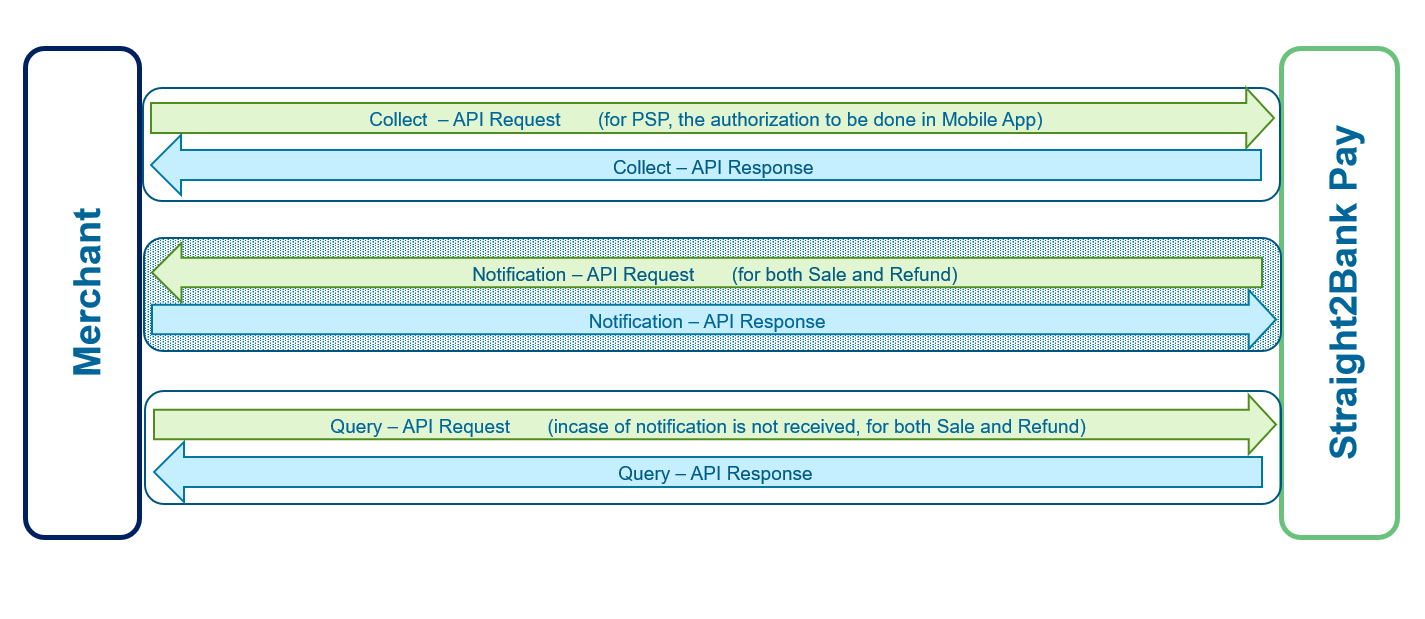
Collect
Merchant Server can call this API to initiate a collect request for applicable PSPs. Straight2Bank Pay does the following based on the PSP ID:
- If PSP meant for QR code generation, then QR string will be generated and respond back synchronously.
- If PSP meant to send collect request further to PSP, then the request will be sent to PSP and acknowledgement message will be sent synchronously as response.
Collect Request (Merchant Server to Straight2Bank Pay)
| Protocol |
HTTPS POST (REST API) |
Message Format |
XML or JSON |
|
|---|---|---|---|---|
| Communication Layer level security |
TLSv1.2 |
|||
| Message layer level Security |
Request: RS256 Signature , AES-256 encryption Response: HMAC-SHA256 hashing, AES-256 encryption, RSA2048 Encryption |
|||
| URL |
Test: https://test-s2bpay.sc.com/s2bpaysit/collect Prod: https://s2bpay.sc.com/s2bpay/collect |
|||
| Event |
Whenever Merchant needs to collect |
|||
Message Specification
| Seq Num | Key Name | M/O/C | Type & Length | Remarks |
|---|---|---|---|---|
| X1 | corpid | M | X(8) | Corp ID of Merchant |
| X2 | collect_req | M | X(2000) |
Key-value payload needs to be constructed as described in section Request Parameters of s2bpay.js, then payload needs to be AES-256 CBC encrypted using shared secret key, encrypted string needs to be base64 encoded and populated here. Refer AES256 encryption/decryption section to view the sample code to perform AES encryption. |
Each key-value pair used to construct payload string for 'collect_req' tag need to be concatenated using & (ampersand) character.
Collect Response (Straight2Bank Pay to Merchant Server)
Straight2Bank Pay receives Collect Request, decrypts, validates the signature and stores the transaction if request is valid, then generates synchronously response and sends back to Merchant.
Message Specification
| Seq Num | Key Name | M/O/C | Type & Length | Remarks |
|---|---|---|---|---|
| X1 | ack | M | X(10) | Possible Value
|
| X2 | ackdesc | O | X(100) |
This tag will be populated only if ack is FAIL. Possible error description:
|
| X3 | corpid | C | X(8) | Corp ID of Merchant. |
| X4 | collect_resp | C | X(2000) |
Key-value payload will be constructed as descripted in section Notification Request, then payload is encrypted (algorithm: AES-256 CBC) using a random key, encrypted string is base64 encoded and populated here. Refer to AES256 encryption/decryption section to view sample code to perform AES decryption. |
| X5 | enc_key | C | X(2000) |
Random key used to encrypt'collect_resp' tag is encrypted using Merchant's public key (algorithm: RSA-2048) and populated here. Refer to RSA 2048 encryption/decryption section to view sample code to perform RSA decryption. |
Each key-value pair used to construct payload string for 'collect_resp' tag is concatenated using & (ampersand) character.
Request and Response Samples
Collect Request - Sample Message
Clear-text value for 'collect_req' tag:
amt=10&corpid=CUIMOM01&country=SG¤cy=SGD&datetime=18092018122600&pspid=SGPAYNOW&ref1=234252343&ref2=6545256&sign=b+0fpnA/8qI2wqsPUaLTv+fxHv49rgk4xf7ieflB6J8H8MFzQI8VjAP1Efw2r8BRBZXK7ZwE+Pnrf286y5fP3vtTEgZJIZv8iGs0ySlodUruqe0xJNElFLtbXJjZt13CG3B3wPTucXBl+PO24WyaA1DkaFjZzsjiSC2V6VwoW1zMJ9ecSu+3Kqh8UBc2HyyH3M6CwL0NzxjQS+o077Yharayh6sqTd3ELt1q71dKSv7TNeRpzhUtW+8+BVYB4LMjE7hF1iKymsZKdQsEiDpY+LrJ2LXJ1PboiQu1wvKin0fFpRnRX8v25t5XKUZC8yvBPKIRtty8/golsl8tpodxbw==
XML message:
								<?xml version="1.0" encoding="UTF-8" standalone="yes"?>
<xml>
<corpid>CUIMOM01</corpid>
<collect_req>wZxXJAPejDGUXEgmMyKoteLkgoPmSGbBz4UlHQongLpFyso2MCP6OidMkVpOdQdH97TTE7JAsqOsSLs2mu9CLe/d516meeNospOwrQUajbbgcwOXCkotRw64BfO3PQZ5EnAj3idxdvap7eZLLxRL0fn6yCTAy66D/kaj1tFzJPK1K7Kt3DBGlSy2AMoJggpV23c9FO05UylyCDBSHbbXlk6OKKj5VGt6QVHmezzuycdzXoBM/lqzEN4qAo0kvpBbdUT3i9dZYmDLKHC3sVgpjVJ4S3nIKqMopwfsbm+maPMh2k57aXJG3ZqpZB43OIbVJIijbPXKenHGETQJDsJROHsUwqlAc1f+Zs1yAD8NeV40SN585XqWgClCI4WOIRMvMSFrm8cRpbs7dGhCgOPkyLrHZyHxjQcI3XXZgMU3bBxJkKdk5vOkw76go1Osuy8fA95JlbTZ4YlpEPc9J7cFfsuzXj6v/fjy/9jajinhaX3mRYevYVnqssK8EoF1zcbXzK1T/MFjCyOqRHMeAASKFq+peTMqehZJom4VpFbO0YsplefQLnrxm9vGeGrXoEZkEHmsQ2qgXFmbLU3Fq/y0XOY4uldYnqReaTMCE5LFH14=</collect_req>
</xml>
Collect Response - Sample Message
Clear-text value for 'collect_resp' tag for PENDING status:
ack=PASS&amt=10.00&ccy=SGD&corpid=CN000002&ctry=SG&datetime=18092018122611&qrstr=MDAwMjAxMjYzNjAwMDlTRy5QQVlOT1cwMTAxMjAyMDkwMTIyMTkwMEIwMzAxMDUyMDQzMDM3NTMwMzcwMjU0MDUxMC4wMDU4MDJTRzU5MTJQYXlOb3cgVUFUMDI2MDA5U2luZ2Fwb3JlNjIxMTAxMDc2NTQ1MjU2NjMwNEU3Q0M=&ref1=234252343&ref2=6545256&status=PENDING&txnid=8000000942&txntype=NEW&hash=B9A3798F251AE07889420459D5758C44A4165C379BE3422023B53E04E67404D2
Clear-text value for 'collect_resp' tag for ERROR status:ack=PASS&amt=1.00&ccy=INR&corpid=CN000002&corpref=0609201118103825&ctry=IN&datetime=06092018133755&ref1=0609201118103825&status=ERROR&statusdesc=Invalid VPA&txnid=8000110845&txntype=NEW&hash=BECDD88F0EE19C61AD7B6839F3BF0CDBCFB9E5B590900AD162DD016EFE005AAF
XML message:
								<?xml version="1.0" encoding="UTF-8" standalone="yes"?>
<xml>
<ack>PASS</ack>
<corpid>CN000002</corpid>
<collect_resp>HpBodmPUtt6bBhTK2KAkl01jO6X11Uj6kScr6jBEdNgtoCGsLUPvfT6bl+/L06an/iw0SwduwN0J2MaHYfrfK1n7WNexohDD5Sc9iw4ZEuZWR1krmUmQwFXNgwjmOCFeZzVVW9/+Y1S7Wx+xTxxR7rRSYpUq0/qNxdHEQwhmw0d8kOsEtOeFgK+IibY/9OQZ+BiMPi9DOOChplZFpWKE2ELrNZd4VRYI0GAKseFa0f9uphZ7JfRmGNF7elTWXScyGaiBHsGFWxmzcqvb5aSKPXvGnPAF3wzYT10huM+plPx2/I2yAshGvsXtR2W8VKVeufmPSEJynGLTAUUXmFu9n7FqtbGi4hXYF/39I9W3AzlvsbBQqhHM6Ed2hNBMNnq2</collect_resp>
<enc_key>W5M1G6BDJGlTEgFOcIrdsb3GN/WHjf4A8v5vewXnVwpFJQzfDnGiPVFwIqS3H3bQMrUXvERmWSgaT2vBdU+btvwPQtssFqiiT3c/IGBeLtgEJ9YXmBlf/kacF6MG5tN6ghpg4BKsFT7jB5Cdnrmi+RchtMZxqBO4v0nXxOkHiUif+ooWC8O0HLaEPIluTxCdo9AhJaFj60XW+2YKQnWcAwKSiEf1aWL3P+bjycgS/TUZQbnf/1m1XPl8P9GXm4Kovu+xiLlFLnhS4LZ8W9hisVv1mM6hwV5Kr0rlAuo0Fa8oUbUI26k/rA+8KmymuGFeJLgiFRb3G+CpS5jiqnMGtA==</enc_key>
</xml>
For FAIL acknowledgment
								<?xml version="1.0" encoding="UTF-8" standalone="yes"?>
<xml>
<ack>FAIL</ack>
<ackdesc>Sign Error</ackdesc>
</xml>
Try it out
eMandate
Merchant Server can call this API to initiate a collect request for applicable PSPs. Straight2Bank Pay does the following based on the PSP ID:
- Mandate registration-S2B Pay Hosted API for Corporate Client to register mandate.
- This API will be Supported by the data level Security model as JWT (JWE/JWS) .
eMandate Request (Merchant Server to Straight2Bank Pay)
| Protocol |
HTTPS POST (REST API) |
Message Format |
XML or JSON |
|
|---|---|---|---|---|
| Communication Layer level security |
TLSv1.2 |
|||
| Message layer level Security |
Request and Response: JWE String (RS-256 Sign, AES-256 GCM encryption) SCB RSA Public Key: https://test-s2bpay.sc.com/s2bpaysit/devguide#idocs_pubkey |
|||
| URL |
Test: https://test-s2bpay.sc.com/s2bpaysit/eMandate Prod: https://s2bpay.sc.com/s2bpay/emandate |
|||
Message Specification
| Seq Num | Key Name | M/O/C | Type & Length | Remarks |
|---|---|---|---|---|
| E1 | corpid | M | X(8) | Corp ID of Merchant |
| E2 | emandate_req | M | X(4000) | This tag can either contain JWE string / AES-256 encrypted
string as BAU. JWE format string which contains this following parts separated by .(dot) JWE Header.JWE encrypted Key.Initialization Vector.Ciphertext.Authentication Tag The details are explained in below table - JWS String |
The following table lists the key names used to construct the value for 'emandate_req' tag.
Payload Attributes
| Seq Num | Key Name | M/O/C | Type & Length | Remarks |
|---|---|---|---|---|
| P1 | corpid | M | X(8) | Corp ID of Merchant |
| P2 | amt | C | N(16,3) | 13 integer digits and a precision of 2 decimals. To be populated in MAXAMOUNT of mandate Table. Mandatory for action C. |
| P2 | country | M | X(2) | 2 character country code |
| P3 | currency | M | X(3) | 3 character currency code. Only domestic currency is supported |
| P4 | actn | O | X(1) | possible action:
C - create default value (if not present, C to be considered) A - amend D - delete. A and D to be considered only the corresponding MANDATE status is SUCCESS, for other status, sync response to be sent with FAILED with the error message 'requested action is not allowed'. For A, if Mandate record is in SUCCESS STATUS and D action is initiated earlier and it is in PENDING status, then A action to be rejected, error message 'Amendment is not allowed for the mandate that is being Deleted'. For D, if Mandate record is in SUCCESS STATUS and A action is initiated earlier and it is in PENDING status, then D action to be rejected, error message 'Deletion is not allowed for the mandate that is being amended'. For A, the value to be amended (amount, amount type and end date) to checked against existing MANDATE record, if all are same, then A to be rejected with the error message 'New value of amendment is same with the existing mandate data'. |
| P5 | ref1 | O | X(100) | Reference Number 1 - To pass client reference. It should be unique default at corp/PSP Level INUPIDDI BILLREFNO [REF1]. In case, this parameter is not configured, then map same value of ID (s2bpay assigned unique value) to BILLREF column of mandate table. For action A and D, this field should have the value of parent's BILLREFNO |
| P6 | ref2 | O | X(100) | Reference Number 2 - To pass payerId (ID assigned by client for each payer) default at PSP Level INUPIDDI CORP_PAYERID [REF2] |
| P7 | ref3 | O | X(100) | Reference Number 3 - To pass PayerVPA INUPIDDI PAYER_VPA [REF3]. In case, this parameter is not configured or derived value is null, s2bpay to call UPI SWITCH API to generate 'AutoPay QR' |
| P8 | ref4 | O | X(100) | Reference Number 4 |
| P9 | ref5 | O | X(100) | Reference Number 5 |
| P10 | ref6 | O | X(100) | Reference Number 6 |
| P11 | ref7 | O | X(100) | Reference Number 7 |
| P12 | ref8 | O | X(100) | Reference Number 8 |
| P13 | ref9 | O | X(100) | Reference Number 9 |
| P14 | ref10 | O | X(100) | Reference Number 10 |
| P15 | datetime | M | N(14) | Format: DDMMYYYYHH(24)MMSS (GMT+08:00) |
| P16 | pspid | M | X(8) | PSP for which mandate is being initiated. For UPI mandate, default PSPID is INUPIDDI |
| P18 | rurl | O | X(100) | Mandatory for lmandate & bmandate (phase2). Optional for emandate API |
eMandate Response (Straight2Bank Pay to Merchant Server)
Straight2Bank Pay receives eMandate Request, decrypts, validates the signature and stores the transaction if request is valid, then generates synchronously response and sends back to Merchant.
Message Specification
| Seq Num | Key Name | M/O/C | Type & Length | Remarks |
|---|---|---|---|---|
| R1 | ack | M | X(10) | Possible Value : PASS / FAIL. Applicable only for sync response of eMandate and mandate query. |
| R2 | ackdesc | O | X(100) | This tag will be populated only if ack is FAIL. Applicable only for sync response of eMandate and mandate query. |
| R3 | corpid | C | X(8) | Corp ID of Merchant. Present only when ack=PASS for sync response of eMandate and mandate query. Notification request message CorpId will be populated. |
| R4 | emandate_resp | C | X(2000) |
This tag can either contain JWE string / AES-256 encrypted string as BAU. JWE format string which contains this following parts separated by .(dot) JWE Header.JWE encrypted Key.Initialization Vector.Ciphertext.Authentication Tag The details are explained in JWS String Table |
Payload Attributes
| Seq Num | Key Name | M/O/C | Type & Length | Remarks | P1 | status | M | X(10) | possible values: eMandate sync Response: FAILED, PENDING mandate query response & Notification Request Message: PEND NG, SUCCESS (only for this DDI can be initiated by client), FAIL, CANCELLED, AUTHORIZED |
|---|---|---|---|---|
| P2 | statusdesc | O | X(100) | Remarks on status if available. |
| P3 | txntype | M | X(20) | Possible value: MANDATE, AMEND_MANDATE, CANCEL_MANDATE |
| P4 | corpid | M | X(8) | Corp ID of Merchant |
| P5 | mndtid | M | N(14) | Straight2Bank Pay generated unique Mandate ID |
| P6 | payerid | M | X(50) | Merchant assigned payer id as part of ref field. |
| P7 | billref | M | X(50) | Corporate reference for mandate |
| P8 | txnref | M | X(50) | TXNREF from mandate table |
| P9 | ref1 | O | X(100) | Reference Number 1. payerId in any one of Ref |
| P10 | ref2 | O | X(100) | Reference Number 2. PayerVPA in any one of Ref |
| P11 | ref3 | O | X(100) | Reference Number 3. |
| P12 | ref4 | O | X(100) | Reference Number 4. |
| P13 | ref5 | O | X(100) | Reference Number 5. |
| P14 | ref6 | O | X(100) | Reference Number 6. |
| P15 | ref7 | O | X(100) | Reference Number 7. |
| P16 | ref8 | O | X(100) | Reference Number 8. |
| P17 | ref9 | O | X(100) | Reference Number 9. |
| P18 | ref10 | O | X(100) | Reference Number 10. |
| P19 | date | M | N(14) | Current date time in HKT in DDMMYYYYHHMISS format (GMT+8) |
| P20 | pspid | M | X(8) | PSP for which mandate is being initiated |
| P21 | ctry | M | X(2) | 2 character country code |
| P22 | ccy | M | X(3) | 3 character currency code. Only domestic currency is supported |
| P23 | strtdt | O | X(8) | FROMDATE from mandate table |
| P24 | enddt | O | X(8) | TODATE from mandate table |
| P25 | payeraccnum | M | X(35) | Payer Account Number from Mandate Table |
| P26 | payerbankcode | M | X(11) | Payer Bankcode from mandate table |
| P27 | payername | M | X(100) | Payer Name from mandate table |
| P28 | sgmnt | O | X(20) | SEGMENT value from mandate table |
| P29 | payeraccnumtkn | O | X(250) | PAYER_ACC_TK from mandate table |
| P30 | payeridenttype | O | X(50) | PAYER_IDENT_TYPE from mandate table |
| P31 | payerident | O | X(250) | PAYER_IDNET from mandate table |
| P32 | payeridenttkn | O | X(250) | PAYER_IDNET_TK from mandate table |
| P33 | issurctry | O | X(2) | INSTR_ISSUER_CTRY from mandate table |
| P34 | issurbin | O | X(100) | INSTR_BIN from mandate table |
| P35 | isdefault | O | X(1) | ISDEFAULT from mandate table |
| P36 | psptkn | O | X(4000) | PSP_TK from mandate table |
| P37 | maxamt | O | N(18,3) | MAXAMOUNT from mandate table |
| P38 | schedulefreq | O | X(50) | SCHEDULE_FREQ from mandate table |
| P39 | corpident | M | X(99) | CORP_IDENT from mandate table |
| P40 | amttype | O | X(50) | AMT_TYPE from mandate table |
| P41 | schedulerelation | O | X(50) | SCHEDULE_RELATION from mandate table |
| P42 | scheduleday | O | X(50) | SCHEDULE_DAY from mandate table |
| P43 | schemetxnref | O | X(100) | SCHME_TXNREF from mandate table |
| P44 | qrstr | O | X(4000) | QR string will be sent, in case of mandate request is for Autopay QR |
| P45 | corpacc | O | X(35) | Corporate Account number. |
Request and Response Samples
eMandate Request - Sample Message
Clear-text value for 'emandate_req' tag:
{ "corpid": "CUIMOM01", "amt": "10", "country": "SG", "currency": "SGD", "actn": "C", "ref1": "234252343", "ref2": "6545256", "ref3": "payer_vpa", "ref4": "232", "ref5": "", "ref6": "", "ref7": "", "ref8": "", "ref9": "", "ref10": "", "datetime": "18092018122600", "pspid": "SGPAYNOW", "rurl": "https://example.com/return" }
XML message:
								<?xml version="1.0" encoding="UTF-8" standalone="yes"?>
<xml>
<corpid>CUIMOM01</corpid>
<emandate_req>eyJlbmMiOiJBMjU2R0NNIiwiYWxnIjoiUlNBLU9BRVAtMjU2In0.RyAD2NS_disLVDhk-Ja-2JoMu6SdOMi_E8sIowXRdGP35kOakvTsE8aDcoW3beUfB9UavtXCsyv2vD61J1dDXNP02Qtwoa-JkhXdghLf0TpUgxewayizhJxRrDNcmgTDVw9WL761RDb2RqPuvnkC_iYF4znD9SUZp-DgzL9Ye1CqW9rM9IzhwDS56B4b20e8so9pck0hpMuKF5hE0-lDdsID7UhTTBCeJUE-Uw4feBRAhUGyeUsbWv8b0NX2HxWBu9cVnhirNT4j2yp-tFOfhni8z4C0Z1iHS7Eyo_n8D9xp3JqknaSqRYO3JPtTCRxNVPDQ4jcimm4eRmCzbfdN_g.n_q7WLrjX4pbDUyL.ZifqpUuCKk7wK43Ts453dT0Wcg2H39CYybPTbSUR3IC1zwqc2BZ4Kkf28Tg_zosptBsWvnxIzavix5TmYTk4BXl7tqHXmquTQ7j9f2EQLA1fdR9OJGUgOF0BUs1NKUsR0TGO_4x80f4jpsABdEZZVZHfSUdY2WnZE1zn_3Rtb1xbVVumDRuD3tp_zq8udOWJGv5XZBxyHImK9L3DazwQQcpZjm8bEII9HPuB9s9QRV82OruCKxT7SYF7Msq4DvMpkJdQG4JA_Hqkwx7TclPqBsINTgJT3ONgC5Viubx_4jjZCDjYIZqu0sO9XW3kkTS2Ef16Uw1EUBOIzvy0NRsfvUmRmnh6cMiVC5gxEkJAHAojdas6ajEq0QtoL5KIFh_0Coznc7ykPLpHAC1lCGxeRd7mccdu1yIUQ6nO3Nc-GrXYJMsGhWbHGzXvIpfAi0DbYBM8X0bdPfmKwExoSGa_f_j6KFMUOeOcA33N70qpsUlLPtHRl0BigH0XHQ2SDUoZOVMRNEuonldeIEM9JsBZLLS4kF-l-0VOxaApBVHjZP_c8OAl0_hwbqL1BNRFJZOru80C6cJ26GnZqJO3Rp_4sir_SqeYX2OD1APQgsNmO0Vtowz8LBLO.d4Lr8wKRJEMkgYgIqTWo3Q</emandate_req>
</xml>
eMandate Response - Sample Message
Clear-text value for response status:
{ "ack": "PASS", "ackdesc": "Description if FAIL", "corpid": "CN000002", "emandate_resp": { "status": "PENDING", "statusdesc": "Remarks on status", "txntype": "MANDATE", "corpid": "CN000002", "mndtid": "12345678901234", "payerid": "payer_id_value", "billref": "corporate_reference", "txnref": "txn_reference", "ref1": "reference_1", "ref2": "reference_2", "ref3": "reference_3", "ref4": "reference_4", "ref5": "reference_5", "ref6": "reference_6", "ref7": "reference_7", "ref8": "reference_8", "ref9": "reference_9", "ref10": "reference_10", "date": "18092018122600", "pspid": "SGPAYNOW", "ctry": "SG", "ccy": "SGD", "strtdt": "start_date", "enddt": "end_date", "payeraccnum": "payer_account_number", "payerbankcode": "payer_bank_code", "payername": "payer_name", "sgmnt": "segment_value", "payeraccnumtkn": "payer_account_token", "payeridenttype": "payer_ident_type", "payerident": "payer_ident", "payeridenttkn": "payer_ident_token", "issurctry": "issuer_country", "issurbin": "issuer_bin", "isdefault": "Y", "psptkn": "psp_token", "maxamt": "1000.00", "schedulefreq": "3", "corpident": "corporate_identifier", "amttype": "amount_type", "schedulerelation": "schedule_relation", "scheduleday": "schedule_day", "schemetxnref": "2409243423", "qrstr": "qr_string", "corpacc": "1234567890" } }
XML message:
								<?xml version="1.0" encoding="UTF-8" standalone="yes"?>
<xml>
<ack>PASS</ack>
<corpid>CN000002</corpid>
<emandate_resp>eyJlbmMiOiJBMjU2R0NNIiwiYWxnIjoiUlNBLU9BRVAtMjU2In0.RyAD2NS_disLVDhk-Ja-2JoMu6SdOMi_E8sIowXRdGP35kOakvTsE8aDcoW3beUfB9UavtXCsyv2vD61J1dDXNP02Qtwoa-JkhXdghLf0TpUgxewayizhJxRrDNcmgTDVw9WL761RDb2RqPuvnkC_iYF4znD9SUZp-DgzL9Ye1CqW9rM9IzhwDS56B4b20e8so9pck0hpMuKF5hE0-lDdsID7UhTTBCeJUE-Uw4feBRAhUGyeUsbWv8b0NX2HxWBu9cVnhirNT4j2yp-tFOfhni8z4C0Z1iHS7Eyo_n8D9xp3JqknaSqRYO3JPtTCRxNVPDQ4jcimm4eRmCzbfdN_g.n_q7WLrjX4pbDUyL.ZifqpUuCKk7wK43Ts453dT0Wcg2H39CYybPTbSUR3IC1zwqc2BZ4Kkf28Tg_zosptBsWvnxIzavix5TmYTk4BXl7tqHXmquTQ7j9f2EQLA1fdR9OJGUgOF0BUs1NKUsR0TGO_4x80f4jpsABdEZZVZHfSUdY2WnZE1zn_3Rtb1xbVVumDRuD3tp_zq8udOWJGv5XZBxyHImK9L3DazwQQcpZjm8bEII9HPuB9s9QRV82OruCKxT7SYF7Msq4DvMpkJdQG4JA_Hqkwx7TclPqBsINTgJT3ONgC5Viubx_4jjZCDjYIZqu0sO9XW3kkTS2Ef16Uw1EUBOIzvy0NRsfvUmRmnh6cMiVC5gxEkJAHAojdas6ajEq0QtoL5KIFh_0Coznc7ykPLpHAC1lCGxeRd7mccdu1yIUQ6nO3Nc-GrXYJMsGhWbHGzXvIpfAi0DbYBM8X0bdPfmKwExoSGa_f_j6KFMUOeOcA33N70qpsUlLPtHRl0BigH0XHQ2SDUoZOVMRNEuonldeIEM9JsBZLLS4kF-l-0VOxaApBVHjZP_c8OAl0_hwbqL1BNRFJZOru80C6cJ26GnZqJO3Rp_4sir_SqeYX2OD1APQgsNmO0Vtowz8LBLO.d4Lr8wKRJEMkgYgIqTWo3Q</emandate_resp>
</xml>
For FAIL acknowledgment
								<?xml version="1.0" encoding="UTF-8" standalone="yes"?>
<xml>
<ack>FAIL</ack>
<ackdesc>Sign Error</ackdesc>
</xml>
Try it out
Notification
Merchant is expected to host a REST API (also called as Webhook / Reverse API) to receive real-time notification from Straight2Bank Pay.
As per buyer's user journey, if buyer has successfully authorized a payment, then PSP notifies to Straight2Bank Pay, Straight2Bank Pay saves the status and notifies to Merchant Server in real-time. This notification will be sent only for successful transaction for NEW transactions. For REFUND transactions, Notification will be sent both for Success and Fail scenarios.
Merchant Server is expected to accept the message, saves the status and sends the response synchronously back to Straight2Bank Pay server. In case, Straight2Bank Pay receives timeout error or no response while delivering the notification message, it will automatically retry for 3 days for every 2 hours until the message is successfully delivered and response message is received.
The notification and its response message specifications have been designed by Straight2Bank Pay:
Notification Request (Straight2Bank Pay to Merchant Server)
| Protocol |
HTTPS POST (REST API) |
Message Format |
XML or JSON as configured in profile |
|
|---|---|---|---|---|
| Communication Layer level security |
Minimum TLSv1.2 |
|||
| Message layer level Security |
Request: HMAC-SHA256 hashing, AES-256 encryption, RSA2048 Encryption Response: RS256 Signature , AES-256 encryption |
|||
| Notification URL |
Merchant URL as configured in Profile. |
|||
| SCB IP Address | Following subnet range to be
white listed at Merchant server (Same for Test and Production):
166.81.66.31, 166.81.66.32, 166.81.66.33, 166.81.66.34, 166.81.66.35, 166.81.66.36, 166.81.66.37, 166.81.66.38, 166.81.66.39, 166.81.66.40 166.81.85.31, 166.81.85.32, 166.81.85.33, 166.81.85.34, 166.81.85.35, 166.81.85.36, 166.81.85.37, 166.81.85.38, 166.81.85.39, 166.81.85.40 166.81.13.0/25, 166.81.14.0/25, 166.81.23.0/25, 166.81.24.0/25 166.81.78.0/25, 166.81.77.0/25, 166.81.79.0/25, 166.81.80.0/25 |
|||
| Event |
Whenever Buyer authorize a payment successfully and or any REFUND transaction reached to final status. |
|||
Message Specification
| Seq Num | Key Name | M/O/C | Type & Length | Remarks |
|---|---|---|---|---|
| X1 | corpid | M | X(8) | Corp ID of Merchant |
| X2 | notifyreq | M | X(2000) |
Key-value payload will be constructed as described in next table, then payload is encrypted (algorithm: AES-256 CBC) using a random key, then encrypted string is base64 encoded and populated here. Refer to AES256 encryption/decryption section to view sample code to perform AES decryption. |
| X3 | enc_key | M | X(2000) | Random key used to encrypt 'notifyreq' tag is encrypted using Merchant's public key (algorithm: RSA-2048) and populated here. Refer to RSA 2048 encryption/decryption section to view sample code to perform RSA decryption. |
The following table lists the key name used to construct the value for 'notifyreq' tag, each key-value pair is separated using & (ampersand) character
Request Parameters:
| Seq Num | Key Name | M/O/C | Type & Length | Remarks |
|---|---|---|---|---|
| P1 | ack | M | X(10) |
"PASS" Applicable only for
|
| P2 | status | M | X(10) | For possible value, please refer to status values. |
| P3 | statusdesc | O | X(100) | Remarks on status if available. |
| P4 | txntype | M | X(20) | Possible value:
|
| P5 | corpid | M | X(8) | Corp ID of Merchant |
| P6 | amt | M | N(16,3) | 13 integer digits and a precision of 2 decimals |
| P7 | ccy | M | X(3) | 3 character currency code |
| P8 | ctry | M | X(2) | 2 character country code |
| P9 | ref1 | O | X(100) | Reference Number 1 |
| P10 | ref2 | O | X(100) | Reference Number 2 |
| P11 | ref3 | O | X(100) | Reference Number 3 |
| P12 | ref4 | O | X(100) | Reference Number 4 |
| P13 | ref5 | O | X(100) | Reference Number 5 |
| P14 | corpref | C | X(100) | The unique ref value of NEW Transaction |
| P15 | refundcorpref | O | X(100) | The unique ref value of REFUND Transaction |
| P16 | txnid | M | X(16) | Straight2Bank Pay generated unique transaction ID for this NEW transaction. |
| P17 | refundtxnid | O | X(16) | Straight2Bank Pay generated unique transaction ID for this REFUND transaction. |
| P18 | optxnid | O | X(75) | PSP assignedTransaction ID for NEW Transaction |
| P19 | refundoptxnid | O | X(75) | PSP assigned Transaction ID for REFUND Transaction |
| P20 | qrstr | C | X(500) |
Applicable only in 'collect' API response. If pspid in 'collect' API request message is meant for QR code generation, then QR string will be generated, base64 encoded and respond back synchronously. Merchant needs to base64 decode, convert the qrstr into QR image and present it to the buyer either in electronic medium or physical bill or invoice. |
| P21 | pspid | M | X(8) |
Not Applicable for 'collect' API response. PSP ID (indicates payment method). Eg: BDSSLNET, BDSSLCRD, BDSSLNET, SGPAYNOW, HKFPSHKD. PSP IDs to be obtained from Implementation Manager. |
| P22 | payername | O | X(70) |
Not Applicable for 'collect' API response. For certain payment methods, S2BPay receives the Payer Name. It can be included on this notification message. It is not applicable for all payment methods. |
| P23 | payeraccnum | O | X(34) |
Not Applicable for 'collect' API response. For certain payment methods, S2BPay receives the Payer Account Number. It can be included on this notification message if regulator rule allows. It is not applicable for all payment methods. |
| P24 | payerbankcode | O | X(50) |
Not Applicable for 'collect' API response. For certain payment methods, S2BPay receives the Payer Bank Code. It can be included on this notification message. It is not applicable for all payment methods. |
| P25 | payerident | O | X(50) |
Not Applicable for 'collect' API response. For certain payment methods, S2BPay receives the Payer's identity (like mobile number). It can be included on this notification message if regulator rule allows. It is not applicable for all payment methods. |
| P26 | corpident | O | X(50) |
Not Applicable for 'collect' API response. For certain payment methods, S2BPay receives the Merchant's identity (like Biller ID, VPA). It can be included on this notification message. It is not applicable for all payment methods. |
| P27 | authcode | O | X(70) |
Not Applicable for 'collect' API response. For certain payment methods, S2BPay receives the Authorization Code. It can be included on this notification message. It is not applicable for all payment methods. |
| P28 | date | M | X(14) |
Datetime stamp when the transaction is made. Format: DDMMYYYYHH24MiSS (GMT+8) |
| P29 | hash | M | X(200) | HMAC Hash value of entire key-value pair string. Straight2Bank Pay uses HMACSHA256 algorithm by passing Secret key. Merchant needs to verify this Hash using Verification of Hash Value at Merchant Server, it should not be performed in Browser for security reason. If computed Hash value does not match with the hash value in the message, then Merchant Server needs to reject the message. |
Notification Response (Merchant Server to Straight2Bank Pay)
Merchant is expected to generate synchronous response for each notify message that is pushed to Merchant's Webhook URL.
Message Specification| Seq Num | Key Name | M/O/C | Type & Length | Remarks |
|---|---|---|---|---|
| X1 | corpid | M | X(8) | Corp ID of Merchant |
| X2 | notify_resp | M | X(2000) |
Key-value payload needs to be constructed as described in next table, then payload needs to be AES-256 CBC encrypted using shared secret key, encrypted string needs to be base64 encoded and populated here. Refer to AES256 encryption/decryption section to view the sample code to perform AES encryption. |
The following table lists the key name used to construct the value for 'notify_resp' tag. Each key-value pair needs to be separated using & (ampersand) character.
| Seq Num | Key Name | M/O/C | Type & Length | Remarks |
|---|---|---|---|---|
| P1 | status | M | X(10) | Possible Value:
|
| P2 | statusdesc | O | X(100) |
Description of the Error. E.g. Hashing Error |
| P3 | ackref | M | X(16) | Acknowledgment Reference which can be used to investigate of any missing notification. |
| P4 | txnid | M | X(16) | Transaction ID that has been sent in the notifyreq message. |
| P5 | date | O | X(14) |
Datetime stamp of Merchant server. Format: DDMMYYYYHH24MiSS (GMT+8) |
| P6 | sign | M | X(200) |
Signature of entire key-value pair string using Merchant's Private key. Algorithm to be used : RS256 Refer to Generation of Digital Signature |
Request and Response Samples
Notification Request - Sample Message
Clear-text value for 'notifyreq' tag:
amt=1.00&ccy=INR&corpid=CUIIN001&corpref=8000083745&ctry=IN&date=09012018214705&optxnid=1&ref1=ref1&ref2=ref2&ref3=ref3&ref4=ref4&ref5=ref5&status=SUCCESS&txnid=8000083745&txntype=NEW&hash=A7F4CB71B49E86B30BE4ECA2561F998223FA1FAD83531A07DFF982979CEFB862
XML message:
								<?xml version="1.0" encoding="UTF-8" standalone="yes"?>
<xml>
<corpid>CUIIN001</corpid>
<notifyreq>MkxJywCyD+nUMsgb7AqAjMWmL6VclHHSYP4Xjnl2IJejEiQLAFbwMxcj/91rTK05qzIye8y4e3jfbLlY0wtjVe4IbDo7zSaP1A2zrogCV5VV0auRw2mB89EDtdAwbGHRNC3JMnbFLL3/8F6lN1YALs6eHE4W8W/rkunCnl/OUZhcTE
mwzUPniDdXkJaiRN/zIVR9R2C///ZmxSfN7cltENUiqJdI6qSDaV/UnsIZLKwIRL/o1ORnS3/oO/7GqciXwY63r+wpgeIwoGseaJGhwpXNgQ2AP7A6i70PkmVT3D1hXp+I5ppxMKgpL3B/BPwP5e3rQp/MXlP8Urvj4qf/IQ==</notifyreq>
<enc_key>I5z/K2x1DNxJJW3oJEw++JzaSwYl+ZGYhvMmgeXZ7cL1cSUEd+CIT9mpc/dRPQSeGDp4pgnJYtx7/J+pbin7Wt9V1Ix9pFrpaHOj3upFi4jHzuLxh1vnxzREWrYyx7m1jfgqJfJpk1H0QfaZyqh8KYJ1lI5tHcQQsf8QrdhsCpBxUoDo4
hYQu1vpHuoKypw6teMI1bZFxubWFDe+QCJifZxWcBEProTYKpk6XgOnXR62X3jAUuIIl4MUE9SiziFqQMThhxL0XRqYsrvovHJwFCJEHRA6+ew4pa1fmY1rchp/VCDlkXHCyTc2rGLfeXC2wsORvKJ4MtNInPoXty8T6Q==</enc_key>
</xml>
Notification Response - Sample Message
Clear-text value for 'notify_resp' tag:
ackref=8900064789&date=13092016181800&status=SUCCESS&txnid=6000064687&sign=E9C4E04664A469EA2196820B12D1D0EF4E209BE8A456D7B806A0EED2264C1C81
XML message:
								<?xml version="1.0" encoding="UTF-8" standalone="yes"?>
<xml>
<corpid>CN000001</corpid>
<notify_resp> 2nK57VdsNzeXj229xl7mIKjBEM0xjfutFGkjry7v2IEKUseJ9URgLkbz1z504w3pvv00VDlrvObH+r1G5VUeY8XNvzWF1i1e8WIVKauYeFo2wF3cMRBPZ4ObGqF/KmUykb9hM7Sd5wnz9d/B6
CEzvJh305thMfKH+AYz70IX+BdONzeI3XAOcm0YWr2MMQdj</notify_resp>
</xml>
Try it out
Mandate Notification [Key Value Pair]
Mandate Notification [Key Value Pair] Request (Straight2Bank Pay to Merchant Server)
| Protocol |
HTTPS POST (REST API) |
Message Format |
XML or JSON as configured in profile |
|
|---|---|---|---|---|
| Communication Layer level security |
Minimum TLSv1.2 |
|||
| Message layer level Security |
Request: HMAC-SHA256 hashing, AES-256 encryption, RSA2048 Encryption Response: RS256 Signature , AES-256 encryption |
|||
| Notification URL |
Merchant URL as configured in Profile. |
|||
| SCB IP Address | Following subnet range to be
white listed at Merchant server (Same for Test and Production):
166.81.66.31, 166.81.66.32, 166.81.66.33, 166.81.66.34, 166.81.66.35, 166.81.66.36, 166.81.66.37, 166.81.66.38, 166.81.66.39, 166.81.66.40 166.81.85.31, 166.81.85.32, 166.81.85.33, 166.81.85.34, 166.81.85.35, 166.81.85.36, 166.81.85.37, 166.81.85.38, 166.81.85.39, 166.81.85.40 166.81.13.0/25, 166.81.14.0/25, 166.81.23.0/25, 166.81.24.0/25 166.81.78.0/25, 166.81.77.0/25, 166.81.79.0/25, 166.81.80.0/25 |
|||
| Event |
Whenever Buyer authorizes an Mandate using Card (Master Card / Visa) or Bank Account (like eGiro for SG) |
|||
Message Specification
| Seq Num | Key Name | M/O/C | Type & Length | Remarks |
|---|---|---|---|---|
| X1 | corpid | M | X(8) | Corp ID of Merchant |
| X2 | mndt_notifyreq | M | X(2000) |
Key-value payload will be constructed as described in next table, then payload is encrypted (algorithm: AES-256 CBC) using a random key, then encrypted string is base64 encoded and populated here. Refer to AES256 encryption/decryption section to view sample code to perform AES decryption. |
| X3 | enc_key | M | X(2000) | Random key used to encrypt 'mndt_notifyreq' tag is encrypted using Merchant's public key (algorithm: RSA-2048) and populated here. Refer to RSA 2048 encryption/decryption section to view sample code to perform RSA decryption. |
The following table lists the key name used to construct the value for 'mndt_notifyreq' tag, each key-value pair is separated using & (ampersand) character
Request Parameters:
| Seq Num | Key Name | M/O/C | Type & Length | Remarks |
|---|---|---|---|---|
| M1 | ack | M | X(10) |
"PASS" Applicable only for
|
| M2 | status | M | X(10) | For possible value
|
| M3 | statusdesc | O | X(100) | Remarks on status if available. |
| M4 | mndtid | M | N(14) | Straight2Bank Pay generated unique Mandate ID |
| M5 | corpid | M | X(8) | Corp ID of Merchant |
| M6 | payerid | M | X(50) | Merchant assigned payer id as part of ref field. |
| M7 | txntype | M | X(20) | Possible value:
|
| M8 | txnref | O | X(50) | Reference number that is sent to PSP to identify Mandate. |
| M9 | ref1 | O | X(250) | Reference Number 1 |
| M10 | ref2 | O | X(250) | Reference Number 2 |
| M11 | ref3 | O | X(250) | Reference Number 3 |
| M12 | ref4 | O | X(250) | Reference Number 4 |
| M13 | ref5 | O | X(250) | Reference Number 5 |
| M14 | ref6 | O | X(250) | Reference Number 6 |
| M15 | ref7 | O | X(250) | Reference Number 7 |
| M16 | ref8 | O | X(250) | Reference Number 8 |
| M17 | ref9 | O | X(250) | Reference Number 9 |
| M18 | ref10 | O | X(250) | Reference Number 10 |
| M19 | ctry | M | X(2) | 2 character country code |
| M20 | ccy | M | X(3) | 3 character currency code |
| M21 | pspid | M | X(8) | PSP ID (indicates payment method). Eg: SGWPCRD1. PSP IDs to be obtained from Implementation Manager |
| M22 | isdefault | O | X(1) | Possible value Y or N to indicates whether this mandate_notify is default for the payerid |
| M23 | billref | O | X(50) | Bill (Mandate) Reference sent to PSP |
| M24 | psptkn | O | X(4000) | Psp assigned token for this mandate |
| M25 | maxamt | O | N(18,3) | Maximum amount assigned by Payer |
| M26 | strtdt | O | X(8) | Mandate start date Format: DDMMYYYY (GMT+8) |
| M27 | enddt | O | X(8) | Mandate expiry (End) data Format: DDMMYYYY (GMT+8) |
| M28 | sgmnt | O | X(50) | Mandate segment, possible value:
|
| M29 | payeraccnum | O | X(50) | Payer Account in clear text, it will be populated if no regulatory allows to share the account number |
| M30 | Payeraccnumtkn | O | X(250) | Masked payer Account Number |
| M31 | payerbankcode | O | X(50) | Payer Bank Code or Card scheme name |
| M32 | payername | O | X(75) | Payer Name |
| M33 | payeridenttype | O | X(50) | Payer Identifier Type |
| M34 | payerident | O | X(250) | Payer Identifier Value |
| M35 | payeridenttkn | O | X(250) | Payer Identifier Value token |
| M36 | issurctry | O | X(2) | Country Code Card Issuer |
| M37 | Issurbin | O | X(100) | Issuer Identity |
| M38 | date | M | X(14) | Datetime stamp when the transaction is made. Format: DDMMYYYYHH24MiSS (GMT+8) |
| M39 | hash | M | X(200) | HMAC Hash value of entire key-value pair string. Straight2Bank Pay uses HMACSHA256 algorithm by passing Secret key. Merchant needs to verify this Hash using Verification of Hash Value at Merchant Server, it should not be performed in Browser for security reason. If computed Hash value does not match with the hash value in the message, then Merchant Server needs to reject the message. |
Mandate Notification [Key Value Pair] Response (Merchant Server to Straight2Bank Pay)
Merchant is expected to generate synchronous response for each notify message that is pushed to Merchant's Webhook URL.
Message Specification
| Seq Num | Key Name | M/O/C | Type & Length | Remarks |
|---|---|---|---|---|
| X1 | corpid | M | X(8) | Corp ID of Merchant |
| X2 | mndt_notify_resp | M | X(2000) |
Key-value payload needs to be constructed as described in next table, then payload needs to be AES-256 CBC encrypted using shared secret key, encrypted string needs to be base64 encoded and populated here. Refer to AES256 encryption/decryption section to view the sample code to perform AES encryption. |
The following table lists the key name used to construct the value for 'mndt_notify_resp' tag. Each key-value pair needs to be separated using & (ampersand) character.
| Seq Num | Key Name | M/O/C | Type & Length | Remarks |
|---|---|---|---|---|
| P1 | status | M | X(10) | Possible Value:
|
| P2 | statusdesc | O | X(100) |
Description of the Error. E.g. Hashing Error |
| P3 | ackref | M | X(16) | Acknowledgment Reference which can be used to investigate of any missing notification. |
| P4 | mndtid | M | X(16) | Mandate ID that has been sent in the mndt_notifyreq message. |
| P5 | date | O | X(14) |
Datetime stamp of Merchant server. Format: DDMMYYYYHH24MiSS (GMT+8) |
| P6 | sign | M | X(200) |
Signature of entire key-value pair string using Merchant's Private key. Algorithm to be used : RS256 Refer to Generation of Digital Signature |
Mandate Notification [Key Value Pair] Request and Response Samples
Mandate Notification [Key Value Pair] Request - Sample Message
Clear-text value for 'mndt_notifyreq' tag:
amt=1.00&ccy=INR&corpid=CUIIN001&corpref=8000083745&ctry=IN&date=09012018214705&optxnid=1&ref1=ref1&ref2=ref2&ref3=ref3&ref4=ref4&ref5=ref5&status=SUCCESS&txnid=8000083745&txntype=NEW&hash=A7F4CB71B49E86B30BE4ECA2561F998223FA1FAD83531A07DFF982979CEFB862
XML message:
								<?xml version="1.0" encoding="UTF-8" standalone="yes"?>
<xml>
<corpid>CUIIN001</corpid>
<mndt_notifyreq>MkxJywCyD+nUMsgb7AqAjMWmL6VclHHSYP4Xjnl2IJejEiQLAFbwMxcj/91rTK05qzIye8y4e3jfbLlY0wtjVe4IbDo7zSaP1A2zrogCV5VV0auRw2mB89EDtdAwbGHRNC3JMnbFLL3/8F6lN1YALs6eHE4W8W/rkunCnl/OUZhcTE
mwzUPniDdXkJaiRN/zIVR9R2C///ZmxSfN7cltENUiqJdI6qSDaV/UnsIZLKwIRL/o1ORnS3/oO/7GqciXwY63r+wpgeIwoGseaJGhwpXNgQ2AP7A6i70PkmVT3D1hXp+I5ppxMKgpL3B/BPwP5e3rQp/MXlP8Urvj4qf/IQ==</mndt_notifyreq>
<enc_key>I5z/K2x1DNxJJW3oJEw++JzaSwYl+ZGYhvMmgeXZ7cL1cSUEd+CIT9mpc/dRPQSeGDp4pgnJYtx7/J+pbin7Wt9V1Ix9pFrpaHOj3upFi4jHzuLxh1vnxzREWrYyx7m1jfgqJfJpk1H0QfaZyqh8KYJ1lI5tHcQQsf8QrdhsCpBxUoDo4
hYQu1vpHuoKypw6teMI1bZFxubWFDe+QCJifZxWcBEProTYKpk6XgOnXR62X3jAUuIIl4MUE9SiziFqQMThhxL0XRqYsrvovHJwFCJEHRA6+ew4pa1fmY1rchp/VCDlkXHCyTc2rGLfeXC2wsORvKJ4MtNInPoXty8T6Q==</enc_key>
</xml>
Mandate Notification [Key Value Pair] Response - Sample Message
Clear-text value for 'mndt_notify_resp' tag:
ackref=8900064789&date=13092016181800&status=SUCCESS&txnid=6000064687&sign=E9C4E04664A469EA2196820B12D1D0EF4E209BE8A456D7B806A0EED2264C1C81
XML message:
								<?xml version="1.0" encoding="UTF-8" standalone="yes"?>
<xml>
<corpid>CN000001</corpid>
<mndt_notify_resp> 2nK57VdsNzeXj229xl7mIKjBEM0xjfutFGkjry7v2IEKUseJ9URgLkbz1z504w3pvv00VDlrvObH+r1G5VUeY8XNvzWF1i1e8WIVKauYeFo2wF3cMRBPZ4ObGqF/KmUykb9hM7Sd5wnz9d/B6
CEzvJh305thMfKH+AYz70IX+BdONzeI3XAOcm0YWr2MMQdj</mndt_notify_resp>
</xml>
Try it out
Mandate Notification [JWE Format]
Mandate Notification [JWE Format] Request (Straight2Bank Pay to Merchant Server)
| Protocol |
HTTPS POST (REST API) |
Message Format |
XML or JSON as configured in profile |
|
|---|---|---|---|---|
| Communication Layer level security |
Minimum TLSv1.2 |
|||
| Message layer level Security |
Request and Response: JWE String (RS-256 Sign, AES-256 GCM encryption) SCB RSA Public Key: https://test-s2bpay.sc.com/s2bpaysit/devguide#idocs_pubkey |
|||
| Notification URL |
Merchant URL as configured in Profile. |
|||
| SCB IP Address | Following subnet range to be
white listed at Merchant server (Same for Test and Production):
166.81.66.31, 166.81.66.32, 166.81.66.33, 166.81.66.34, 166.81.66.35, 166.81.66.36, 166.81.66.37, 166.81.66.38, 166.81.66.39, 166.81.66.40 166.81.85.31, 166.81.85.32, 166.81.85.33, 166.81.85.34, 166.81.85.35, 166.81.85.36, 166.81.85.37, 166.81.85.38, 166.81.85.39, 166.81.85.40 166.81.13.0/25, 166.81.14.0/25, 166.81.23.0/25, 166.81.24.0/25 166.81.78.0/25, 166.81.77.0/25, 166.81.79.0/25, 166.81.80.0/25 |
|||
| Event |
Whenever Buyer authorizes an Mandate using Card (Master Card / Visa) or Bank Account (like eGiro for SG) |
|||
Message Specification
| Seq Num | Key Name | M/O/C | Type & Length | Remarks |
|---|---|---|---|---|
| X1 | corpid | M | X(8) | Corp ID of Merchant |
| X2 | mndt_notifyreq | M | X(2000) |
This tag contains JWE String JWE format string which contains this following parts separated by .(dot) JWE Header.JWE encrypted Key.Initialization Vector.Ciphertext.Authentication Tag The details are explained in JWS String Table |
Request Parameters:
| Seq Num | Key Name | M/O/C | Type & Length | Remarks |
|---|---|---|---|---|
| M1 | ack | M | X(10) |
"PASS" Applicable only for
|
| M2 | status | M | X(10) | For possible value
|
| M3 | statusdesc | O | X(100) | Remarks on status if available. |
| M4 | mndtid | M | N(14) | Straight2Bank Pay generated unique Mandate ID |
| M5 | corpid | M | X(8) | Corp ID of Merchant |
| M6 | payerid | M | X(50) | Merchant assigned payer id as part of ref field. |
| M7 | txntype | M | X(20) | Possible value:
|
| M8 | txnref | O | X(50) | Reference number that is sent to PSP to identify Mandate. |
| M9 | ref1 | O | X(250) | Reference Number 1 |
| M10 | ref2 | O | X(250) | Reference Number 2 |
| M11 | ref3 | O | X(250) | Reference Number 3 |
| M12 | ref4 | O | X(250) | Reference Number 4 |
| M13 | ref5 | O | X(250) | Reference Number 5 |
| M14 | ref6 | O | X(250) | Reference Number 6 |
| M15 | ref7 | O | X(250) | Reference Number 7 |
| M16 | ref8 | O | X(250) | Reference Number 8 |
| M17 | ref9 | O | X(250) | Reference Number 9 |
| M18 | ref10 | O | X(250) | Reference Number 10 |
| M19 | ctry | M | X(2) | 2 character country code |
| M20 | ccy | M | X(3) | 3 character currency code |
| M21 | pspid | M | X(8) | PSP ID (indicates payment method). Eg: SGWPCRD1. PSP IDs to be obtained from Implementation Manager |
| M22 | isdefault | O | X(1) | Possible value Y or N to indicates whether this mandate_notify is default for the payerid |
| M23 | billref | O | X(50) | Bill (Mandate) Reference sent to PSP |
| M24 | psptkn | O | X(4000) | Psp assigned token for this mandate |
| M25 | maxamt | O | N(18,3) | Maximum amount assigned by Payer |
| M26 | strtdt | O | X(8) | Mandate start date Format: DDMMYYYY (GMT+8) |
| M27 | enddt | O | X(8) | Mandate expiry (End) data Format: DDMMYYYY (GMT+8) |
| M28 | sgmnt | O | X(50) | Mandate segment, possible value:
|
| M29 | payeraccnum | O | X(50) | Payer Account in clear text, it will be populated if no regulatory allows to share the account number |
| M30 | Payeraccnumtkn | O | X(250) | Masked payer Account Number |
| M31 | payerbankcode | O | X(50) | Payer Bank Code or Card scheme name |
| M32 | payername | O | X(75) | Payer Name |
| M33 | payeridenttype | O | X(50) | Payer Identifier Type |
| M34 | payerident | O | X(250) | Payer Identifier Value |
| M35 | payeridenttkn | O | X(250) | Payer Identifier Value token |
| M36 | issurctry | O | X(2) | Country Code Card Issuer |
| M37 | Issurbin | O | X(100) | Issuer Identity |
| M38 | date | M | X(14) | Datetime stamp when the transaction is made. Format: DDMMYYYYHH24MiSS (GMT+8) |
Mandate Notification [JWE Format] Response (Merchant Server to Straight2Bank Pay)
Merchant is expected to generate synchronous response for each notify message that is pushed to Merchant's Webhook URL.
Message Specification
| Seq Num | Key Name | M/O/C | Type & Length | Remarks |
|---|---|---|---|---|
| X1 | corpid | M | X(8) | Corp ID of Merchant |
| X2 | mndt_notify_resp | M | X(2000) |
This tag contains JWE String JWE format string which contains this following parts separated by .(dot) JWE Header.JWE encrypted Key.Initialization Vector.Ciphertext.Authentication Tag The details are explained in JWS String Table |
Payload Attributes
| Seq Num | Key Name | M/O/C | Type & Length | Remarks |
|---|---|---|---|---|
| P1 | status | M | X(10) | Possible Value:
|
| P2 | statusdesc | O | X(100) |
Description of the Error. E.g. Hashing Error |
| P3 | ackref | M | X(16) | Acknowledgment Reference which can be used to investigate of any missing notification. |
| P4 | mndtid | M | X(16) | Mandate ID that has been sent in the mndt_notifyreq message. |
| P5 | date | O | X(14) |
Datetime stamp of Merchant server. Format: DDMMYYYYHH24MiSS (GMT+8) |
Mandate Notification [JWE Format] Request and Response Samples
Mandate Notification [JWE Format] Request - Sample Message
Clear-text value for 'mndt_notifyreq' tag:
{ "amt": "1.00", "ccy": "INR", "corpid": "CUIIN001", "corpref": "8000083745", "ctry": "IN", "date": "09012018214705", "optxnid": "1", "ref1": "ref1", "ref2": "ref2", "ref3": "ref3", "ref4": "ref4", "ref5": "ref5", "status": "SUCCESS", "txnid": "8000083745", "txntype": "NEW" }
XML message:
								<?xml version="1.0" encoding="UTF-8" standalone="yes"?>
<xml>
<corpid>CUIIN001</corpid>
<mndt_notifyreq>eyJlbmMiOiJBMjU2R0NNIiwiYWxnIjoiUlNBLU9BRVAtMjU2In0.RyAD2NS_disLVDhk-Ja-2JoMu6SdOMi_E8sIowXRdGP35kOakvTsE8aDcoW3beUfB9UavtXCsyv2vD61J1dDXNP02Qtwoa-JkhXdghLf0TpUgxewayizhJxRrDNcmgTDVw9WL761RDb2RqPuvnkC_iYF4znD9SUZp-DgzL9Ye1CqW9rM9IzhwDS56B4b20e8so9pck0hpMuKF5hE0-lDdsID7UhTTBCeJUE-Uw4feBRAhUGyeUsbWv8b0NX2HxWBu9cVnhirNT4j2yp-tFOfhni8z4C0Z1iHS7Eyo_n8D9xp3JqknaSqRYO3JPtTCRxNVPDQ4jcimm4eRmCzbfdN_g.n_q7WLrjX4pbDUyL.ZifqpUuCKk7wK43Ts453dT0Wcg2H39CYybPTbSUR3IC1zwqc2BZ4Kkf28Tg_zosptBsWvnxIzavix5TmYTk4BXl7tqHXmquTQ7j9f2EQLA1fdR9OJGUgOF0BUs1NKUsR0TGO_4x80f4jpsABdEZZVZHfSUdY2WnZE1zn_3Rtb1xbVVumDRuD3tp_zq8udOWJGv5XZBxyHImK9L3DazwQQcpZjm8bEII9HPuB9s9QRV82OruCKxT7SYF7Msq4DvMpkJdQG4JA_Hqkwx7TclPqBsINTgJT3ONgC5Viubx_4jjZCDjYIZqu0sO9XW3kkTS2Ef16Uw1EUBOIzvy0NRsfvUmRmnh6cMiVC5gxEkJAHAojdas6ajEq0QtoL5KIFh_0Coznc7ykPLpHAC1lCGxeRd7mccdu1yIUQ6nO3Nc-GrXYJMsGhWbHGzXvIpfAi0DbYBM8X0bdPfmKwExoSGa_f_j6KFMUOeOcA33N70qpsUlLPtHRl0BigH0XHQ2SDUoZOVMRNEuonldeIEM9JsBZLLS4kF-l-0VOxaApBVHjZP_c8OAl0_hwbqL1BNRFJZOru80C6cJ26GnZqJO3Rp_4sir_SqeYX2OD1APQgsNmO0Vtowz8LBLO.d4Lr8wKRJEMkgYgIqTWo3;</mndt_notifyreq>
</xml>
Mandate Notification [JWE Format] Response - Sample Message
Clear-text value for 'mndt_notify_resp' tag:
{ "ackref": "8900064789", "date": "13092016181800", "status": "SUCCESS", "txnid": "6000064687"}
XML message:
								<?xml version="1.0" encoding="UTF-8" standalone="yes"?>
<xml>
<corpid>CN000001</corpid>
<mndt_notify_resp>eyJlbmMiOiJBMjU2R0NNIiwiYWxnIjoiUlNBLU9BRVAtMjU2In0.RyAD2NS_disLVDhk-Ja-2JoMu6SdOMi_E8sIowXRdGP35kOakvTsE8aDcoW3beUfB9UavtXCsyv2vD61J1dDXNP02Qtwoa-JkhXdghLf0TpUgxewayizhJxRrDNcmgTDVw9WL761RDb2RqPuvnkC_iYF4znD9SUZp-DgzL9Ye1CqW9rM9IzhwDS56B4b20e8so9pck0hpMuKF5hE0-lDdsID7UhTTBCeJUE-Uw4feBRAhUGyeUsbWv8b0NX2HxWBu9cVnhirNT4j2yp-tFOfhni8z4C0Z1iHS7Eyo_n8D9xp3JqknaSqRYO3JPtTCRxNVPDQ4jcimm4eRmCzbfdN_g.n_q7WLrjX4pbDUyL.ZifqpUuCKk7wK43Ts453dT0Wcg2H39CYybPTbSUR3IC1zwqc2BZ4Kkf28Tg_zosptBsWvnxIzavix5TmYTk4BXl7tqHXmquTQ7j9f2EQLA1fdR9OJGUgOF0BUs1NKUsR0TGO_4x80f4jpsABdEZZVZHfSUdY2WnZE1zn_3Rtb1xbVVumDRuD3tp_zq8udOWJGv5XZBxyHImK9L3DazwQQcpZjm8bEII9HPuB9s9QRV82OruCKxT7SYF7Msq4DvMpkJdQG4JA_Hqkwx7TclPqBsINTgJT3ONgC5Viubx_4jjZCDjYIZqu0sO9XW3kkTS2Ef16Uw1EUBOIzvy0NRsfvUmRmnh6cMiVC5gxEkJAHAojdas6ajEq0QtoL5KIFh_0Coznc7ykPLpHAC1lCGxeRd7mccdu1yIUQ6nO3Nc-GrXYJMsGhWbHGzXvIpfAi0DbYBM8X0bdPfmKwExoSGa_f_j6KFMUOeOcA33N70qpsUlLPtHRl0BigH0XHQ2SDUoZOVMRNEuonldeIEM9JsBZLLS4kF-l-0VOxaApBVHjZP_c8OAl0_hwbqL1BNRFJZOru80C6cJ26GnZqJO3Rp_4sir_SqeYX2OD1APQgsNmO0Vtowz8LBLO.d4Lr8wKRJEMkgYgIqTWo3;</mndt_notify_resp>
</xml>
Try it out
Query
Straight2Bank Pay may fail to deliver the notification message if Merchant server is not reachable or Merchant URL's SSL certificate is not matching, etc. As an alternative way to get the status, Straight2Bank Pay hosts Query API. If Merchant has not received the expected notification message from Straight2Bank Pay in time or Merchant does not want to host an API to receive notification, then Merchant can make use of Query API to get the status of a transaction.
This API can be used to get the status of Refund transaction as well.
Query Request (Merchant Server to Straight2Bank Pay)
| Protocol |
HTTPS POST (REST API) |
Message Format |
XML or JSON |
|
|---|---|---|---|---|
| Communication Layer level security |
TLSv1.2 |
|||
| Message layer level Security |
Request: RS256 Signature , AES-256 encryption Response: HMAC-SHA256 hashing, AES-256 encryption, RSA2048 Encryption |
|||
| URL |
Test: https://test-s2bpay.sc.com/s2bpaysit/query Prod: https://s2bpay.sc.com/s2bpay/query |
|||
| Event |
Whenever Merchant needs status of a transactions for both NEW and REFUND. |
|||
Message Specification
| Seq Num | Key Name | M/O/C | Type & Length | Remarks |
|---|---|---|---|---|
| X1 | corpid | M | X(8) | Corp ID of Merchant |
| X2 | query_req | M | X(2000) |
Key-value payload needs to be constructed as described in the next table, then payload needs to be AES-256 CBC encrypted using shared secret key, encrypted string needs to be base64 encoded and populated here. Refer to AES256 encryption/decryption section to view the sample code to perform AES encryption. |
The following table lists the key names used to construct the value for 'query_req' tag. Each key-value pair needs to be concatenated using & (ampersand) character.
| Seq Num | Key Name | M/O/C | Type & Length | Remarks |
|---|---|---|---|---|
| P1 | corpid | M | X(8) | Corp ID of Merchant. |
| P2 | corpref | M | X(100) | Unique reference of transaction for which status is being queried. |
| P3 | datetime | M | X(14) |
Datetime stamp of client server. Format: DDMMYYYYHH(24)MISS |
| P4 | sign | M | X(200) | Signature of entire key-value pair string using Merchant's Private key. Algorithm to be used : RS256 Refer to Generation of Digital Signature |
Query Response (Straight2Bank Pay to Merchant Server)
Straight2Bank Pay receives the Query Request, decrypts, validates the signature and locates the requested transaction using Corp ID and corpref. If corresponding transaction is found, then response will be generated synchronously and sent back to Merchant.
Message Specification
| Seq Num | Key Name | M/O/C | Type & Length | Remarks |
|---|---|---|---|---|
| X1 | ack | M | X(10) | Possible Value
|
| X2 | ackdesc | O | X(100) |
This tag will be populated only if ack is FAIL. Possible error description:
|
| X3 | corpid | M | X(8) | Corp ID of Merchant. |
| X4 | query_resp | M | X(2000) |
Key-value payload will be constructed as described in section Notification Request, then payload is encrypted (algorithm: AES-256 CBC) using a random key, encrypted string is base64 encoded and here. Refer to AES256 encryption/decryption section to view sample code to perform AES decryption. |
| X5 | enc_key | M | X(2000) | Random key used to encrpt 'query_resp' tag is encrypted using Merchant's public key (algorithm: RSA-2048) and populated here. Refer to RSA 2048 encryption/decryption section to view sample code to perform RSA decryption. |
Each key-value pair used to construct payload string for 'query_resp' tag is concatenated using & (ampersand) character. If status is ERROR in query response, then following parameters are not applicable: txntype, amt, ccy, ctry, ref1, ref2, ref3, ref4, ref5, refundcorpref, txnid, refundtxnid, optxnid, refundoptxnid.
Request and Response Samples
Query Request - Sample Message
Clear-text value for 'query_req' tag:
corpid=CN000001&corpref=1234567890&datetime=13092016181800&sign=4A3BA9484039D100FE75D4AECB1FE6496876546004BFA118E1D06EBE83E03725
Sample - XML message:
								<?xml version="1.0" encoding="UTF-8" standalone="yes"?>
<xml>
<corpid>CN000001</corpid>
<query_req>+PUC1/q3BSYPC38PPSIXJPZaQ/lblAlOAf59QpBTH4ba6h4OyxsKaKO2NGHXsSoq1TU0EAfrvw5mQf51MvhABojj1/b/FVcgGX3Zj8/7ZW0Oi2Vic/Em8ZhojTbP+UfUAxqHDzSmB/fI20XHpXFJb9DUGbl7dBfEvuPFMR9Xr24=</query_req>
</xml>
Query Response - Sample Message
Clear-text value for 'query_resp' tag for SUCCESSFUL status:
ack=PASS&amt=10000.00&ccy=VND&corpid=CUIMOMO1&corpref=7000082839&ctry=VN&date=09012018230344&optxnid=131760705&ref1=test1&ref2=test2&ref3=test3&ref4=test4&status=SUCCESSFUL&statusdesc=RECONCILED&txnid=7000082839&txntype=NEW&hash=A5A7515CCB973E8182A8AF9E1D726AE1FA980D0E8773F6A384E7DA477020A0E0
Clear-text value for 'query_resp' tag for UNSUCCESSFUL status:
ack=PASS&amt=10000.00&ccy=VND&corpid=CUIMOMO1&corpref=8000083727&ctry=VN&date=09012018223647&optxnid=1515479610685&ref1=ref1&ref2=ref2&ref3=ref3&ref4=ref4&ref5=ref5&status=UNSUCCESSFUL&statusdesc=Order was canceled by user&txnid=8000083727&txntype=NEW&hash=E8CAB36EAED77377E8F815FFE043377B09242BCF658BB449079E1987CED27CE8
Clear-text value for 'query_resp' tag for PENDING status:
ack=PASS&amt=10000.00&ccy=VND&corpid=CUIMOMO1&corpref=8000002012&ctry=VN&date=14022018153025&optxnid=0&ref1=ref1&ref2=ref2&ref3=ref3&ref4=ref4&ref5=ref5&status=PENDING&txnid=8000002012&txntype=NEW&hash=BDA180AC88A5E72683B21B0CA4466684CC4A1FBD844B0CCA1E3543A00D8F5451
Clear-text value for 'query_resp' tag for ERROR status:
ack=PASS&corpid=CUIMOMO1&corpref=9999999991&date=09012018173223&status=ERROR&statusdesc=Transaction Not Found&hash=AEDC5F1B10F26346EA27A6954004D64FB9480FE388D11E70A33D94ADFC82D97C
XML message:
								<?xml version="1.0" encoding="UTF-8" standalone="yes"?>
<xml>
<ack>PASS</ack>
<corpid>CUIMOMO1</corpid>
<query_resp>vYusFLuU5LtOwTU1GOVz58xFvbxnCC3Gw/vk67zzGQe3MW4iE5fsDSmVcCp3CIktHdMTku7Pbdjw1yn3NHAFnbFZSvhKgcbm3DRvYYE2dMUXs1yA4AgU9w252sGWzLNGXBh2qNqG1QoLXKxxFIgg1R/1q4K+txMF+9+FPAL4GGHcu0WvQ5YY6VBMhpFuj5b3dWifFM9G89K/wVox86BUfJ625n4BI5ZTHveMC4TJia/UHLOM4EHvdG7MYwXmsnbjO9FLpUNBFq7b4C4nxN34SoRq0hT2e0xIBNBmFuD63diNvS2tOY5rT0TEFdFn4fFS3nJNyezUjOfqBLmqGsED8yITudi9GN7VXT/5+hKPtSU05FbOm4/NIjH5/Kf5fIhDjn/SqP5ERT1XcI7zSxzcNQ==  AfBeiFGkBluQFPTyk43EQc4xMrIW2HoJT+fx0V+sLSYFjAkvwPp8+ptI+Nl+xXtgKOqcsD1/NiQBEx+GRfJlkv2GM1nZga7rodmJG4XeELhccBhDSYaTkhNZv2dKvlOiSU0wb1K1GJQMPRX0eDbebnir9ZO3Vi2yVbqiPjZPm52hUpV3PpwHaVFgE3qmHJ0+wNEJrDhzZ8hO/c/2lhvLubgJuBKINEQqPne+XPmjrAjc2kHZUeXwN7RhlqgIo5Mipag/p1+Ed+Fk4Q2XZE5J3lzfwEnzLLiQwOyMgzK/rU68zjPO+oFruKo8FcHG/AoisaqDW5qIFEicVNLp7nm25w==</enc_key>
</xml>
Try it out
Mandate Query
Straight2Bank Pay may fail to deliver the mandate notification message if Merchant server is not reachable or Merchant URL's SSL certificate is not matching, etc. As an alternative way to get the status, Straight2Bank Pay hosts Mandate Query API. If Merchant has not received the expected notification message from Straight2Bank Pay in time or Merchant does not want to host an API to receive notification, then Merchant can make use of Mandate Query API to get the status of a mandate.
Mandate Query Request (Merchant Server to Straight2Bank Pay)
| Protocol |
HTTPS POST (REST API) |
Message Format |
JSON |
|
|---|---|---|---|---|
| Communication Layer level security |
TLSv1.2 |
|||
| Message layer level Security |
Request and Response: JWE String (RS-256 Sign, AES-256 GCM encryption) SCB RSA Public Key: https://test-s2bpay.sc.com/s2bpaysit/devguide#idocs_pubkey |
|||
| URL |
Test: https://test-s2bpay.sc.com/s2bpaysit/mandatequery Prod: https://s2bpay.sc.com/s2bpay/mandatequery |
|||
| Event |
Whenever Merchant needs status of a mandate. |
|||
Message Specification
| Seq Num | Key Name | M/O/C | Type & Length | Remarks |
|---|---|---|---|---|
| X1 | corpid | M | X(8) | Corp ID of Merchant |
| X2 | mandatequery_req | M | X(2000) |
This tag can either contain JWE string / AES-256 encrypted string as BAU. JWE format string which contains this following parts separated by .(dot) JWE Header.JWE encrypted Key.Initialization Vector.Ciphertext.Authentication Tag The details are explained in JWS String Table |
The following tables lists the details used to construct the value for 'mandatequery_req' tag.
Payload Attributes
| Seq Num | Key Name | M/O/C | Type & Length | Remarks |
|---|---|---|---|---|
| P1 | corpid | M | X(8) | Corp ID of Merchant |
| P2 | payerid | M | X(100) | payer_id |
| P3 | billref | M | X(100) | client reference of mandate |
| P4 | pspid | M | X(8) | PSP for which mandate query is being initiated IN Mandate: INUPIDDI SG Mandate: SGRTDDI1 (In case of SG PSPID, mandate status will be fetched from mandate table) |
| P5 | actn | C | X(1) | Possible Value: C - Default value. A - Amend D - Delete |
| P6 | datetime | M | X(14) | Datetime stamp of client server. Format: DDMMYYYYHH(24)MISS |
Mandate Query Response (Straight2Bank Pay to Merchant Server)
Straight2Bank Pay receives the Mandate Query Request, decrypts, validates the signature and locates the requested transaction using Corp ID and mandate ref. If corresponding transaction is found, then response will be generated synchronously and sent back to Merchant.
Message Specification
| Seq Num | Key | M/O/C | Type(Length) | Remarks |
|---|---|---|---|---|
| R1 | ack | M | X(10) | Possible Value: PASS / FAIL. Applicable only for sync response of eMandate and mandate query. |
| R2 | ackdesc | O | X(100) | This tag will be populated only if ack is FAIL. Applicable only for sync response of eMandate and mandate query. |
| R3 | corpid | C | X(8) | Corp ID of Merchant. Present only when ack=PASS for sync response of eMandate and mandate query. Notification request message CorpId will be populated. |
| R4 | mandatequery_resp | C | X(2000) |
This tag can either contain JWE string / AES-256 encrypted string as BAU. JWE format string which contains this following parts separated by .(dot) JWE Header.JWE encrypted Key.Initialization Vector.Ciphertext.Authentication Tag The details are explained in JWS String Table |
Payload Attributes
Message and Payload specification are same as Mandate Notification [JWE Format] Request .
Request and Response Samples
Mandate Query Request - Sample Message
Clear-text value for 'mandatequery_req' tag:
{ "corpid": "CN000001", "payerid": "110520211929288", "billref": "110520211929288", "pspid": "SGRTDDI1", "actn": "C", "datetime": "13092016181800" }
Sample - XML message:
								<?xml version="1.0" encoding="UTF-8" standalone="yes"?>
<xml>
<corpid>CN000001</corpid>
<mandatequery_req>eyJlbmMiOiJBMjU2R0NNIiwiYWxnIjoiUlNBLU9BRVAtMjU2In0.RyAD2NS_disLVDhk-Ja-2JoMu6SdOMi_E8sIowXRdGP35kOakvTsE8aDcoW3beUfB9UavtXCsyv2vD61J1dDXNP02Qtwoa-JkhXdghLf0TpUgxewayizhJxRrDNcmgTDVw9WL761RDb2RqPuvnkC_iYF4znD9SUZp-DgzL9Ye1CqW9rM9IzhwDS56B4b20e8so9pck0hpMuKF5hE0-lDdsID7UhTTBCeJUE-Uw4feBRAhUGyeUsbWv8b0NX2HxWBu9cVnhirNT4j2yp-tFOfhni8z4C0Z1iHS7Eyo_n8D9xp3JqknaSqRYO3JPtTCRxNVPDQ4jcimm4eRmCzbfdN_g.n_q7WLrjX4pbDUyL.ZifqpUuCKk7wK43Ts453dT0Wcg2H39CYybPTbSUR3IC1zwqc2BZ4Kkf28Tg_zosptBsWvnxIzavix5TmYTk4BXl7tqHXmquTQ7j9f2EQLA1fdR9OJGUgOF0BUs1NKUsR0TGO_4x80f4jpsABdEZZVZHfSUdY2WnZE1zn_3Rtb1xbVVumDRuD3tp_zq8udOWJGv5XZBxyHImK9L3DazwQQcpZjm8bEII9HPuB9s9QRV82OruCKxT7SYF7Msq4DvMpkJdQG4JA_Hqkwx7TclPqBsINTgJT3ONgC5Viubx_4jjZCDjYIZqu0sO9XW3kkTS2Ef16Uw1EUBOIzvy0NRsfvUmRmnh6cMiVC5gxEkJAHAojdas6ajEq0QtoL5KIFh_0Coznc7ykPLpHAC1lCGxeRd7mccdu1yIUQ6nO3Nc-GrXYJMsGhWbHGzXvIpfAi0DbYBM8X0bdPfmKwExoSGa_f_j6KFMUOeOcA33N70qpsUlLPtHRl0BigH0XHQ2SDUoZOVMRNEuonldeIEM9JsBZLLS4kF-l-0VOxaApBVHjZP_c8OAl0_hwbqL1BNRFJZOru80C6cJ26GnZqJO3Rp_4sir_SqeYX2OD1APQgsNmO0Vtowz8LBLO.d4Lr8wKRJEMkgYgIqTWo3Q;</mandatequery_req>
</xml>
Mandate Query Response - Sample Message
Clear-text value for 'mandatequery_resp' tag for SUCCESSFUL status:
{ "status": "SUCCESS", "statusdesc": "TransactionSuccessful", "txntype": "MANDATE", "corpid": "CUIMOMO1", "mndtid": "12345678901234", "payerid": "110520211929288", "billref": "110520211929288", "txnref": "2400097684", "ref1": "ref1", "ref2": "ref2", "ref3": "ref3", "ref4": "ref4", "ref5": "ref5", "ref6": "ref6", "ref7": "ref7", "ref8": "ref8", "ref9": "ref9", "ref10": "ref10", "date": "09012018230344", "pspid": "PSP123", "ctry": "VN", "ccy": "VND", "strtdt": "01012022", "enddt": "31122022", "payeraccnum": "1234567890", "payerbankcode": "BK123456789", "payername": "John Doe", "sgmnt": "segment1", "payeraccnumtkn": "accToken123", "payeridenttype": "IDType1", "payerident": "ident123", "payeridenttkn": "identToken123", "issurctry": "VN", "issurbin": "BIN123", "isdefault": "Y", "psptkn": "pspToken123", "maxamt": "10000.00", "schedulefreq": "monthly", "corpident": "corpIdent123", "amttype": "fixed", "schedulerelation": "relation1", "scheduleday": "15", "schemetxnref": "schemeTxnRef123", "qrstr": "qrString123", "corpacc": "corpAcc123" }
XML message:
								<?xml version="1.0" encoding="UTF-8" standalone="yes"?>
<xml>
<ack>PASS</ack>
<corpid>CUIMOMO1</corpid>
<mandatequery_resp>eyJlbmMiOiJBMjU2R0NNIiwiYWxnIjoiUlNBLU9BRVAtMjU2In0.RyAD2NS_disLVDhk-Ja-2JoMu6SdOMi_E8sIowXRdGP35kOakvTsE8aDcoW3beUfB9UavtXCsyv2vD61J1dDXNP02Qtwoa-JkhXdghLf0TpUgxewayizhJxRrDNcmgTDVw9WL761RDb2RqPuvnkC_iYF4znD9SUZp-DgzL9Ye1CqW9rM9IzhwDS56B4b20e8so9pck0hpMuKF5hE0-lDdsID7UhTTBCeJUE-Uw4feBRAhUGyeUsbWv8b0NX2HxWBu9cVnhirNT4j2yp-tFOfhni8z4C0Z1iHS7Eyo_n8D9xp3JqknaSqRYO3JPtTCRxNVPDQ4jcimm4eRmCzbfdN_g.n_q7WLrjX4pbDUyL.ZifqpUuCKk7wK43Ts453dT0Wcg2H39CYybPTbSUR3IC1zwqc2BZ4Kkf28Tg_zosptBsWvnxIzavix5TmYTk4BXl7tqHXmquTQ7j9f2EQLA1fdR9OJGUgOF0BUs1NKUsR0TGO_4x80f4jpsABdEZZVZHfSUdY2WnZE1zn_3Rtb1xbVVumDRuD3tp_zq8udOWJGv5XZBxyHImK9L3DazwQQcpZjm8bEII9HPuB9s9QRV82OruCKxT7SYF7Msq4DvMpkJdQG4JA_Hqkwx7TclPqBsINTgJT3ONgC5Viubx_4jjZCDjYIZqu0sO9XW3kkTS2Ef16Uw1EUBOIzvy0NRsfvUmRmnh6cMiVC5gxEkJAHAojdas6ajEq0QtoL5KIFh_0Coznc7ykPLpHAC1lCGxeRd7mccdu1yIUQ6nO3Nc-GrXYJMsGhWbHGzXvIpfAi0DbYBM8X0bdPfmKwExoSGa_f_j6KFMUOeOcA33N70qpsUlLPtHRl0BigH0XHQ2SDUoZOVMRNEuonldeIEM9JsBZLLS4kF-l-0VOxaApBVHjZP_c8OAl0_hwbqL1BNRFJZOru80C6cJ26GnZqJO3Rp_4sir_SqeYX2OD1APQgsNmO0Vtowz8LBLO.d4Lr8wKRJEMkgYgIqTWo3Q</mandatequery_resp>
</xml>
Try it out
Additional APIs
Straight2Bank Pay offers following APIs that can be utilized irrespective of which integration method is used to initiate the collection request.
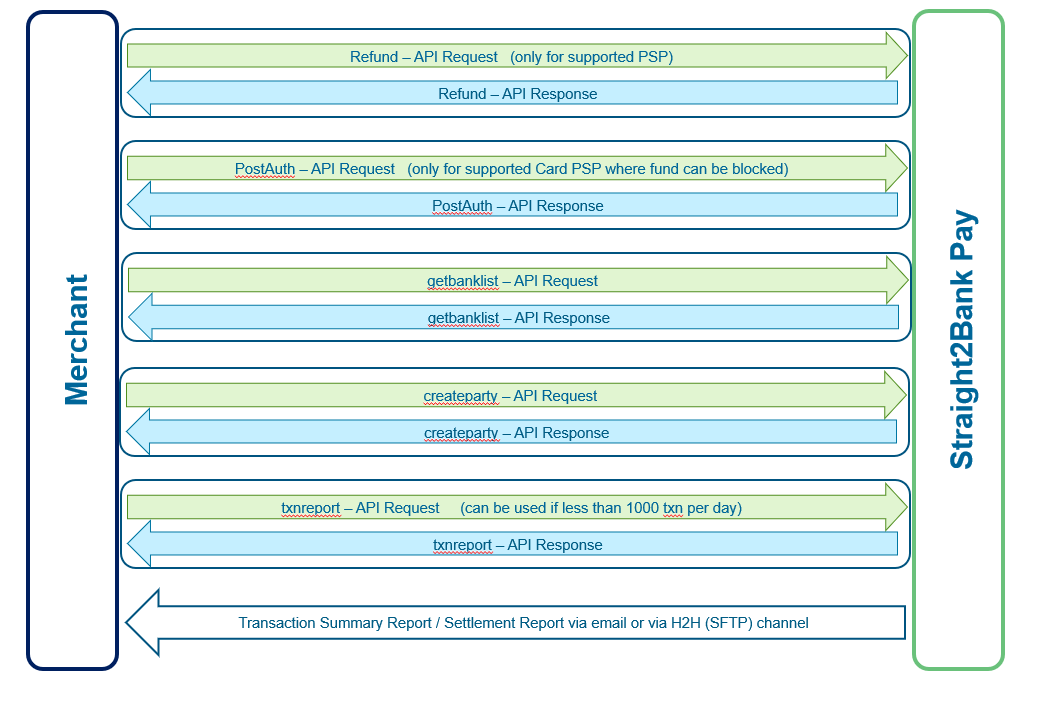
Refund
Merchant Server can initiate refund request using this API for PSPs that support refund. Straight2Bank Pay server does the following validation:
- Refund request can be raised only against a transaction that was successfully authorized by a buyer via Straight2Bank Pay.
- Refund requested amount should not be greater than the corresponding authorized transaction amount.
- Multiple refund requests can be initiated, but total amount of all refunds, should not exceed the authorized transaction amount.
Successfully validated refund request will be accepted and queued for processing. For each refund request, Straight2Bank Pay will initiate fund transfer from Merchant's account to internal account, this transfer will be initiated using Merchant's S2B Group ID as like Merchant has initiated Book Transfer (BT) payment to pay internal account. Once funds have been successfully debited from Merchant's account, Straight2Bank Pay will call API of PSP and request for refund to the Buyer. Buyer will be identified based on the reference number of authorized transaction that was initiated by buyer to pay to Merchant.
Straight2Bank Pay accepts the refund request, validates and sends acknowledgment back synchronously. If Merchant Profile is configured to receive real-time notification, then Straight2Bank Pay notifies final status of refund to Merchant's server via API end-point URL that been configured in the profile. Message specification of refund notification is same as described in section Notification Request
In case the notification message does not reach in time or merchant does not want to host API to receive notification, then Merchant can make use of Query API to receive the status of refund. Please refer Query API details in section Query
In case, PSP does not support Refund due to some reason or Buyer has paid using Instant payment method (like QR or RTP), then Straight2Bank Pay offers refund service which initiates outgoing payment via Clearing House to the Beneficiary. If Beneficiary of refund is available in Straight2Bank Pay (as it is received as part collection transaction), then Merchant does not need to provide the Beneficiary data as part of Refund instruction as Straight2Bank Pay uses the buyer name, buyer account number and buyer Bank code as Beneficiary details for the outgoing payment for the initiated refund instruction. In case, S2BPay does not receive the buyer data in collection transaction, then Merchant is expected to send Beneficiary data (creditaccnum, creditbankcode & creditorname) to S2BPay (as part refund instruction) which will be used as Beneficiary in outgoing domestic payment.
Refund Request (Merchant Server to Straight2Bank Pay)
| Protocol |
HTTPS POST (REST API) |
Message Format |
XML or JSON |
|
|---|---|---|---|---|
| Communication Layer level security |
TLSv1.2 |
|||
| Message layer level Security |
Request: RS256 Signature , AES-256 encryption Response: HMAC-SHA256 hashing, AES-256 encryption, RSA2048 Encryption |
|||
| URL |
Test: https://test-s2bpay.sc.com/s2bpaysit/refund Prod: https://s2bpay.sc.com/s2bpay/refund |
|||
| Event |
Whenever Merchant needs to initiate refund |
|||
Message Specification
| Seq Num | Key Name | M/O/C | Type & Length | Remarks |
|---|---|---|---|---|
| X1 | corpid | M | X(8) | Corp ID of Merchant |
| X2 | refund_req | M | X(2000) |
Key-value payload needs to be constructed as descripted in next table, then payload needs to be AES-256 CBC encrypted using shared secret key, encrypted string needs to be base64 encoded and populated here. Refer AES256 encryption/decryption section to view the sample code to perform AES encryption. |
The following table lists the key names used to construct the value for 'refund_req' tag. Each key-value pair needs to be concatenated using & (ampersand) character.
| Seq Num | Key Name | M/O/C | Type & Length | Remarks |
|---|---|---|---|---|
| P1 | corpid | M | X(8) | Corp ID of Merchant. |
| P2 | refundcorpref | M | X(16) | Unique reference of this refund request |
| P3 | amt | M | N(16,3) | Amount to be refunded |
| P4 |
txnid/ corpref/ optxnid |
C |
Reference number to locate earlier collected transaction for which refund is being initiated, either one of the following key values can be used: txnid - Transaction ID that is assigned by Straight2Bank Pay, Merchant can get this value from notification message. corpref - Transaction Reference that was assigned by Merchant. optxnid - Transaction Reference that was assigned by Operator (PSP). Merchant can get this value from notification message. |
|
| P5 | debitaccnum | O | X(34) |
Merchant's account that needs to be debited to process the refund request. If no value is provided for this tag, then it will be defaulted to the account that has been configured in profile. |
| P6 | refundvaldt | O | X(8) |
Format: DDMMYYYY If value date populated is future date, then it will be considered. Otherwise, Straight2Bank Pay will compute the value date based on when collected transaction is credited into Merchant account. |
| P7 | pspid | O | X(8) | PSP id of the transaction |
| P8 | type | C | X(10) |
If any PSP supports both Refund and VOID (same day cancellation), then it is mandatory to be explicitly to be mentioned. Possible value:
|
| P9 | creditaccnum | C | X(34) | Beneficiary Account Number or Beneficiary Proxy to which the fund to be sent. It is mandatory for the PSP for which Straight2Bank Pay does not receive Buyer Account Number from PSP or Clearing House. |
| P10 | creditbankcode | C | X(11) | Beneficiary Bank Code. If Bank Code is mandatory for outgoing payment, then it is not avaialble in Straight2Bank Pay, then it is mandatory. |
| P11 | creditorname | C | X(70) | Beneficiary Name. It is mandatory for the PSP for which Straight2Bank Pay does not receive Buyer Name from PSP or Clearing House. |
| P12 | paytype | C | X(10) | It will indicate either Payment Type or sub-payment-type, coded value. The value will be provided during the implementation if it is applicable. |
| P13 | datetime | M | X(14) |
Datetime stamp of client server Format: DDMMYYYYHH(24)MMSS (GMT+08:00) |
| P14 | sign | M | X(200) |
Signature of entire key-value pair using Merchant's Private key. Algorithm to be used : RS256 Refer to Generation of Digital Signature |
Refund Response (Straight2Bank Pay to Merchant Server)
Straight2Bank Pay receives Refund Request, decrypts, validates the signature and stores transaction if request is valid, then generates synchronously response and sends back to Merchant.
Message Specification
| Seq Num | Key Name | M/O/C | Type & Length | Remarks |
|---|---|---|---|---|
| X1 | ack | M | X(10) | Possible value:
|
| X2 | ackdesc | C | X(100) |
This tag will be populated only if ack is FAIL. PossibleValues:
|
| X3 | corpid | C | X(8) | Corp ID of Merchant. |
| X4 | refund_resp | C | X(2000) |
Key-value payload will constructed as described in section Notification Request, then payload is encrypted (algorithm: AES-256 CBC) using a random key, encrypted string is base64 encoded and populated here. Refer to AES256 encryption/decryption section to view sample code to perform AES decryption. |
| X5 | enc_key | C | X(2000) | Random key used to encrypt 'refund_resp' tag is encrypted using Merchant's public key (algorithm: RSA-2048) and populated here. Refer to RSA 2048 encryption/decryption section to view sample code to perform RSA decryption. |
Each key-value pair used to construct payload string for 'refund_resp' tag is concatenated using & (ampersand) character. For ERROR status, following are possible statusdesc values:
- Transaction not found
- Refund Amount is greater than Paid Amount
- refundref already exists
- No or Multiple values found in refundtxn
Request and Response Samples
Refund Request - Sample Message
clear-text value for 'refund_req' tag:
amt=1&corpid=CN000002&datetime=01092018230815&pspid=SGFDMS01&refundcorpref=0109201811194015&txnid=8000092202&sign=I2gCL1lw7f6pq8g+9uxzwZb1yJgVKjZXRkgLuuqKfse7JLv2kDHhJ723nnemLaqnzERtfADkW1ObRYFXipNeEgvPoL4slGZSITFnw7vmzOYnO6CAb+S9pr44NxrNVWNlTz5ho6rgtsxkCpp35jrhLTlb/pb7yT3pKE9/ZOZV/47hqt+hob1qPs+llkhOG6JxiAADTPXMQ0fYe58G8qDGwTGJnTodJEmd4qe+Ccbyzzbxji9G/hY3hfM7e/Uh8lqor+wdZbkYtpf6RZ25/LoBFIelqqp749R9FoC6P+aOl6RtAsJBW/sdujFQ34EYzK5LBoNov5n8kTt8RHPwtZXDaA==
Sample - XML message:
								<?xml version="1.0" encoding="UTF-8" standalone="yes"?>
<xml>
<corpid>CN000002</corpid>
<refund_req>RmLPKUiYs8yQW7/CUYBABO0SyKNPrkemhVxG2FtgAh0oir3/Htw9t+WPupgdmicbIBebog/SGvTNeYqvzSLDmGvVCiJNj604FOX65N4f5mTn6OJ+72VOUm+rlzvgC30DspGM49XdZWM6NNuFQ0Q5otvTkF05CxrZLqofR1KVgAK6zwb/JUsS0v/+YPOt27wWYk/YTmXWEtFincEKTTIKLYvuJ2SJ+rVwEUtdTQJj2SK9bDDVPJpdra/IEZITMoISxex0FfdrrduCzYXsrP8EX0/uzERk8+h3d9RJZOULHul+Ft3FBO3lyjVQacYAA/jrxnwU5ThLI8HZtqTyE/7LV2Cv4QHq2LrQ+7TD8m7rIFWmxEArVeoMgA6IIBPlgaYl0l8YhuhGhRfxpAst5gMDVZQkO/Gltvgbye4NWs84zCVZVb9LdW8lX6G/ny+J782YD252fCi6wnNobt/aF1RyOd/rImCf+VhNFiHRZ6gl7bI/7t+otUumra5a2x9Q6knL3zTwzFOZp3KwbLpcWxNETbe/wvksBrrgV9Lh32/PbKUWpZsDnP6tk65fdtrhmTf90xI1jRWiIyjtARYxtTKkSZhbsWhIALMHG29Lv9oQI0A=</refund_req>
</xml>
Refund Response - Sample Message
Clear-text value for 'refund_resp' tag for ACCEPTED status:ack=pass&amt=1.00&ccy=MYR&corpid=CN000002&corpref=8000092202&datetime=01092018230946&optxnid=84516311335&ref1=05062018194017&refundcorpref=0109201811194015&refundtxnid=8000110568&status=ACCEPTED&txnid=8000092202&txntype=REFUND&hash=8DDEA0AE766185B5F31421F5ACBD1FC46E42643F36E6803C3AC1CEA498FF0309
Clear-text value for 'refund_resp' tag for ERROR status:ack=PASS&corpid=CN000002&datetime=04092018144511&status=ERROR&statusdesc=Refund Amount is greater than Paid Amount&hash=59637D619A1AF291F2CEAE725E70AAF8A05A292108C4BF3B328977460D50F3F6
XML message:
								<?xml version="1.0" encoding="UTF-8" standalone="yes"?>
<xml>
<ack>PASS</ack>
<corpid>CN000002</corpid>
<refund_resp>HpBodmPUtt6bBhTK2KAkl01jO6X11Uj6kScr6jBEdNgtoCGsLUPvfT6bl+/L06an/iw0SwduwN0J2MaHYfrfK1n7WNexohDD5Sc9iw4ZEuZWR1krmUmQwFXNgwjmOCFeZzVVW9/+Y1S7Wx+xTxxR7rRSYpUq0/qNxdHEQwhmw0d8kOsEtOeFgK+IibY/9OQZ+BiMPi9DOOChplZFpWKE2ELrNZd4VRYI0GAKseFa0f9uphZ7JfRmGNF7elTWXScyGaiBHsGFWxmzcqvb5aSKPXvGnPAF3wzYT10huM+plPx2/I2yAshGvsXtR2W8VKVeufmPSEJynGLTAUUXmFu9n7FqtbGi4hXYF/39I9W3AzlvsbBQqhHM6Ed2hNBMNnq2</refund_resp>
<enc_key>W5M1G6BDJGlTEgFOcIrdsb3GN/WHjf4A8v5vewXnVwpFJQzfDnGiPVFwIqS3H3bQMrUXvERmWSgaT2vBdU+btvwPQtssFqiiT3c/IGBeLtgEJ9YXmBlf/kacF6MG5tN6ghpg4BKsFT7jB5Cdnrmi+RchtMZxqBO4v0nXxOkHiUif+ooWC8O0HLaEPIluTxCdo9AhJaFj60XW+2YKQnWcAwKSiEf1aWL3P+bjycgS/TUZQbnf/1m1XPl8P9GXm4Kovu+xiLlFLnhS4LZ8W9hisVv1mM6hwV5Kr0rlAuo0Fa8oUbUI26k/rA+8KmymuGFeJLgiFRb3G+CpS5jiqnMGtA==</enc_key>
</xml>
For FAIL acknowledgment
								<?xml version="1.0" encoding="UTF-8" standalone="yes"?>
<xml>
<ack>FAIL</ack>
<ackdesc>Sign Error</ackdesc>
</xml>
Try it out
PostAuth
This API is mandatory for UAE PGS payment method to confirm that the delivery is completed and request for the settlement.
For credit card payment method in certain countries, Merchant Profile can be configured to get pre-authorization from the buyer as part of user journey. After pre-authorization, Merchant is expected to call this API to send Post Authorization request with the final amount to be billed to the buyer, this amount should equal or less than the pre-authorized amount by the buyer.
PostAuth Request (Merchant Server to Straight2Bank Pay)
| Protocol |
HTTPS POST (REST API) |
Message Format |
XML or JSON |
|
|---|---|---|---|---|
| Communication Layer level security |
TLSv1.2 |
|||
| Security Algorithm |
Request: RS256 Signature , AES-256 encryption Response: HMAC-SHA256 hashing, AES-256 encryption, RSA2048 Encryption |
|||
| URL |
Test: https://test-s2bpay.sc.com/s2bpaysit/postauth Prod: https://s2bpay.sc.com/s2bpay/postauth |
|||
| Event |
Whenever Merchant wants to charge the final amount to Buyer's Card. |
|||
Message Specification
| Seq Num | Key Name | M/O/C | Type & Length | Remarks |
|---|---|---|---|---|
| X1 | corpid | M | X(8) | Corp ID of Merchant |
| X2 | postauth_req | M | X(2000) |
Key-value payload needs to be constructed as described in next table, then payload needs to be AES-256 CBC encrypted using shared secret key, encrypted string needs to be base64 encoded and populated here. Refer AES256 encryption/decryption section to view the sample code to perform AES encryption. |
The following table lists the key names used to construct the value for 'postauth_req' tag. Each key-value pair needs to be concatenated using & (ampersand) character.
| Seq Num | Key Name | M/O/C | Type & Length | Remarks |
|---|---|---|---|---|
| P1 | corpid | M | X(8) | Corp ID of Merchant. |
| P2 | postauthref | O | X(16) | reference of this postauth request |
| P3 | amt | M | N(16,3) | Final Amount to be charged to the card. |
| P4 | txnid / corpref / optxnid | C | X(75) |
Reference number to locate earlier pre-authorized transaction for which postauth is being initiated, either one of the following key value can be used: txnid - Transaction ID that is assigned by Straight2Bank Pay, Merchant can get this value from notification message. corpref - Transaction Reference that was assigned by Merchant. optxnid - Transaction Reference that was assigned by Operator (PSP). Merchant can get this value from notification message. |
| P5 | pspid | M | X(8) | PSP id of the transaction |
| P6 | datetime | M | X(14) |
Datetime stamp of client server in HKT Format: DDMMYYYYHH(24)MMSS (GMT+08:00) |
| P7 | sign | M | X(200) |
Signature of entire key-value pair string using Merchant's Private key. Algorithm to be used : RS256 Refer to Generation of Digital Signature |
PostAuth Response (Straight2Bank Pay to Merchant Server)
Straight2Bank Pay receives PostAuth Request, decrypts, validates the signature and stores transaction if request is valid, then generates synchronously response and sends back to Merchant.
Message Specification
| Seq Num | Key Name | M/O/C | Type & Length | Remarks |
|---|---|---|---|---|
| X1 | ack | M | X(10) |
Possible Value
|
| X2 | ackdesc | C | X(100) |
This tag will be populated only if ack is FAIL. Possible error description:
|
| X3 | corpid | C | X(8) | Corp ID of Merchant. |
| X4 | postauth_resp | C | X(2000) |
Key-value payload will constructed as described in section Notification Request, then payload is encrypted (algorithm: AES-256 CBC) using a random key, encrypted string is base64 encoded and populated here. Refer to AES256 encryption/decryption section to view sample code to perform AES decryption. |
| X5 | enc_key | C | X(2000) |
Random key used to encrypt 'postauth_resp' tag is encrypted using Merchant’s public key (algorithm: RSA-2048) and populated here. Refer to RSA 2048 encryption/decryption section to view sample code to perform RSA decryption. |
Each key-value pair used to construct payload string for 'postauth_resp' tag is concatenated using & (ampersand) character. For ERROR status, following are possible statusdesc values:
- Transaction not found
- Postauth Amount is greater than User Authorized Amount
Request and Response Samples
PostAuth Request - Sample Message
Clear-text value for 'postauth_req' tag:
amt=1&corpid=CN000002&date=18092018195916&postauthref=18092018094616&pspid=SGFDMS01&txnid=9999999999&sign=JnngPZwX4B+Hv54FN4mF2M06O+37uZvRU1t4+rMenYViYwJJn8DO6vIqBNsEllJiU9n7fBONqkGMN6PRVa3svMtJxOFWRRmzxSHJ8QYPCwx1Woi6l7DqOyUboOj/xalCwHvp7TXhxTzywtTWFSUTV+AqM0RSe7f0UVlDMPhC9vLVOq2Ytk9sBDrEqTjNRJ+QKYBjNbNJlm3G8D7/l2ouXo8YpjmXrE8FASQeNHHQHNhZJIq9wzSKLetH0Qsm8VJne37XTlK9JZywhXVmEVJ6l8CNb60vunc5PiYjo7zPvVD7skSdF5fqx3CblxIgGLOm0AZ3BxXMlVx5yq3BbldyEg==
XML message:
								<?xml version="1.0" encoding="UTF-8" standalone="yes"?>
<xml>
<corpid>CN000002</corpid>
<postauth_req>RmLPKUiYs8yQW7/CUYBABFECc7u3nnrpdbXo1Ieqgjfwj7mnBRKhLw38DOZOIHEmZ1uKH28bDT5lXyFRJ1mFbXIakDO14D5uTbr2Fhbw7MdYtq0G0Jq9EC2cwKuKEM/QCCuW5j85jd9IlRkFN2gmiRHNvLMuvfZPQuRTU7cJ2t2/Tvb6s+wkExwxXhOB8JPXvQD87NgE30CIfEyqQnRxis5IyIHLtuC9RBxkRzpk+gCuWDobANFT3maZwf/r4RhPyCHl3e5METUkqAp+Fm7gXhDPOLVoA+9f1rfpYYLcNwySwab986QzPcZnV4OPT5ygENV3kdxxR5hLYnA/nQAhsKHpWJm6F5/gBLoRS/MWCD9Y/a8Wpkj/isYazmXDkxvxZPC3kQekfRyfOQo7SCxdcpp/D+4kkb40OF5/GNuI9GbYfHk/br8o0KFnqhPeAyxWELRi1MHSYdC1xORYCUg9dXvnmx0dbTZy3Iw82rozO8r92TEAmDAKe+qEm6zB/5/J9e8MPuaPWs0czZ/nY4Hl4BJRrE3jKPP4WoLyPJe++b3f2xHzdvjTzGaDM6NT7DNtCL3sRqsk3lLLlyLqnSA3fTAuK/+7/JZ604DgEJllhNI=</postauth_req>
</xml>
PostAuth Response - Sample Message
Clear-text value for 'postauth_resp' tag for SUCCESS status:ack=PASS&amt=1&ccy=SGD&corpid=CN000002&corpref=8000000923&ctry=SG&date=26072018194519&optxnid=84518647137&ref1=45778&status=SUCCESS&txnid=8000000923&txntype=NEW&hash=A792872638828316BD214C4BE30521B6EEFB6C6330F3AE5E85D84FCFD085A230
Clear-text value for 'postauth_resp' tag for ERROR status:ack=PASS&corpid=CN000002&date=19092018122858&status=ERROR&statusdesc=Transaction Not Found&hash=051A6A8D5AA834098121A93FB42BC5247E9996A6B93730091A9419B032C1339E
XML message:
								<?xml version="1.0" encoding="UTF-8" standalone="yes"?>
<xml>
<corpid>CN000002</corpid>
<postauth_resp>EIT+JOdgtmuwPCEf7aNhIS4RfAC+rgoHRUzFfaOqrXiU/0elJIhlW1CHrStDY/dRHsAk43JQ0Nz0nkt/Q9u/N/7Ro9o3z4PFaJsCvghLp9e/5FFTvyKiJ6PKHhAVnvjTJmZyrSEn9LYACA8k/O9H0AkVg9t/rGgg4RTVRTbBQABask5Ds2ZZcJRud2mseRx68qD4mJypPrvnCSAUQCQpHKjaIFkxMYHmoTK4SXJ+Vu1+ZT/FsBNPbhF7MHVnM8HLlRqqVjuvlFvGRfPa/tP4NfHfTufTfLi+qFgmqluD0d1kxR40sEp/uYYa/f9dG71l</postauth_resp>
<enc_key>dNZJ9ExVM00EIInY9cdwSWNf1vzb0YiTCyUhkzM1nftYB6iWBWD4wj/riBzmjYKLsGq+LWoinTl8PcjXrxj+0Ut6+FL+So5ddiRJBqCGEuyWtfq7Xkz6mtqOZ+IlI5vwx85IHg5R8x8wmsLRu+BYuKFIXkTbaThfePElwkfypUzYIY2Y5udaCku7BNYmfucROEfxGcfcQR4y0/Qwih/IUAbXmMQDrbjH4aege7BvTCz7osnH/VlJHpIbARKxu/MLw80jAGjb23Gvftw54fUI88QVOLGjyBcuygygZwt0DoIp8uYmzZRK4TX5iQYotafp09fPyAR/g7wcCumtVQBYNA==</enc_key>
</xml>
For FAIL acknowledgment
								<?xml version="1.0" encoding="UTF-8" standalone="yes"?>
<xml>
<ack>FAIL</ack>
<ackdesc>Sign Error</ackdesc>
</xml>
Try it out
TxnReport
This API provides a list of transactions for any day. It is recommended to make use of this API only if number of transaction is less than or equal to 1000. For more than 1000 transactions, Merchant can get the report from Straight2Bank Pay via SFTP server or via eMail, Merchant can download the report from Bank's SFTP server and Straight2Bank Pay can push the files to Merchant's SFTP server.
TxnReport Request (Merchant Server to Straight2Bank Pay)
| Protocol |
HTTPS POST (REST API) |
Message Format |
XML or JSON |
|
|---|---|---|---|---|
| Communication Layer level security |
TLSv1.2 |
|||
| Security Algorithm |
Request: RS256 Signature , AES-256 encryption Response: HMAC-SHA256 hashing, AES-256 encryption, RSA2048 Encryption |
|||
| URL |
Test: https://test-s2bpay.sc.com/s2bpaysit/txnreport Prod: https://s2bpay.sc.com/s2bpay/txnreport |
|||
| Event |
Once in a day. |
|||
Message Specification
| Seq Num | Key Name | M/O/C | Type & Length | Remarks |
|---|---|---|---|---|
| X1 | corpid | M | X(8) | Corp ID of Merchant. |
| X2 | txnrpt_req | M | X(2000) |
Key-value payload needs to be constructed as descripted in next table, then payload needs to be AES-256 CBC encrypted using shared secret key, encrypted string needs to be base64 encoded and populated here. Refer AES256 encryption/decryption section to view the sample code to perform AES encryption. |
The following table lists the key names used to construct the value for 'txnrpt_req' tag. Each key-value pair needs to be concatenated using & (ampersand) character.
| Seq Num | Key Name | M/O/C | Type & Length | Remarks |
|---|---|---|---|---|
| P1 | corpid | M | X(8) | Corp ID of Merchant. |
| P2 | apiref | M | X(16) | reference of this txnreport request |
| P3 | fltrreqdate | M | X(8) |
Date for which report is requested Format: DDMMYYYY |
| P4 | fltrstatus | O | X(25) |
Status of the transaction to be filtered For NEW Transaction
For REFUND Transaction:
|
| P7 | fltrtxntype | O | X(10) |
Type of the transaction. Valid Values:
|
| P8 | fltrpspid | O | X(8) |
PSP for which report is needed. PSP ID to be obtained from Implementation Manager. |
| P9 | datetime | M | X(14) |
Datetime stamp of client server Format: DDMMYYYYHH(24)MMSS (GMT+08:00) |
| P10 | sign | M | X(200) |
Signature of entire key-value pair string using Merchant's Private key. Algorithm to be used : RS256 Refer to Generation of Digital Signature |
TxnReport Response (Straight2Bank Pay to Merchant Server)
Straight2Bank Pay receives TxnReport Request, decrypts, validates the signature, then generates synchronously response and sends back to Merchant.
Message Specification
| Seq Num | Key Name | M/O/C | Type & Length | Remarks |
|---|---|---|---|---|
| X1 | ack | M | X(10) |
Possible Value
|
| X2 | ackdesc | O | X(100) |
This tag will be populated only if ack is FAIL. Possible error description:
|
| X3 | corpid | M | X(8) | Corp ID of Merchant. |
| X4 | apiref | M | X(16) | Echoed from Request message |
| X5 | datetime | M | X(14) |
Date & time Format: DDMMYYYYHH(24)MMSS (GMT+08:00) |
| X4 | txnrpt_resp | M | X(30K) |
Key-value payload will be constructed as described in the next table then payload is encrypted (algorithm: AES-256 CBC) using a random key, encrypted string is base64 encoded and populated here. Refer to AES256 encryption/decryption section to view sample code to perform AES decryption. |
| X5 | enc_key | M | X(2000) |
Random key used to encrypt 'txnrpt_resp' tag is encrypted using Merchant's public key (algorithm: RSA-2048) and populated here. Refer to RSA 2048 encryption/decryption section to view sample code to perform RSA decryption. |
The following table lists the tag names used to construct the value for 'txnrpt_resp' tag, the format of the payload will be same as the format of the request message, it will be either XML or JSON.
| Seq Num | Key Name | M/O/C | Type & Length | Remarks |
|---|---|---|---|---|
| P1 | status | M | X(10) | Status of the Transaction |
| P2 | statusdesc | O | X(100) | This tag will be returned only if a status description is present |
| P3 | txntype | M | X(20) |
Possible value:
|
| P4 | corpid | M | X(8) | Corp ID of Merchant |
| P5 | amt | M | N(16,3) | 13 integer digits and a precision of 2 decimals |
| P6 | ccy | M | X(3) | 3 character currency code |
| P7 | ctry | M | X(2) | 2 character country code |
| P8 | ref1 | O | X(100) | Reference Number 1 |
| P9 | ref2 | O | X(100) | Reference Number 2 |
| P10 | ref3 | O | X(100) | Reference Number 3 |
| P11 | ref4 | O | X(100) | Reference Number 4 |
| P12 | ref5 | O | X(100) | Reference Number 5 |
| P13 | corpref | O | X(16) | The unique ref value of NEW Transaction |
| P14 | refundcorpref | O | X(16) | The unique ref value of REFUND Transaction |
| P15 | txnid | M | X(16) | Straight2Bank Pay generated unique transaction ID for this NEW transaction. |
| P16 | refundtxnid | O | X(16) | Straight2Bank Pay generated unique transaction ID for this REFUND transaction. |
| P17 | optxnid | O | X(75) | PSP assinged Transaction ID for NEW Transaction |
| P18 | refundoptxnid | O | X(75) | PSP assinged Transaction ID for REFUND Transaction |
| P19 | pspid | M | X(8) |
Not Applicable for 'collect' API response. PSP ID (indicates payment method). Eg: BDSSLNET, BDSSLCRD, BDSSLNET, SGPAYNOW, HKFPSHKD. PSP IDs to be obtained from Implementation Manager. |
| P20 | payername | O | X(256) |
Not Applicable for 'collect' API response. For certain payment methods, S2BPay receives the Payer Name. It can be inlcuded on this notifcation message. It is not applicable for all payment methods. |
| P21 | payeraccnum | O | X(34) |
Not Applicable for 'collect' API response. For certain payment methods, S2BPay receives the Payer Account Numbe. It can be inlcuded on this notifcation message if regulator rule allows. It is not applicable for all payment methods. |
| P22 | payerbankcode | O | X(50) |
Not Applicable for 'collect' API response. For certain payment methods, S2BPay receives the Payer Bank Code. It can be inlcuded on this notifcation message. It is not applicable for all payment methods. |
| P23 | payerident | O | X(50) |
Not Applicable for 'collect' API response. For certain payment methods, S2BPay receives the Payer's identity (like mobile number). It can be inlcuded on this notifcation message if regulator rule allows. It is not applicable for all payment methods. |
| P24 | corpident | O | X(50) |
Not Applicable for 'collect' API response. For certain payment methods, S2BPay receives the Merchant's identity (like Biller ID, VPA). It can be included on this notification message. It is not applicable for all payment methods. |
| P25 | authcode | O | X(70) |
Not Applicable for 'collect' API response. For certain payment methods, S2BPay receives the Authorization Code. It can be inlcuded on this notifcation message. It is not applicable for all payment methods. |
| P26 | gstamt | O | N(16,3) |
Applicable only for Txn Report response GST amount applicable for that transaction. Applicable only for certain payment methods |
| P27 | taxamt | O | N(16,3) |
Applicable only for Txn Report response GST amount applicable for that transaction. Applicable only for certain payment methods |
| P28 | chrgamt | O | N(16,3) |
Applicable only for Txn Report response Charge amount applicable for that transaction. Applicable only for certain payment methods |
| P29 | netamt | O | N(16,3) |
Applicable only for Txn Report response Net amount that is settled for that transaction. Applicable only for certain payment methods |
| P30 | totalchrgamt | O | N(16,3) |
Applicable only for Txn Report response Total charge amount applicable for that transaction. Applicable only for certain payment methods |
| P31 | settlementdate | O | X(8) |
Applicable only for Txn Report response Date on which this transaction will be settled. Format: DDMMYYYY |
| P32 | datetime | M | X(14) |
Datetime stamp when the transaction is made Format: DDMMYYYYHH(24)MMSS (GMT+08:00) |
Request and Response Samples
TxnReport Request - Sample Message
Clear-text value for 'txnrpt_req' tag:
apiref=9999999991&corpid=CN000002&datetime=18012019141850&fltrreqdate=18012019&fltrpspid=INBILDSK &fltrstatus=SUCCESSFUL&fltrtxntype=NEW&sign=VnIx2rBHfDSPh7vj5iJTwughxVono3MHHyWGbWbpFacdKQSvIS4Vg6oF/fuvos6hVaPAcfjvW39kUR6D1AenMFRWMz8KxlOLwps3uRicZMS9JvcMFRowI99hgHJidq3tQo5FKGbsB1wtAE645mQgziTIWS63UrN32pRzAEfX2QXwGWerk2Hub37zyKOmQa2mMzdMIZdoANbCo5+fD+F/4ArGJPyM9hIFFRmogbF6gUaOQSqmTmXtiYMmV3DxemCMd7KogK3PBDDJ9Ttz9StCWRkFks04Z83v4t92vVug2Eqpx6YXK361Vss0RGLIh+djHj5LkTxjQEEGJgA2oqa86g==
XML message:
								<?xml version="1.0" encoding="UTF-8" standalone="yes"?>
<xml>
<corpid>CN000002</corpid>
<txnrpt_req>WNU3YqSl7LFF6/gvel+TmE8c0nQXSAxuA1QrItwVBK+WPF8YjPocQFXg8tZF7PuwsxRt/VrIBsmt2xxcQGiMQebKL1UbO3FP6QsHSHoFetBVi8xwf/1B1mXt4tUoCcPE7hH4frPvRB7xEPXU7kPIhkZWmm103Ko3HoL3uue7mbjuZCnjyrvg40Rj39t4pAWRO+CxhQYdVnW+vtaQ1BNfNV5ZoX7fFQMaGwEUANHn5Xp4hjPQ/8D9meKUVD8iZlOWWhPYJn8/z7NUi9UgJhVwvgu3NBRIA7Hn3GySzrcKmNKYvTReihW82TmWWdK2Nv++G4+hR8N9/YWVVUhYioestUrjnbp36pikFK0nmxJUwTB2uqTiHReCDm3g4GdiGupdEUvqEDjo6BvvMAlaZwNZzypMBEQGp5GUWY0vATOoqy0nAW38eFkd0b/j7ZyjfYJxwBxcuSfGqVnlbtESX1kyZH+T68iHA8f1WFO01mxJ23Gv5EtLDfWiIardSFWcZ5GQr80TFF4WEMvtu/UoGq82JTZNiSLt8bY58H7V2rqW1+Hzfw6DKO3MkOt0T4yepXrMwtO7pe5/FzQbOUCcANiaq87laFRDgfCnfLizHIy8sQI=</txnrpt_req>
</xml>
TxnReport Response - Sample Message
Clear-text value for 'txnrpt_resp':
								<txn>
<status>CREDITED</status>
<statusdesc>Credited</statusdesc>
<txntype>NEW</txntype>
<amt>47458.95</amt>
<ccy>INR</ccy>
<ctry>IN</ctry>
<ref1>Bala1234</ref1>
<corpref>Bala1234</corpref>
<txnid>9000114698</txnid>
<optxnid>13123599</optxnid>
<psp_id>INBILDSK</psp_id>
<gstamt>3.24</gstamt>
<chrgamt>18</chrgamt>
<netamt>47437.71</netamt>
<totalchrgamt>21.24</totalchrgamt>
<settlementdate>17022023</settlementdate>
<datetime>18012019141323</datetime>
</txn>
XML message:
								<?xml version="1.0" encoding="UTF-8" standalone="yes"?>
<xml>
<ack>PASS</ack>
<corpid>CN000002</corpid>
<apiref>9999999991</apiref>
<datetime>18012019141904</datetime>
<txnrpt_resp>islpieDY3b2az09FG7i1gkuVMokr3mAck7tdT9sVKiaaoowztOV4nFEN8pDlJgOjtjwMcSqK2H0HxZpqKhQTJQKxw0wa/ix9x0QAYR2d1Hypmbb0PAJbZcoexCnA2hmAcX8hWF0By8hQSAWYUuscS3snOW26yKFrQFTNdXy4MEuiuVRgXCTz732GJbElVL1B8I2UOHjtaLKYwECg3uR005nJ1cQwqw227qoz+fo2/wulU6oisI7QzstqVknyR1V54fipdVnx5rT7tsmMBDsxJqpscLpHvKQFPqzAcpHqpVxIBRkzv0RWF4pa8aY9j5fdjLRCZ87j9FbfL/GlJ/igVBFJIAWq8/S1n1jIHEDUoADEWwNN3FyUHXsI4haWJspKeb4N/a05T5GXiDtrGQvK68v/Pf0XepA+KppsZVnWv8A3nQTATWZBaWHAPF/L16gJ6+lrf6L+uAWSh7kS+AAnoDC5vYUgSrnGZ0AY/WWQRv1USTjTv8vS+pm7vw+BJawzhU0uLYTBmb1RUPtUVpmjnE1eWLushwAM0PGwhZ/CLPjQT981IHQpXMeivRnm7nPkn71gpboSoBnRRK7rrjKWntRSpQeFFb3ThswRavitDWcGLHHtD9FoxZBnQgoxvipVI4kpSKtDoZ0PrJtRu12ahAL7ZzR9SDvKNBDbU9gut3CKeMHaGmiVP/fpSWzMy9n9+u2FYcmhZBcriM3VRpgw4bEvAwk+9qr5cFsQDdmrFNwHQxz2NPgBh7ZcjjIPAjQUK1uL9M/k1DRCPGmssGAT0bJCFcK++oe6z7AWGCECW6qGwLiT7M1VwfZcawXjq+gPlmCvUCOPL0cGAs0mxlVRB3yr4QC6vY/vPEby5VEWkg/6oSHcE0sC9CAlaTf/ZX+7C11M0t2qMUC4iu1D41swAxfSfYMnMYhc6cDb2CTqyP65prAuKEWlDlQ9Mt98bRD13JqLtdkVY0LG2PBBWDiWg0DrSN0IlAvMAb8VBLEyMATM30TRozEEKBC5p8OdjNSxs31Gr5KrNgpkQ5urNkVrunvzGvAvIcj2CIe1R0T9qV3iWSeV9AIiciB4mYW02Ry5DpXW/M7MccbLef8NQekukY9suc9PDz+/GtNKd1atPnkN51SNSACK7jtDNCk1sxFsuPidzpWO2JYJx2kHmZr8YzSH4qOQj2cRgxOTQ0cKdzljCdllrWI77j95xncGiw6pTnQDSfh+iYWWpcR7wSFIx5J7lT3UPk74HylNFWNJgY/4xH24h+LipEDUvv/8IG/XXZuCKH+4EMpCAYp7aQvQR6XFRgoSAtSoVhu2fCp4LCBFoBtoiL6dfsku4BveG/Q38FsM/JAx6JXb2LhwxI5bJZdhZm9W66Jm8+y+Rb48MVJdsY77UL0LAx3jQyhj5V9EFKadsfLXlMnTZHtATDAwObxsOjnnpwmXHaNmtWjtADOLVTKSn71hDqYu297kf6y9t4I5g98zQwuP4YS6ZlRag0QNkcINdn4lIS1YWOqmWp/uomHC7MLUz2/VVhjHTx+EZNE7pdVtGF7K1GUcdSKCQ+juMvX5sdOYXXEbRIf3FABvIpI1Ak5RZJXIE3c2QLBafNKXVMp67yVke2RVCgY6R+XI0lzkOeWuCn33SMWtOoKlv/N3dszZ42JuwQJk/MpVs8fKlAXUoWB2dfNHUpol30jYBf1GS7/wIEQIwvRLIzYPgo9ksnsui6GX0/Qnl7JtmRSuQFa1uSVS8yxzjodqCU+rxoukc1L7IsJ7pA2b/FQ94O3wTEgKr/AP5aWxu0tkAzIWMPRNsYkYHmGn48x2y5apRNyRvOXPGUtG5GYPjEk+4QopWEU+GypBlJXVpplpbEGubjdB0wdoebyLIry+rZPxpFvcprJIu4zeieOJ8LK9OnBcLxZDT6Ua10JqLX5SSScjk+6p2+Y24bMKhJTunQB9tiUV4YyYPZLfMYDFuU+6W8Mw7VjHVDj9ovsilTqkWZW6uQ+6vWGfxm9hA2+EvVfi5FhI6e/BQ8Grsz/AKO8OJ6rXp/YkSUy5S2amCPJzIA6Su0l0S5/45kxBR+mVQhvwa0Zwm6W8aKH1/Q4WjDyZ26JV3Y3Qx5DS3YqVVgF9T5NYNffiV42ieUyC3zjqGzovkoOhkNWeKAVevtSWI/uwWcPttawgWN2bYceZtp21PRPvYyNXI+WPfqIoxBnU605Hk1Ya2UGKQO/1TOZmhMwOhYZFS4WAr0Tft6VYxjBbVsho0nCRizQI+J7KYiGpytPEwFVaGwRrP6wCjCHGwezfCbUowK4vJ7U4UsIJni4ZfHzkBPfkAJLMonTSLwNOGciEEBlOI96oS8/VxZh04ElQjSMiq3dVgRYCQvAeL8uC7IJiOZiVrEJpmvBc9VhNc3CdLF5b3j05QzlJI3GGKhHPBfIoC6Oj/Jxr/fNaI3QjuyO223yieC08Suw2Bqc3z4Ud8msU/Ah2zgxlV1kAZEY+o49NfxAazXbSnPTRKv/c7PLE5MtKaljswlV8z8plpVkUkMwoERldoTv7atxZxrTlPlMbi48e0kVFIbwxN4W7mvjKINgWve3E5mchXRjixwguYqIaGCX1hWFzVfFAGlPKij/yDCz3OAKUgYo61diI</txnrpt_resp>
<enc_key>F/kYBr1xfhyKIm5seGtabcp20iex2QfCdKEJ+OFn0woPIPk8boLKfqBC53Kojh8NYETgKEOc612OozzJS5KFxVxFJJn/HlWTMloRxfCB825bpYK/cujEw1zBVAxPlQR83U0LDq+0RZljwGMz6++vBHgN6dFl0Jfw0giBhTus3V9+BI6zbeR6gkJZDAI35ztJ8bxaFwNYiLAK2ID8npBQtmFzATbBvFlchule1NN499FV7mf5eKefgB/E3Qchv4SkSGAeXBSOo07KTUEKPkOSpc70gXqBg+cQ/3KxBhCVP/sSDpwVWmQHA1JRTKnrEZteXp0PPpnmxeVXcWeDMqgijQ==</enc_key>
</xml>
Try it out
Banklist API
If Merchant uses Re-direct Integration, wants to avoid Straigh2Bank Pay UI (User interface) and payment method expects to show the Bank List for the buyer to choose, then Merchant can call this API to get the list of Bank supported for the such payment Method (like FPX for Malaysia, NetBanking for Indonesia, etc) and present in Merchant's UI.
Banklist Request (Merchant Server to Straight2Bank Pay)
| Protocol |
HTTPS POST (REST API) |
Message Format |
XML or JSON |
|
|---|---|---|---|---|
| Communication Layer level security |
TLSv1.2 |
|||
| Security Algorithm |
Request and Response: JWE String (RS-256 Sign, AES-256 GCM encryption) SCB RSA Public Key: https://test-s2bpay.sc.com/s2bpaysit/devguide#idocs_pubkey |
|||
| URL |
Test: https://test-s2bpay.sc.com/s2bpaysit/getbanklist Prod: https://s2bpay.sc.com/s2bpay/getbanklist |
|||
| Event |
Whenever Merchant needs to get the Bank lists from S2BPAY |
|||
Message Specification
| Seq Num | Key Name | M/O/C | Type & Length | Remarks |
|---|---|---|---|---|
| X1 | corpid | M | X(8) | Corp ID of Merchant. |
| X2 | banklist_req | M | X(2000) |
This tag can either contain JWE string / AES-256 encrypted string as BAU. JWE format string which contains this following parts separated by .(dot) JWE Header.JWE encrypted Key.Initialization Vector.Ciphertext.Authentication Tag The details are explained in below table - JWS String |
The following tables lists the details used to construct the value for 'banklist_req' tag.
JWE String
| JWE Component | Value |
|---|---|
| JWE Header | Base64URL encode (UTF8(JSON value)) {"enc":"A256GCM","alg":"RSA-OAEP-256"} |
| JWE encrypted Key | Generate a random key(32 chars). Encrypt the random key with SCB Public key using RSA-2048 algorithm |
| Initialization Vector | Generate a 12 byte IV string used for GCM encryption |
| Ciphertext | Form the JWS String with Header.Payload.Signature format explain in next table. Encrypt the JWS string with random key generated using AES-256 GCM algorithm and populate in Ciphertext. |
| Authentication Tag | Authentication tags returned in GCM algorithm |
JWS String
| JWS Component | Value |
|---|---|
| JWS Header | Base64URL encode (UTF8(JSON value)) {"alg":"RS256","typ":"JWT"} |
| JWS Payload | Payload is base-64 encoded JSON string. |
| JWS Signature | Sign generated for Header.Payload using RS256 algorithm with Sender's Private key The value will be validated at receiver's end |
Payload Attributes
| Key Name | M/O/C | Type & Length | Remarks |
|---|---|---|---|
| corpid | M | X(8) | Corp ID of Merchant |
| pspid | M | X(8) | PSP for which Bank list is requested EG: FPX Retail PSP ID: MYFPXB2C |
| datetime | M | N(14) | Format: DDMMYYYYHH(24)MMSS (GMT+08:00) The encrypted string is valid only for 5 minutes from the created time. |
Banklist Response (Straight2Bank Pay to Merchant Server)
Message Specification
| Seq Num | Key Name | M/O/C | Type & Length | Remarks |
|---|---|---|---|---|
| X1 | ack | M | X(10) |
Possible Value
|
| X2 | ackdesc | O | X(100) |
This tag will be populated only if ack is FAIL. |
| X3 | corpid | C | X(8) | Corp ID of Merchant. Present only when ack=PASS |
| X4 | banklist_resp | C | X(2000) | Present only when ack = PASS JWE format string which contains this following parts separated by .(dot). JWE Header.JWE encrypted Key.Initialization Vector.Ciphertext.Authentication Tag The details are explained in below table: |
The following table lists the tag names used to construct the value for 'banklist_resp' tag.
JWE String
| JWE Component | Value |
|---|---|
| JWE Header | Base64URL encode (UTF8(JSON value)) {"enc":"A256GCM","alg":"RSA-OAEP-256"} |
| JWE encrypted Key | Random key is encrypted with Merchant's public key. Decrypt it using Merchant's private key |
| Initialization Vector | 12 byte IV string used for GCM decryption |
| Ciphertext | JWS String with Header.Payload.Signature format explain in next table. Decrypt it with the Random key |
| Authentication Tag | Authentication tags returned in GCM algorithm |
JWS String
| JWS Component | Value |
|---|---|
| JWS Header | Base64URL encode (UTF8(JSON value)) {"alg":"RS256","typ":"JWT"} |
| JWS Payload | Payload is Base-64 encoded JSON string with attributes in next table |
| JWS Signature | Sign generated for Header.Payload using RS256 algorithm with Sender's Private key The value will be validated at receiver's end |
Payload Attributes
| Key Name | M/O/C | Type & Length | Remarks | ||||||||||||||||||||||||||||||||||||||||
|---|---|---|---|---|---|---|---|---|---|---|---|---|---|---|---|---|---|---|---|---|---|---|---|---|---|---|---|---|---|---|---|---|---|---|---|---|---|---|---|---|---|---|---|
| corpid | M | X(8) | Corp ID of Merchant | ||||||||||||||||||||||||||||||||||||||||
| pspid | M | X(8) | PSP for which Bank list is requested | ||||||||||||||||||||||||||||||||||||||||
| datetime | M | N(14) | Current date time in HKT | ||||||||||||||||||||||||||||||||||||||||
| banklist | M | JSON Array | JSON Array with the following fields
|
Request and Response Samples
Banklist Request - Sample Message
Clear-text value for JWS payload of 'banklist_req' tag:
Message:
{"corpid":"CN000002","pspid":"MYFPXB2C","datetime":"14052022093000"}
Banklist Response - Sample Message
Clear-text value for JWS payload of 'banklist_resp' tag:
								{"corpid":"CN000002",
 "pspid":"MYFPXB2C",
 "datetime":"14052022093000",
 "banklist":[{"bankcode":"ABB0233","bankname":"Affin Bank", "status":"active"},
	    {"bankcode":"AMBB0209","bankname":"AmBank", "status":"inactive"}]
}
Create Party
This API is applicable for Master Merchant. Master Merchant can utilize this API to submit the details of sub-Merchant. For Singapore, this API also serves to create UEN Proxy for each sub-merchant with the display name of both Master Merchant and sub-Merchant name together. For Malaysia, Straight2Bank Pay uses the sub-merchant details for regulatory reporting.
Create Party Request (Merchant Server to Straight2Bank Pay)
| Protocol |
HTTPS POST (REST API) |
Message Format |
XML or JSON |
|
|---|---|---|---|---|
| Communication Layer level security |
TLSv1.2 |
API Name |
Create Party |
|
| Source |
Corporate client |
Destination |
S2BPAY |
|
| Message layer level Security |
Request and Response: JWE String (RS-256 Sign, AES-256 GCM encryption) SCB RSA Public Key: https://test-s2bpay.sc.com/s2bpaysit/devguide#idocs_pubkey |
|||
| URL |
Test: https://test-s2bpay.sc.com/s2bpaysit/createparty Prod: https://s2bpay.sc.com/s2bpay/createparty |
|||
| Event |
Whenever Corporate wants to create SubCorpId |
|||
Message Specification
| Seq Num | Key Name | M/O/C | Type & Length | Remarks |
|---|---|---|---|---|
| X1 | corpid | M | X(8) | Corp ID of Merchant. |
| X2 | createparty_req | M | X(2000) |
This tag contains JWE String JWE format string which contains this following parts separated by .(dot) JWE Header.JWE encrypted Key.Initialization Vector.Ciphertext.Authentication Tag The details are explained in below table - JWS String |
The following tables lists the details used to construct the value for 'createparty_req' tag.
JWE String
| JWE Component | Value |
|---|---|
| JWE Header | Base64URL encode (UTF8(JSON value)) {"enc":"A256GCM","alg":"RSA-OAEP-256"} |
| JWE encrypted Key | Generate a random key(32 chars). Encrypt the random key with SCB Public key using RSA-2048 algorithm |
| Initialization Vector | Generate a 12 byte IV string used for GCM encryption |
| Ciphertext | Form the JWS String with Header.Payload.Signature format explain in next table. Encrypt the JWS string with random key generated using AES-256 GCM algorithm and populate in Ciphertext. |
| Authentication Tag | Authentication tags returned in GCM algorithm |
JWS String
| JWS Component | Value |
|---|---|
| JWS Header | Base64URL encode (UTF8(JSON value)) {"alg":"RS256","typ":"JWT"} |
| JWS Payload | Payload is base-64 encoded JSON string with attributes in next table |
| JWS Signature | Sign generated for Header.Payload using RS256 algorithm with Sender's Private key The value will be validated at receiver's end |
Payload Attributes
| Key Name | M/O/C | Type & Length | Remarks |
|---|---|---|---|
| corpid | M | X(8) | Corp ID of Merchant |
| subcorpid | M | X(50) | subcorpid value given by merchant the value to be URL encoded if having &= |
| subcorpname | M | X(70) | name of sub corporate the value to be URL encoded if having &= |
| subcorpnamell | O | X(70) | name of sub corporate in local language |
| shortname | O | X(70) | Alias name for sub corporate the value to be URL encoded if having &= |
| subcorpidproxy | C | X(50) | Mandatory for Singapore. specify the suffix value to be used with for PROXY |
| country | M | X(2) | country code |
| mcc | O | X(4) | Merchant category code |
| pspid | M | X(8) | PSPid for which subcorpid to be created |
| bizregnum | O | X(100) | Business Registration Number the value to be URL encoded if having &= |
| remark | O | X(200) | Description field the value to be URL encoded if having &= |
| datetime | M | N(14) | Format: DDMMYYYYHH(24)MMSS (GMT+08:00) The encrypted string is valid only for 5 minutes from the created time. |
Create Party Response (Straight2Bank Pay to Merchant Server)
Message Specification
| Seq Num | Key Name | M/O/C | Type & Length | Remarks |
|---|---|---|---|---|
| X1 | ack | M | X(10) |
Possible Value
|
| X2 | ackdesc | O | X(100) |
This tag will be populated only if ack is FAIL. |
| X3 | corpid | C | X(8) | Corp ID of Merchant. Present only when ack=PASS |
| X4 | createparty_resp | C | X(2000) | Present only when ack = PASS JWE format string which contains this following parts separated by .(dot). JWE Header.JWE encrypted Key.Initialization Vector.Ciphertext.Authentication Tag The details are explained in below table: |
The following tables lists the details used to construct the value for 'createparty_resp' tag.
JWE String
| JWE Component | Value |
|---|---|
| JWE Header | Base64URL encode (UTF8(JSON value)) {"enc":"A256GCM","alg":"RSA-OAEP-256"} |
| JWE encrypted Key | Random key is encrypted with Merchant's public key. Decrypt it using Merchant's private key |
| Initialization Vector | Generate a 12 byte IV string used for GCM encryption |
| Ciphertext | JWS String with Header.Payload.Signature format explain in next table. Decrypt it with the Random key |
| Authentication Tag | Authentication tags returned in GCM algorithm |
JWS String
| JWS Component | Value |
|---|---|
| JWS Header | Base64URL encode (UTF8(JSON value)) {"alg":"RS256","typ":"JWT"} |
| JWS Payload | Payload is base-64 encoded JSON string with attributes in next table |
| JWS Signature | Sign generated for Header.Payload using RS256 algorithm with S2BPAY's Private key The value will be validated at receiver's end using S2BPAY's public key |
Payload Attributes
| Key Name | M/O/C | Type & Length | Remarks |
|---|---|---|---|
| corpid | M | X(8) | Corp ID of Merchant |
| subcorpid | M | X(50) | subcorpid value given by merchant the value to be URL encoded if having &= |
| subcorpname | M | X(70) | name of sub corporate the value to be URL encoded if having &= |
| subcorpidproxy | C | X(50) | Value given by merchant |
| country | M | X(2) | country code |
| pspid | M | X(8) | PSPid for which subcorpid to be created |
| partyseqnum | O | N(14) | Straight2Bank Pay generated unique ID for this Proxy entry |
| deleteflag | M | X(1) | Indicates whether this subcorpid is deleted/not Possible values: Y/N Default value : N |
| status | M | X(20) | Possible values: ACCEPTED FAIL SUCCESS (only for PSPs where proxy creation is not required like MY) |
| statusdesc | O | X(100) | Remarks on status if available. |
| datetime | M | N(14) | Current date time in HKT in DDMMYYYYHHMISS format |
Request and Response Samples
Create Party Request - Sample Message
Clear-text value for JWS payload of 'createparty_req' tag:
{"corpid":"CN000002","subcorpid":"SG687687","subcorpname":"ABC Private Limited","shortname":"ABC","subcorpidproxy":"AAA","country":"SG","mcc":"1234","pspid":"SGPAYNOW","bizregnum":"67597697X","remark":"Sample Payload","datetime":"12102022120000"}
Create Party Response - Sample Message
Clear-text value for JWS payload of 'createparty_resp' tag:
{"corpid":"CN000002","subcorpid":"SG687687","subcorpname":"ABC Private Limited","subcorpidproxy":"AAA","country":"SG","pspid":"SGPAYNOW","deleteflag":"N","status":"ACCEPTED","datetime":"12102022120000"}
Try it out
Delete Party
Delete Party Request (Merchant Server to Straight2Bank Pay)
| Protocol |
HTTPS POST (REST API) |
Message Format |
XML or JSON |
|
|---|---|---|---|---|
| Communication Layer level security |
TLSv1.2 |
API Name |
Delete Party |
|
| Source |
Corporate client |
Destination |
S2BPAY |
|
| Message layer level Security |
Request and Response: JWE String (RS-256 Sign, AES-256 GCM encryption) SCB RSA Public Key: https://test-s2bpay.sc.com/s2bpaysit/devguide#idocs_pubkey |
|||
| URL |
Test: https://test-s2bpay.sc.com/s2bpaysit/deleteparty Prod: https://s2bpay.sc.com/s2bpay/deleteparty |
|||
| Event |
Whenever Corporate wants to delete SubCorpId |
|||
Message Specification
| Seq Num | Key Name | M/O/C | Type & Length | Remarks |
|---|---|---|---|---|
| X1 | corpid | M | X(8) | Corp ID of Merchant. |
| X2 | deleteparty_req | M | X(2000) |
This tag contains JWE String JWE format string which contains this following parts separated by .(dot) JWE Header.JWE encrypted Key.Initialization Vector.Ciphertext.Authentication Tag The details are explained in below table - JWS String |
The following tables lists the details used to construct the value for 'deleteparty_req' tag.
JWE String
| JWE Component | Value |
|---|---|
| JWE Header | Base64URL encode (UTF8(JSON value)) {"enc":"A256GCM","alg":"RSA-OAEP-256"} |
| JWE encrypted Key | Generate a random key(32 chars). Encrypt the random key with SCB Public key using RSA-2048 algorithm |
| Initialization Vector | Generate a 12 byte IV string used for GCM encryption |
| Ciphertext | Form the JWS String with Header.Payload.Signature format explain in next table. Encrypt the JWS string with random key generated using AES-256 GCM algorithm and populate in Ciphertext. |
| Authentication Tag | Authentication tags returned in GCM algorithm |
JWS String
| JWS Component | Value |
|---|---|
| JWS Header | Base64URL encode (UTF8(JSON value)) {"alg":"RS256","typ":"JWT"} |
| JWS Payload | Payload is base-64 encoded JSON string with attributes in next table |
| JWS Signature | Sign generated for Header.Payload using RS256 algorithm with Sender's Private key The value will be validated at receiver's end |
Payload Attributes
| Key Name | M/O/C | Type & Length | Remarks |
|---|---|---|---|
| corpid | M | X(8) | Corp ID of Merchant |
| subcorpid | M | X(50) | subcorpid value given by merchant the value to be URL encoded if having &= |
| datetime | M | N(14) | Format: DDMMYYYYHH(24)MMSS (GMT+08:00) The encrypted string is valid only for 5 minutes from the created time. |
Delete Party Response (Straight2Bank Pay to Merchant Server)
Message Specification
| Seq Num | Key Name | M/O/C | Type & Length | Remarks |
|---|---|---|---|---|
| X1 | ack | M | X(10) |
Possible Value
|
| X2 | ackdesc | O | X(100) |
This tag will be populated only if ack is FAIL. |
| X3 | corpid | C | X(8) | Corp ID of Merchant. Present only when ack=PASS |
| X4 | deleteparty_resp | C | X(2000) | Present only when ack = PASS JWE format string which contains this following parts separated by .(dot). JWE Header.JWE encrypted Key.Initialization Vector.Ciphertext.Authentication Tag The details are explained in below table: |
The following tables lists the details used to construct the value for 'deleteparty_resp' tag.
JWE String
| JWE Component | Value |
|---|---|
| JWE Header | Base64URL encode (UTF8(JSON value)) {"enc":"A256GCM","alg":"RSA-OAEP-256"} |
| JWE encrypted Key | Random key is encrypted with Merchant's public key. Decrypt it using Merchant's private key |
| Initialization Vector | Generate a 12 byte IV string used for GCM encryption |
| Ciphertext | JWS String with Header.Payload.Signature format explain in next table. Decrypt it with the Random key |
| Authentication Tag | Authentication tags returned in GCM algorithm |
JWS String
| JWS Component | Value |
|---|---|
| JWS Header | Base64URL encode (UTF8(JSON value)) {"alg":"RS256","typ":"JWT"} |
| JWS Payload | Payload is base-64 encoded JSON string with attributes in next table |
| JWS Signature | Sign generated for Header.Payload using RS256 algorithm with S2BPAY's Private key The value will be validated at receiver's end using S2BPAY's public key |
Payload Attributes
| Key Name | M/O/C | Type & Length | Remarks |
|---|---|---|---|
| corpid | M | X(8) | Corp ID of Merchant |
| subcorpid | M | X(50) | subcorpid value given by merchant the value to be URL encoded if having &= |
| subcorpname | M | X(70) | name of sub corporate the value to be URL encoded if having &= |
| subcorpidproxy | C | X(50) | Value given by merchant |
| country | M | X(2) | country code |
| pspid | M | X(8) | PSPid for which subcorpid to be created |
| accnum | O | X(34) | Merchant Account number for which Proxy is created |
| partyseqnum | O | N(14) | Straight2Bank Pay generated unique ID for this Proxy entry |
| proxy | O | X(200) | Proxy created as per merchant configuration |
| regid | O | X(50) | Registration ID while creating Proxy |
| diplayname | O | X(140) | Display name used when creating proxy based on merchant configuration the value to be URL encoded if having &= |
| deleteflag | M | X(1) | Indicates whether this subcorpid is deleted/not Possible values: Y/N Default value : N |
| status | M | X(20) | Current status of proxy from Straight2Bank Pay records Possible values: SUCCESS, FAIL, PENDING |
| statusdesc | O | X(100) | Remarks on status if available. |
| datetime | M | N(14) | Current date time in HKT in DDMMYYYYHHMISS format |
Request and Response Samples
Delete Party Request - Sample Message
Clear-text value for JWS payload of 'deleteparty_req' tag:
{"corpid":"CN000002","subcorpid":"SG687687","datetime":"12102022120000"}
Delete Party Response - Sample Message
Clear-text value for JWS payload of 'deleteparty_resp' tag:
{"corpid":"CN000002","subcorpid":"SG687687","subcorpname":"ABC Private Limited","subcorpidproxy":"AAA","country":"SG","pspid":"SGPAYNOW","proxy":"SG000002SG6787687","regid":"779324636295","accnum":"0100584918","diplayname":"ABC Private Limited Singapore","deleteflag":"N","status":"ACCEPTED","datetime":"12102022120000"}
Try it out
Query Party
Query Party Request (Merchant Server to Straight2Bank Pay)
| Protocol |
HTTPS POST (REST API) |
Message Format |
XML or JSON |
|
|---|---|---|---|---|
| Communication Layer level security |
TLSv1.2 |
API Name |
Query Party |
|
| Source |
Corporate client |
Destination |
S2BPAY |
|
| Message layer level Security |
Request and Response: JWE String (RS-256 Sign, AES-256 GCM encryption) SCB RSA Public Key: https://test-s2bpay.sc.com/s2bpaysit/devguide#idocs_pubkey |
|||
| URL |
Test: https://test-s2bpay.sc.com/s2bpaysit/queryparty Prod: https://s2bpay.sc.com/s2bpay/queryparty |
|||
| Event |
Whenever Corporate wants to query SubCorpId |
|||
Message Specification
| Seq Num | Key Name | M/O/C | Type & Length | Remarks |
|---|---|---|---|---|
| X1 | corpid | M | X(8) | Corp ID of Merchant. |
| X2 | queryparty_req | M | X(2000) |
This tag contains JWE String JWE format string which contains this following parts separated by .(dot) JWE Header.JWE encrypted Key.Initialization Vector.Ciphertext.Authentication Tag |
The following tables lists the details used to construct the value for 'queryparty_req' tag.
JWE String
| JWE Component | Value |
|---|---|
| JWE Header | Base64URL encode (UTF8(JSON value)) {"enc":"A256GCM","alg":"RSA-OAEP-256"} |
| JWE encrypted Key | Generate a random key(32 chars). Encrypt the random key with SCB Public key using RSA-2048 algorithm |
| Initialization Vector | Generate a 12 byte IV string used for GCM encryption |
| Ciphertext | Form the JWS String with Header.Payload.Signature format explain in next table. Encrypt the JWS string with random key generated using AES-256 GCM algorithm and populate in Ciphertext. |
| Authentication Tag | Authentication tags returned in GCM algorithm |
JWS String
| JWS Component | Value |
|---|---|
| JWS Header | Base64URL encode (UTF8(JSON value)) {"alg":"RS256","typ":"JWT"} |
| JWS Payload | Payload is base-64 encoded JSON string with attributes in next table |
| JWS Signature | Sign generated for Header.Payload using RS256 algorithm with Sender's Private key The value will be validated at receiver's end |
Payload Attributes
| Key Name | M/O/C | Type & Length | Remarks |
|---|---|---|---|
| corpid | M | X(8) | Corp ID of Merchant |
| subcorpid | M | X(50) | subcorpid value given by merchant the value to be URL encoded if having &= |
| datetime | M | N(14) | Format: DDMMYYYYHH(24)MMSS (GMT+08:00) The encrypted string is valid only for 5 minutes from the created time. |
Query Party Response (Straight2Bank Pay to Merchant Server)
Message Specification
| Seq Num | Key Name | M/O/C | Type & Length | Remarks |
|---|---|---|---|---|
| X1 | ack | M | X(10) |
Possible Value
|
| X2 | ackdesc | O | X(100) |
This tag will be populated only if ack is FAIL. |
| X3 | corpid | C | X(8) | Corp ID of Merchant. Present only when ack=PASS |
| X4 | queryparty_resp | C | X(2000) | Present only when ack = PASS JWE format string which contains this following parts separated by .(dot). JWE Header.JWE encrypted Key.Initialization Vector.Ciphertext.Authentication Tag The details are explained in below table: |
The following tables lists the details used to construct the value for 'queryparty_resp' tag.
JWE String
| JWE Component | Value |
|---|---|
| JWE Header | Base64URL encode (UTF8(JSON value)) {"enc":"A256GCM","alg":"RSA-OAEP-256"} |
| JWE encrypted Key | Random key is encrypted with Merchant's public key. Decrypt it using Merchant's private key |
| Initialization Vector | Generate a 12 byte IV string used for GCM encryption |
| Ciphertext | JWS String with Header.Payload.Signature format explain in next table. Decrypt it with the Random key |
| Authentication Tag | Authentication tags returned in GCM algorithm |
JWS String
| JWS Component | Value |
|---|---|
| JWS Header | Base64URL encode (UTF8(JSON value)) {"alg":"RS256","typ":"JWT"} |
| JWS Payload | Payload is base-64 encoded JSON string with attributes in next table |
| JWS Signature | Sign generated for Header.Payload using RS256 algorithm with S2BPAY's Private key The value will be validated at receiver's end using S2BPAY's public key |
Payload Attributes
| Key Name | M/O/C | Type & Length | Remarks |
|---|---|---|---|
| corpid | M | X(8) | Corp ID of Merchant |
| subcorpid | M | X(50) | subcorpid value given by merchant the value to be URL encoded if having &= |
| subcorpname | M | X(70) | name of sub corporate the value to be URL encoded if having &= |
| subcorpidproxy | C | X(50) | Value given by merchant |
| country | M | X(2) | country code |
| pspid | M | X(8) | PSPid for which subcorpid to be created |
| accnum | O | X(34) | Merchant Account number for which Proxy is created |
| partyseqnum | O | O(14) | Straight2Bank Pay generated unique ID for this Proxy entry |
| proxy | O | X(200) | Proxy created as per merchant configuration |
| regid | O | X(50) | Registration ID while creating Proxy |
| diplayname | O | X(140) | Display name used when creating proxy based on merchant configuration the value to be URL encoded if having &= |
| deleteflag | M | X(1) | Indicates whether this subcorpid is deleted/not Possible values: Y/N Default value : N |
| status | M | X(20) | Current status of proxy from Straight2Bank Pay records Possible values: SUCCESS, FAIL, PENDING |
| statusdesc | O | X(100) | Remarks on status if available. |
| datetime | M | O(14) | Current date time in HKT in DDMMYYYYHHMISS format |
Request and Response Samples
Query Party Request - Sample Message
Clear-text value for JWS payload of 'queryparty_req' tag:
{"corpid":"CN000002","subcorpid":"SG687687","datetime":"12102022120000"}
Query Party Response - Sample Message
Clear-text value for JWS payload of 'queryparty_resp' tag:
{"corpid":"CN000002","subcorpid":"SG687687","subcorpname":"ABC Private Limited","subcorpidproxy":"AAA","country":"SG","pspid":"SGPAYNOW","proxy":"SG000002SG6787687","regid":"779324636295","accnum":"0100584918","diplayname":"ABC Private Limited Singapore","deleteflag":"N","status":"SUCCESS","datetime":"12102022120000"}
Try it out
Party Notification
Merchant is expected to host a REST API (also called as Webhook / Reverse API) to receive real-time notification from Straight2Bank Pay.
In the above mentioned party flows, Straight2Bank Pay notifies the corporate client in real-time about the status of the request. For CreateParty, the client is notified in both SUCCESS and FAIL cases while for DeleteParty, the client is notified on successful deletion. Merchant Server is expected to accept the message, saves the status and sends the response synchronously back to Straight2Bank Pay server.
The notification and its response message specifications have been designed by Straight2Bank Pay
Party Notification Request (Straight2Bank Pay to Merchant Server)
| Protocol |
HTTPS POST (REST API) |
Message Format |
XML or JSON |
|
|---|---|---|---|---|
| Communication Layer level security |
TLSv1.2 |
API Name |
Party Notification |
|
| Source |
S2BPAY |
Destination |
Corporate client |
|
| Message layer level Security |
Request and Response: JWE String (RS-256 Sign, AES-256 GCM encryption) SCB RSA Public Key: https://test-s2bpay.sc.com/s2bpaysit/devguide#idocs_pubkey |
|||
| URL |
Client Notify URL as configured |
SCB IP Address | Following subnet range to be
white listed at Merchant server (Same for Test and Production):
166.81.66.31, 166.81.66.32, 166.81.66.33, 166.81.66.34, 166.81.66.35, 166.81.66.36, 166.81.66.37, 166.81.66.38, 166.81.66.39, 166.81.66.40 166.81.85.31, 166.81.85.32, 166.81.85.33, 166.81.85.34, 166.81.85.35, 166.81.85.36, 166.81.85.37, 166.81.85.38, 166.81.85.39, 166.81.85.40 166.81.13.0/25, 166.81.14.0/25, 166.81.23.0/25, 166.81.24.0/25 166.81.78.0/25, 166.81.77.0/25, 166.81.79.0/25, 166.81.80.0/25 |
|
| Event |
For positive and negative scenarios in CreateParty and for successful cases in DeleteParty. |
|||
Message Specification
| Seq Num | Key Name | M/O/C | Type & Length | Remarks |
|---|---|---|---|---|
| X1 | corpid | C | X(8) | Corp ID of Merchant. |
| X2 | party_notifyreq | C | X(2000) |
This tag contains JWE String JWE format string which contains this following parts separated by .(dot) JWE Header.JWE encrypted Key.Initialization Vector.Ciphertext.Authentication Tag The details are explained in below table - JWS String |
The following tables lists the details used to construct the value for 'party_notifyreq' tag.
JWE String
| JWE Component | Value |
|---|---|
| JWE Header | Base64URL encode (UTF8(JSON value)) {"enc":"A256GCM","alg":"RSA-OAEP-256"} |
| JWE encrypted Key | Generate a random key(32 chars). Encrypt the random key with SCB Public key using RSA-2048 algorithm |
| Initialization Vector | Generate a 12 byte IV string used for GCM encryption |
| Ciphertext | Form the JWS String with Header.Payload.Signature format explain in next table. Encrypt the JWS string with random key generated using AES-256 GCM algorithm and populate in Ciphertext. |
| Authentication Tag | Authentication tags returned in GCM algorithm |
JWS String
| JWS Component | Value |
|---|---|
| JWS Header | Base64URL encode (UTF8(JSON value)) {"alg":"RS256","typ":"JWT"} |
| JWS Payload | Payload is base-64 encoded JSON string with attributes in next table |
| JWS Signature | Sign generated for Header.Payload using RS256 algorithm with Sender's Private key The value will be validated at receiver's end |
Payload Attributes
| Key Name | M/O/C | Type & Length | Remarks |
|---|---|---|---|
| corpid | M | X(8) | Corp ID of Merchant |
| subcorpid | M | X(50) | subcorpid value given by merchant the value to be URL encoded if having &= |
| subcorpname | M | X(70) | name of sub corporate the value to be URL encoded if having &= |
| subcorpidproxy | C | X(50) | Value given by merchant |
| country | M | X(2) | country code |
| pspid | M | X(8) | PSPid for which subcorpid to be created |
| accnum | O | X(34) | Merchant Account number for which Proxy is created |
| partyseqnum | O | N(14) | Straight2Bank Pay generated unique ID for this Proxy entry |
| proxy | O | X(200) | Proxy created as per merchant configuration |
| regid | O | X(50) | Registration ID while creating Proxy |
| diplayname | O | X(140) | Display name used when creating proxy based on merchant configuration the value to be URL encoded if having &= |
| deleteflag | M | X(1) | Indicates whether this subcorpid is deleted/not Possible values: Y/N Default value : N |
| status | M | X(20) | Current status of proxy from Straight2Bank Pay records Possible values: SUCCESS, FAIL, PENDING |
| statusdesc | O | X(100) | Remarks on status if available. |
| datetime | M | N(14) | Current date time in HKT in DDMMYYYYHHMISS format |
Party Notify Response (Merchant Server to Straight2Bank Pay)
Message Specification
| Seq Num | Key Name | M/O/C | Type & Length | Remarks |
|---|---|---|---|---|
| X1 | corpid | C | X(8) | Corp ID of Merchant. Present only when ack=PASS |
| X2 | party_notifyresp | C | X(2000) | Present only when ack = PASS JWE format string which contains this following parts separated by .(dot). JWE Header.JWE encrypted Key.Initialization Vector.Ciphertext.Authentication Tag The details are explained in below table: |
The following tables lists the details used to construct the value for 'party_notifyresp' tag.
JWE String
| JWE Component | Value |
|---|---|
| JWE Header | Base64URL encode (UTF8(JSON value)) {"enc":"A256GCM","alg":"RSA-OAEP-256"} |
| JWE encrypted Key | Random key is encrypted with Merchant's public key. Decrypt it using Merchant's private key |
| Initialization Vector | Generate a 12 byte IV string used for GCM encryption |
| Ciphertext | JWS String with Header.Payload.Signature format explain in next table. Decrypt it with the Random key |
| Authentication Tag | Authentication tags returned in GCM algorithm |
JWS String
| JWS Component | Value |
|---|---|
| JWS Header | Base64URL encode (UTF8(JSON value)) {"alg":"RS256","typ":"JWT"} |
| JWS Payload | Payload is base-64 encoded JSON string with attributes in next table |
| JWS Signature | Sign generated for Header.Payload using RS256 algorithm with S2BPAY's Private key The value will be validated at receiver's end using S2BPAY's public key |
Payload Attributes
| Seq Num | Key Name | M/O/C | Type & Length | Remarks |
|---|---|---|---|---|
| P1 | status | M | X(10) | Possible Value:
|
| P2 | statusdesc | O | X(100) |
Description of the Error. E.g. Hashing Error |
| P3 | ackref | M | X(16) | Acknowledgment Reference which can be used to investigate of any missing notification. |
| P4 | partyseqnum | M | X(16) | Transaction ID that has been sent in the notifyreq message. |
| P5 | date | O | X(14) |
Datetime stamp of Merchant server. Format: DDMMYYYYHH24MiSS (GMT+8) |
Request and Response Samples
Party Notify Request - Sample Message
Clear-text value for JWS payload of 'party_notifyreq' tag:
{"corpid":"CN000002","subcorpid":"TEST002SG687687","subcorpname":"ABC Private Limited","subcorpidproxy":"AAA","country":"SG","pspid":"SGPAYNOW","accnum":"0200000451","partyseqnum":"1011","proxy":"03100810BAAA","regid":"543301554798","diplayname":"ABC Company Ltd-ABC Private Limited","deleteflag":"N","status":"SUCCESS","datetime":"07022023152722"}
Party Notify Response - Sample Message
Clear-text value for JWS payload of 'party_notifyresp' tag:
{"status":"SUCCESS","ackref":"8990065897", "partyseqnum":"1011", "date":"07022023152742"}
Try it out
Mandate Link Integration
Mandate Link
Mandate Link generated by Bank can be easily converted into dynamic mandate link by appending an attribute 'cencstr' (client generated encrypted string').
This option requires Merchant to have an application to construct 'cencstr' and append to Bank provided static Mandate Link URL to convert into dynamic payment link.
|
URL |
Production |
https://s2bpay.sc.com/s2bpay/lmandate |
|
Test |
https://test-s2bpay.sc.com/s2bpaysit/lmandate |
Mandate Link Request
URL Specification
| Seq Num | Tag name | M/O/C | Remarks |
|---|---|---|---|
| X1 | encstr | M | This attribute will be provided by Bank one time as part
of on-boarding. This attribute contains the following data:
|
| X2 | cencstr | M |
Key-value payload needs to be constructed as described in section Request Parameters, then payload needs to be AES-256 CBC encrypted using shared secret key, encrypted string needs to be base64 encoded and populated here. Refer to AES256 encryption/decryption section to view the sample code to perform AES encryption. |
Request parameters of 'cencstr'
| Seq Num | Key | M/O/C | Type & Length | Remarks |
|---|---|---|---|---|
| P1 | corpid | M | X(8) | Corp ID of Merchant |
| P2 | ref1 | O | X(100) |
Reference Number 1. This value can be shown in lightbox with the configured Mandate label. |
| P3 | ref2 | O | X(100) |
Reference Number 2. This value can be shown in lightbox with the configured Mandate label. |
| P4 | ref3 | O | X(100) |
Reference Number 3. This value can be shown in lightbox with the configured Mandate label. |
| P5 | ref4 | O | X(100) |
Reference Number 4. This value can be shown in lightbox with the configured Mandate label. |
| P6 | ref5 | O | X(100) |
Reference Number 5. This value can be shown in lightbox with the configured Mandate label. |
| P7 | ref6 | O | X(100) |
Reference Number 6. This value can be shown in lightbox with the configured Mandate label. |
| P8 | ref7 | O | X(100) |
Reference Number 7. This value can be shown in lightbox with the configured Mandate label. |
| P9 | ref8 | O | X(100) |
Reference Number 8. This value can be shown in lightbox with the configured Mandate label. |
| P10 | ref9 | O | X(100) |
Reference Number 9. This value can be shown in lightbox with the configured Mandate label. |
| P11 | ref10 | O | X(100) |
Reference Number 10. This value can be shown in lightbox with the configured Mandate label. |
| P12 | datetime | O | N(14) |
Format: DDMMYYYYHH(24)MMSS (GMT+08:00) Expiry date and time of the Mandate Link. If payment link is invoked after this expiry date and time, then Straight2Bank Pay will reject the request and display the error message. |
| P13 | rurl | O | On this user journey, Straight2Bank Pay uses this URL to re-direct the payer back to merchant page, if provided, as part of this re-direction, Straight2Bank Pay includes the payload to provide the status. Payload parameters will be same as described in section Notification Request | |
| P14 | pspid | O | X(8) | PSP for which payment is being initiated. Eg: BDSSLNET,
BDSSLCRD, BDSSLNET. PSP IDs to be obtained from Implementation Manager. |
| P15 | sign | O | X(500) |
Signature of entire key-value pair using Merchant's Private key. Algorithm to be used : RS256 Refer to Generation of Digital Signature |
Mandate Link Response
Response specification are same as Mandate Notification Request.
Request and Response Samples
Sample Request
Merchant will be provided with an URL during on-boarding, which contains encstr attribute as part of query-string.
https://test-s2bpay.sc.com/s2bpaysit/lmandate?encstr=MBk+Eld6E75xgsUQNMbLR1ZnIDMA+s4XBFJ1WNy3twigc3qJXUZuW0lLQZ3QohIWQ0MAAoMhcj6Pg8eQJ+YF3g==&cencstr=MBk+Eld6E75xgsUQNMbLRzL89TrVP++ChURabfgRwtk=
Merchant can add transaction details with attribute cencstr towards end of the URL as follows:
https://test-s2bpay.sc.com/s2bpaysit/lmandate?encstr=MBk+Eld6E75xgsUQNMbLR5U1saSyiUG1T0r0SCHbkuQdLahIuZ5I0RMrO3Xif20k&cencstr=Mhh1vazm+ol303RlwTVps+OqIgeEakKusfmlPF3j3REWkh8PM+URz5RO+/VLjIw+
Sample Response
Response Sample same as Mandate Notification Request Sample.
Try it out
Report and File Handling
This section provides Format specification of Reports that Straight2Bank Pay generates based on Merchant's Profile. Straight2Bank generates 2 types of reports.
- Transaction Report
- Settlement Report (not applicable for collection via Instant Payment)
- To initiate refund instruction
- To generate dynamic/semi-dynamic payment link
- To generate Payment Link Generator with hard-coded value for reference field
Fraud Awareness
Syntax of the Report
- Straight2Bank Pay report is in CSV file format.
- The report contains one header row with field title and followed by data.
- Each record ends with new line character. Unix-style new line character is being used.
- Start/End character for each field is " (double-quoted).
- Field separator is , (Comma).
- No escape character supported.
- Date field is formatted in YYYY-MM-DD and Time field is formatted in HH:mm:ss (hours are represented in 24 hours format)
- M - Mandatory, O - Optional. C - Conditional (Mandatory based on other fields / conditions)
- Column 'Type & Length' indicates:
- X(n) - Alphanumeric, 'n' indicates maximum number of characters allowed.
- 9(m).9(n) - Numeric alone, 'm' indicates maximum number of total digits including decimals and 'n' indicates maximum number of decimals allowed.
Delivery Channel of Report
The report can be delivered either via eMail or any H2H channel (SFTP, SAP PI, SWIFTNET FileAct).
Transaction Report
The report can be configured in such a way to report only positive status transactions (default setting) or ALL statuses transactions. Refer D17 for the details of the statuses. The report will contain the transaction of a Corp ID, irrespective integration method used to integrate with Straight2Bank Pay.
| Seq Num | Field Name | M/O/C | Type & Length | Column Title | Remarks |
|---|---|---|---|---|---|
| D1 | Corp ID | M | X(8) | Corp ID | Corp ID of Merchant |
| D2 | Country Code | M | X(2) | Country Code | 2-character country code. |
| D3 | PSP ID | M | X(8) | Payment Method | Payment Service Provider ID. S2BPay assigns 8 characters code for each Payment Method. Eg: SG: SGPAYNOW, SGENETS1, SGFDMS01 |
| D4 | Transaction Type | M | X(30) | Txn Type | Possible value:
|
| D5 | Reference 1 | O | X(100) | Ref 1 | Reference 1 as provided by Merchant. |
| D6 | Reference 2 | O | X(100) | Ref 2 | Reference 2 as provided by Merchant. |
| D7 | Reference 3 | O | X(100) | Ref 3 | Reference 3 as provided by Merchant. |
| D8 | Reference 4 | O | X(100) | Ref 4 | Reference 4 as provided by Merchant. |
| D9 | Reference 5 | O | X(100) | Ref 5 | Reference 5 as provided by Merchant. |
| D10 | Unique Reference | M | X(100) | Unique Ref | Unique value either from Merchant (any one field from ref1..ref5 as configured in corp_id profile) or S2BPay assigned unique value. Or Refund reference as provided by Merchant. |
| D11 | Currency Code | M | X(3) | CCYCODE | 3-character currency code. |
| D12 | Amount | M | X(22) | Amount | Amount of the transaction. |
| D13 | S2BPay Assigned Transaction ID | M | X(22) | SCB Txn ID | Straight2Bank Pay generated unique transaction ID for this transaction. |
| D14 | Partner assigned transaction ID | O | X(70) | Partner Txn ID | Our partner (PSP) generated unique transaction ID for this transaction if available. |
| D15 | Status Date | M | X(11) | Created Date | Date on which the transaction status is updated with final status. Date is in GMT+08:00 time zone. |
| D16 | Status Time | M | X(11) | Created Time | Created Time on which the transaction status is updated with final status. Date is in GMT+08:00 time zone. |
| D17 | Status | M | X(22) | Status | For possible value for default Report configuration which
sends Positive status only. For NEW Transaction:
|
| D18 | Status Remarks | O | X(200) | Status Remarks | Remarks on status if available. |
| D19 | Refund Parent Transaction ID | C | X(150) | Refund Parent Txn ID | Transaction ID of original transaction for which refund was initiated. It will be populated only for REFUND txn type. A static code is prefixed with the data, static code value is like UNIQUEREF- or SCB_TXN_ID-. |
| D20 | Payer Account | O | X(35) | Payer Account | Payer Account if available. |
| D21 | Payer Bank Code | O | X(50) | Payer Bank Code | Payer Bank Code if available. |
| D22 | Payer Name | O | X(50) | Payer Name | Payer Name if available. |
| D23 | Client Identity | O | X(50) | Corporate Identity | Client proxy if available. |
| D24 | Pre-auth Amount | O | X(22) | Preauth Amount | Pre-authorized amount if this feature is utilized. |
| D25 | GST Amount | O | X(22) | GST Amount | Not applicable. |
| D26 | Tax Amount | O | X(22) | Tax Amount | Not applicable. |
| D27 | Charge Amount | O | X(22) | Charge Amount | Not applicable. |
| D28 | Net Amount | O | X(22) | Net Amount | Not applicable. |
| D29 | Total Charge Amount | O | X(22) | Total Charge Amount | Not applicable. |
Transaction Report as Prior-Day
This report can be configured as Prior day. Report generation timing needs to be captured at Corporate Profile level. If Report is configured to generate at 02:30 am (GMT+08:00), then the report will be generated with transaction from 02:30am of Prior day to 02:30am of today.
Transaction Report as Prior-Day + Intra-Day
Report can be configured to generate multiple time of the day. If report timing is configured as 00:00,09:00,18:00,- 1st report will be generated at 00:05 of current date with the transactions that are created/authorized from 00:00 of prior day to 00:00 of today.
- 2nd report will be generated at 09:05 of current date with the transactions that are created/authorized from 00:00 of current date to 09:00 of current date.
- 3rd report will be generated at 18:05 of current date with the transactions the tare created/authorized from 00:00 of current date to 18:00 of current date.
Sample Transaction Report
"Corp ID","Country Code","Payment Method","Txn Type","Ref 1","Ref 2","Ref 3","Ref 4","Ref 5","Unique Ref","CCYCODE","Amount","SCB Txn ID","Partner Txn ID","Created Date","Created Time","Status","Status Remarks","Refund Parent Txn ID","Payer Account","Payer BankCode","Payer Name","Corporate Identity","Preauth Amount","GST Amount","Tax Amount","Charge Amount","Net Amount","Total Charge Amount"
"S2BPAY02","HK","HKFPSHKD","NEW","12345678901","","","","CXXXG HO XXX","20000651078","HKD","1","20000651078","","2020-04-14","00:02:35","CREDITED","","","","","","","","","","","",""
Settlement Report
This report will be generated when Straight2Bank sends payment instructions to back office application to credit into Merchant's account. This report will contain all the transactions that are qualified for settlement for current date. Please note that this report does not include Instant Payment (like, UPI, PayNow, FPS, Bank Transfer via VA etc) transaction as settlement has taken place in real-time
| Seq Num | Field Name | M/O/C | Type & Length | Column Title | Remarks |
|---|---|---|---|---|---|
| D1 | Corp ID | M | X(8) | Corp ID | Corp ID of Merchant |
| D2 | Country Code | M | X(2) | Country Code | 2-character country code. |
| D3 | PSP ID | M | X(8) | Payment Method | Payment Service Provider ID. S2BPay assigns 8 characters code for each Payment Method. Eg: SG: SGPAYNOW, SGENETS1, SGFDMS01 |
| D4 | Transaction Type | M | X(30) | Txn Type | Possible value:
|
| D5 | Reference 1 | O | X(100) | Ref 1 | Reference 1 as provided by Merchant. |
| D6 | Reference 2 | O | X(100) | Ref 2 | Reference 2 as provided by Merchant. |
| D7 | Reference 3 | O | X(100) | Ref 3 | Reference 3 as provided by Merchant. |
| D8 | Reference 4 | O | X(100) | Ref 4 | Reference 4 as provided by Merchant. |
| D9 | Reference 5 | O | X(100) | Ref 5 | Reference 5 as provided by Merchant. |
| D10 | Unique Reference | M | X(100) | Unique Ref | Unique value either from Merchant (any one field from ref1..ref5 as configured in Merchant's profile) or S2BPay assigned unique value. Or Refund reference as provided by Merchant. |
| D11 | Settlement Reference | O | X(22) | Settlement Ref | Settlement Reference if available. |
| D12 | Currency Code | M | X(3) | CCYCODE | 3-character currency code. |
| D13 | Pre-auth Amount | M | X(22) | Preauth Amount | 13 integer digits and a precision of 2 decimals |
| D14 | Settlement Date | M | Date | Settlement Date Settlement Date. | |
| D15 | Amount | M | X(22) | Amount | 13 integer digits and a precision of 2 decimals |
| D16 | Charge Amount | O | X(22) | Charge Amount | Charge Amount if available. |
| D17 | Net Amount | O | X(22) | Net Amount | Net Amount if available |
| D18 | S2BPay Assigned Transaction ID | M | X(22) | SCB Txn ID | Straight2Bank Pay generated unique transaction ID for this transaction. |
| D19 | Partner assigned transaction ID | O | X(70) | Partner Txn ID | Our partner (PSP) generated unique transaction ID for this transaction. |
| D20 | Status Date | M | X(11) | Created Date | Date on which the transaction status is updated with final status. Date is in GMT+08:00 time zone. |
| D21 | Status Time | M | X(11) | Created Time | Time on which the transaction status is updated with final status. Date is in GMT+08:00 time zone. |
| D22 | Refund Parent Transaction ID | C | X(150) | Refund Parent Txn ID | Not applicable. |
| D23 | Payer Account | O | X(35) | Payer Account | Payer Account if available. |
| D24 | Payer Bank Code | O | X(50) | Payer BankCode | Payer Bank Code if available. |
| D25 | Payer Name | O | X(50) | Payer Name | Payer Name if available. |
| D26 | Client Identity | O | X(50) | Corporate Identity | Client proxy if available. |
| D27 | GST Amount | O | X(22) | GST Amount | GST Amount if available |
| D28 | Tax Amount | O | X(22) | Tax Amount | Tax Amount if available |
| D29 | Total Charge Amount | O | X(22) | Total Charge Amount | Total Charge Amount if available |
Sample Settlement Report
"Corp ID","Country Code","Payment Method","Txn Type","Ref 1","Ref 2","Ref 3","Ref 4","Ref 5","Unique Ref","Settlement Ref","CCYCODE","Preauth Amount","Settlement Date","Amount","Charge Amount","Net Amount","SCB Txn ID","Partner Txn ID","Created Date","Created Time","Refund Parent Txn ID","Payer Account","Payer BankCode","Payer Name","Corporate Identity","GST Amount","Tax Amount","Total Charge Amount"
"S2BPAY02","BD","BDSSLWLT","NEW","7896541","xxx","1234567889","","","7896541","","BDT","","2020-02-20","100.50","","","20000000001","BMB38922019010215598","2020-02-19","09:21:19","","","BDBKASH1","","","","",""
"S2BPAY02","BD","BDSSLWLT","NEW","7896542","xxx","1234567890","","","7896542","","BDT","","2020-02-20","200.50","","","20000000002","BMB38922019010215599","2020-02-19","11:24:38","","","BDBKASH1","","","","",""
"S2BPAY02","BD","BDSSLWLT","SETTLEMENT","Total Txns : 2","","","","20-Feb-2020","20000000011","","BDT","","2020-02-20","301.00","","","20000000011","","2020-02-20","15:00:35","","","","","","","",""
Bulk File Upload - Refund
Straight2Bank Pay offers following channels to initiate refund against the transactions that are collected via Straight2Bank Pay
- Via API. Please refer Integration Guide for more details.
- Via manual file upload in S2B Web or any H2H channels. This method supports bulk refund initiation using CSV file format.
- Refund request can be initiated only against a transaction that was successfully collected via Straight2Bank Pay.
- Refund requested amount should not be greater than the corresponding collected transaction amount.
- Multiple refund requests can be initiated, but total amount of all refunds, should not exceed the collected transaction amount.
Straight2Bank Pay process the refund request based on PSP of the collected transaction.
If PSP supports processing of refund, then the following process will be applied:
For each refund request, Straight2Bank Pay will initiate fund transfer from Merchant's account to internal account, this transfer will be initiated using Merchant's S2B Group ID as like Merchant has initiated Book Transfer (BT) payment to credit into internal account. Merchant can locate this payment in their regular Payable report from S2B channels.
Once funds have been successfully debited from Merchant's account, Straight2Bank Pay will call API of PSP and request for refund to the Buyer. Buyer will be identified based on the reference number of the collected transaction that was done by buyer to pay to Merchant. Hence Merchant does not need to populate Creditor Name, Creditor Account Number and Creditor Bank code as part of refund file.
If PSP does not support refund, then the following process will be applied:
For each refund request, Straight2Bank Pay initiates outgoing payment to the beneficiary via country's domestic payment method like (ACH or RTGS or FAST), this payment will be initiated using Merchant's S2B Group ID as like Merchant has initiated domestic payment to the Beneficiary. Merchant can locate this payment in their regular Payable report from S2B channels.
Under this category, there are 2 set of PSPs (Payment Methods), one setup of PSPs, payer information (payer name, payer account number and payer bank code) is available in Straight2Bank Pay. For such PSPs, Merchant does not need to populate Creditor Name, Creditor Account Number and Creditor Bank code as part of refund file. Straight2Bank Pay populates beneficiary information for the outgoing payment from the corresponding collected transaction.
Another setup of PSPs, payer information does not reach to Straight2Bank Pay due to regulatory restriction or any other reason. For such scenario, Merchant is expected to collect beneficiary details (Creditor Name, Creditor Account Number and Creditor Bank code) from their Buyer and then populate in refund file.
Refund status will be reported in Transaction Report.
Bulk REFUND file format needs to be in CSV file format. The file needs to have one header row with the field title and followed by data. There is no validation on the header row and it will be ignored.
| Seq Num | Field Name | M/O/C | Type & Length | Remarks |
|---|---|---|---|---|
| R1 | corpid | M | X(8) | Corp ID of Merchant. |
| R2 | Unique Ref of collected txn | C | X(100) | Reference number to locate collected transaction for which refund is being initiated, one of the following field is mandatory, other 2 fields to be kept blank. Unique Ref of collected txn - Transaction Reference that was assigned by Merchant. SCB Txn ID of collected txn - Transaction ID that is assigned by Straight2Bank Pay, Merchant can get this value from notification message or from Transaction Report. Partner Txn ID of collected txn - Transaction Reference that was assigned by partner (PSP). Merchant can get this value from notification message or from Transaction Report. |
| R3 | SCB Txn ID of collected txn | C | X(100) | |
| R4 | Partner Txn ID of collected txn | C | X(100) | |
| R5 | Refund Amount | M | N(16,3) | Amount to be refunded. |
| R6 | Refund Unique Ref | M | X(16) | Unique reference of this refund request. |
| R7 | Refund value Date | O | X(8) | Format: DDMMYYYY
If value date populated is future date, then it will be considered to process the refund on the value date. If no value is provided, then Straight2Bank Pay will process the refund request with the current date. |
| R8 | Refund Debit account number | O | X(8) | Merchant's account that needs to be debited to process the
refund request.
If no value is provided for this field, then it will be defaulted to the account that has been configured in profile. |
| R9 | Type | O | X(8) | If any PSP supports both Refund and VOID (same day cancellation), then it is mandatory to be explicitly to be mentioned. Possible value: VOID REFUND |
| R10 | Credit account number | C | X(10) | Beneficiary Account Number or Beneficiary Proxy to which the fund to be sent. It is mandatory for the PSP for which Straight2Bank Pay does not receive Buyer Account Number from PSP or Clearing House. |
| R11 | Credit bank Code | C | X(34) | Beneficiary Bank Code. If Bank Code is mandatory for outgoing payment, then it is not avaialble in Straight2Bank Pay, then it is mandatory. |
| R12 | Creditor Name | C | X(11) | Beneficiary Name. It is mandatory for the PSP for which Straight2Bank Pay does not receive Buyer Name from PSP or Clearing House. |
| R13 | Payment Type | C | X(70) | It will indicate either Payment Type or sub-payment-type, coded value. The value will be provided during the implemenatoin if it is applicable. |
Sample Refund File
Corp ID,Unique Ref of collected txn,SCB Txn ID of collected txn,Partner Txn ID of collected txn,Refund Amount,Refund Unique Ref,Refund value Date,Refund Debit account number,Type,Credit account  number,Credit bank Code,Creditor Name,Payment Type
SGS2BPAY,200008737931,,,10,RefundQR06,,,,,,,
SGS2BPAY,200008737945,,,10,RefundQR07,,,,,,,
SGS2BPAY,200008737980,,,10,RefundQR08,,,,,,,
SGS2BPAY,200008737986,,,10,RefundQR09,,,,,,,
SGS2BPAY,200008737995,,,10,RefundQR10,,,,,,,
Manual Steps to upload Refund file via Straight2Bank Web
Steps to upload bulk refund file manually via Straight2Bank Web portal:- Login to Straight2Bank Web.
- Navigate to the menu as shown below.
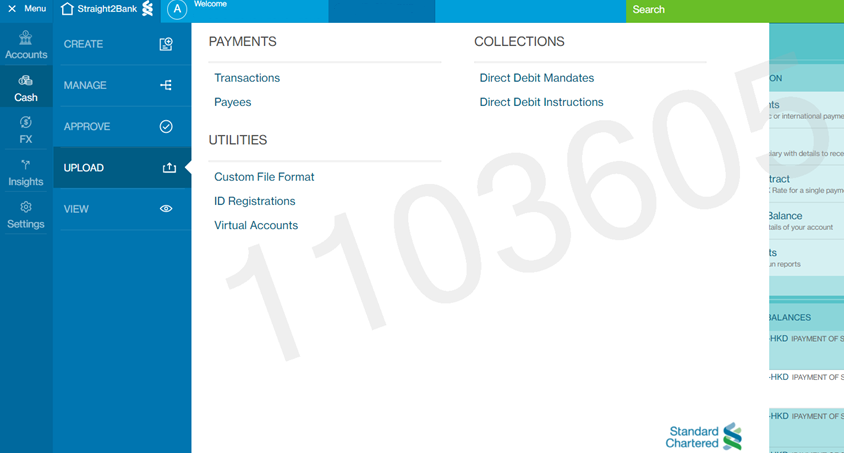
- Choose S2BPAY from 'FILE UPLOAD' dropdown list box, REFUND
from 'DATA TEMPLATE / FILE FORMAT' dropdown list box, choose the file
to be uploaded in 'UPLOAD FILE' and click on 'CONTINUE' button.
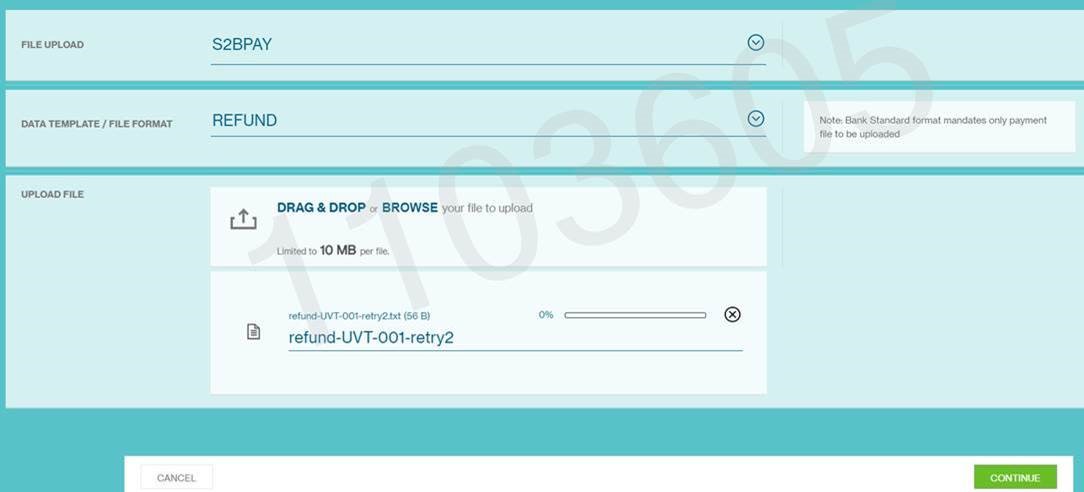
- Enter the Challenge Code into Vasco token and enter the
Response code back on the screen as shown below.
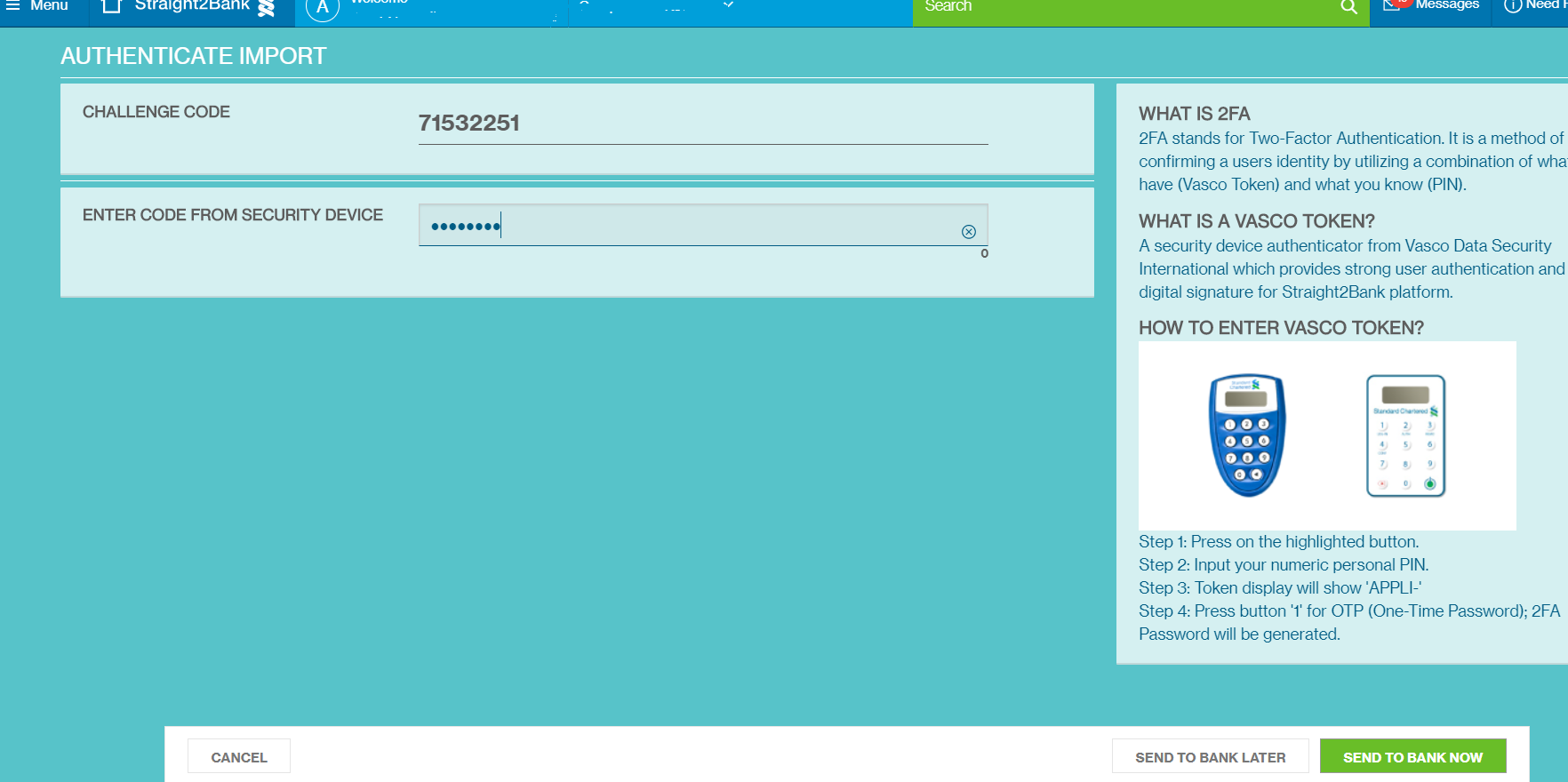
Bulk File Upload - Generate Link
Straight2Bank Pay offers a bulk file upload service to generate the following type of Links. The file can be uploaded via S2B Web or any H2H channels.- Dynamic Payment Link (all fields are non-editable)
- Semi-dynamic Payment Link (few fields can be made as editable)
- Payment Link Generator (to be used when few field's value to be pre-populated with a fixed value and can be made as editable or non-editable).
If GENERATE-LINK file is uploaded successfully, then Straight2Bank Pay generates the output file which will contain same data of input file with one additional field as last field with the Link. The output file will be returned to the same channel from where it was uploaded. Option is available to send the output file to other channel like S2B Web or any H2H channel or via pre-configured email ids.
GENERATE-LINK file format needs to be in CSV file format. The file can have title for each column, in such case, it needs to be configured at Profile level to say how many rows to be ignored with the parameter key LINK_GENERATOR_SKIP_LINES.
List of fields that can be included in the Link. If any field value needs to be populated with static value, then it can be configured at profile level:
| Seq Num | Field Name | M/O/C | Type & Length | Remarks |
|---|---|---|---|---|
| L1 | Corpid | M | X(8) | Corp ID is not required to be part of the file content.
Following options are avaialble to assign the value for Corp ID:
|
| L2 | Country Code | M | X(2) | If Country Code is available in every data row of the file, then the field number to be configured in parameter key LINK_GENERATOR_CTRY, otherwise, the required static value to be configured. |
| L3 | Currency Code | M | X(3) | If Currency Code is available in every data row of the file, then the field number to be configured in parameter key LINK_GENERATOR_CURR, otherwise, the required static value to be configured. |
| L4 | Amount | C | N(16,3) | If Amount is available in every data row of the file, then the field number to be configured in parameter key LINK_GENERATOR_AMT, otherwise, the required static value to be configured. Mandatory for Dynamic Payment Link. Optional for Semi-dynamic and Payment Link Generator. |
| L5 | Reference 1 | O | X(100) | If Reference 1 is available in every data row of the file, then the field number to be configured in parameter key LINK_GENERATOR_REF1, otherwise, the required static value to be configured. |
| L6 | Reference 2 | O | X(100) | If Reference 2 is available in every data row of the file, then the field number to be configured in parameter key LINK_GENERATOR_REF2, otherwise, the required static value to be configured. |
| L7 | Reference 3 | O | X(100) | If Reference 3 is available in every data row of the file, then the field number to be configured in parameter key LINK_GENERATOR_REF3, otherwise, the required static value to be configured. |
| L8 | Reference 4 | O | X(100) | If Reference 4 is available in every data row of the file, then the field number to be configured in parameter key LINK_GENERATOR_REF4, otherwise, the required static value to be configured. |
| L9 | Reference 5 | O | X(100) | If Reference 5 is available in every data row of the file, then the field number to be configured in parameter key LINK_GENERATOR_REF5, otherwise, the required static value to be configured. |
| L10 | Expiry Date Time | M | 9(14) | If Expiry Date Time is part of every data row of the file, then the field number to be configured in parameter key LINK_EXPIRY_DATE_TIME, otherwise, the required number of days to be configured for parameter key LINK_GENERATOR_DATETIME_DAYS to dynamically compute the expiry date and time. If it is configured with the value as 10, then expiry date and time will be set as Current Date + 10 and time will be always 23:59:00. Format: DDMMYYYYHH(24)MMSS Eg: 09092021235959 means 09th Sep 2021 23:59:59 Time Zone needs to be in GMT+08:00 |
| L11 | Return URL | O | X(1000) | If Return URL is available in every data row of the file, then the field number to be configured in parameter key LINK_GENERATOR_RURL, otherwise, the required static value to be configured. |
| L12 | PSP ID | O | X(8) | If PSP ID is available in every data row of the file, then the field number to be configured in parameter key LINK_GENERATOR_PSPID, otherwise, the required static value to be configured. |
Sample GENERATE-LINK File
Input File
Reference Number1,Reference Number2,Reference Number3,Reference Number4,Reference Number5,Amount
1234b,abcde,ref4,,,100
7658b,,,,,200
Output File
Reference Number1,Reference Number2,Reference Number3,Reference Number4,Reference Number5,Amount
1234b,abcde,ref4,,,100,https://s2bpay.sc.com/s2bpay/billcollect?encstr=5M0JbPxwIG3i6wgQ26oecxszH0VE2DIOypv+ZSfA18xgBMltBRvOo32VHzKOVxQc&cencstr=5M0JbPxwIG3i6wgQ26oecyj4/kWq6E2e12VjdFN3jR+tuunMxlMBVXOnYRED6fhkpl3jvZfhV/dHQmJaffbLUg==
7658b,,,,,200,https://s2bpay.sc.com/s2bpay/billcollect?encstr=5M0JbPxwIG3i6wgQ26oecxszH0VE2DIOypv+ZSfA18xgBMltBRvOo32VHzKOVxQc&cencstr=5M0JbPxwIG3i6wgQ26oecwszNDvv95yVoTftiGLnuR7ZQmPZjQcmKYdKHpbTUtpZ
Manual Steps to upload GENERATE-LINK file via Straight2Bank Web
Steps to upload bulk generate-link file manually via Straight2Bank Web portal:- Login to Straight2Bank Web.
- Navigate to the menu as shown below.
- Choose S2BPAY from 'FILE UPLOAD' dropdown list box,
GENERATE-LINK from 'DATA TEMPLATE / FILE FORMAT' dropdown list box,
choose the file to be uploaded in 'UPLOAD FILE' and click on
'CONTINUE' button.
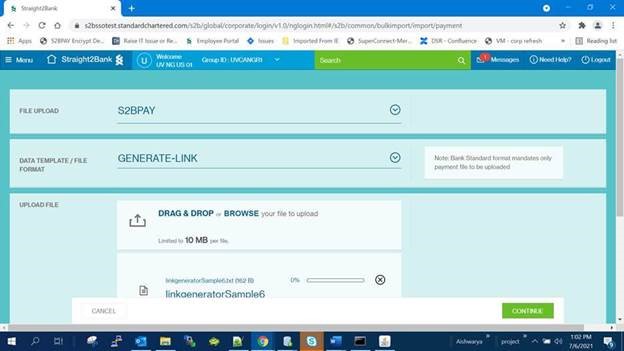
- Enter the Challenge Code into Vasco token and enter the
Response code back on the screen as shown below.
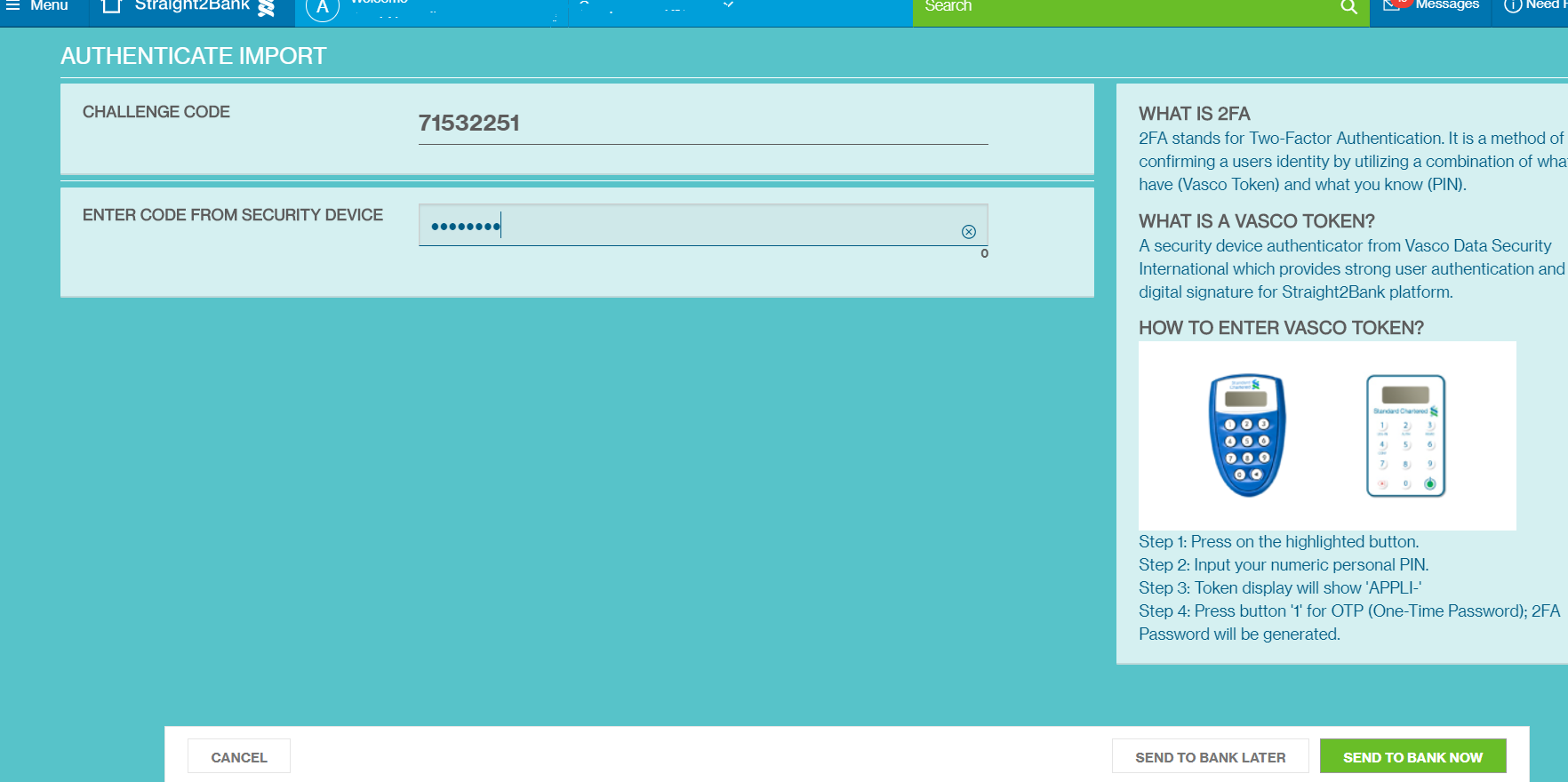
Bulk File Upload - Present Invoice
For 'Invoice Presentment and Payment' module, it is mandatory for Merchant to upload the outstanding invoices that need to be presented to the Payer and collect using payment method of Straight2Bank Pay. Invoice files can be uploaded manually via S2B Web or automatically via any H2H channels.
Straight2Bank Pay applies following logic while processing the invoice file:
- Identifies the corp_id by using the following rule:
- Corp ID is auto-derived if there is just one corp_id created under Merchant's S2B Group ID.
- If more than one Corp ID is available under Merchant's S2B Group ID and Invoice file to be uploaded to just for one Corp ID always, then that corp_id alone to be configured with the key 'PRESENT_INVOICE_CORPID' with the value as Corp ID (enclosed with square bracket [ ]).
- If more than one Corp ID is available under Merchant's S2B Group ID and Invoice File to be created for more than one Corp ID, then the Corp ID needs to be populated as part of the filename. The Position in the file name from where the corp_id to be read needs to be configured with the key PRESENT_INVOICE_CORPID with the value as 'FILENAME,<position of the corp_id>'
- Deletes all the PENDING Invoices (if any) that was uploaded earlier. (this can be disabled if required at Corp_id level)
- Captures Invoices from the File against the corp_id, with status as PENDING. If any invoice in the file is already available with PAID status in Straight2Bank Pay database, then it will be ignored, similarly if invoice does not have all the mandatory fields, then it will be ignored also.
- Following types of line items are supported in the file:
- Invoice
- Debit Note
- Credit Note
- Credit Voucher
- If any item from the file is ignored, then an output file will be sent to the same channel on which the file is uploaded. The output file contains all the data of rejected line item with an additional field as 'REJECTED REASON' as last field. Option is available to send the output file to other channel like S2B Web or any H2H channel or via pre-configured email ids.
After uploading the invoice file, Merchant can send the payment link of the corp_id to their payers to fetch the outstanding invoices and make the payment. S2BPay reports both the payment data and its associated invoice lines items in a report for Merchant.
Merchant can choose which data from Invoice File to be shown for the payer and assign the column title for Invoice table in 'Invoice Presentment' page. PRESENT_INV_UI_FIELDS parameter to be configured at corp_id level.
PRESENT-INVOICE file format needs to be in CSV file format. The file can have title for each column, in such case, it needs to be configured at corp_id level to say how many rows to be ignored with the parameter key PRESENT_INV_SKIP_LINES.
Below table provides the list of fields that can be included in the file. If any field value needs to be populated with static value by default, then it can be configured at corp_id level.
In case, Merchant csv file does not follow the field order as per below table, field order of merchant file can be configured at corp_id level. Even few optional fields can be configured as mandatory.
| Seq Num | Field Name | M/O/C | Type & Length | Remarks |
|---|---|---|---|---|
| L1 | Invoice Type | M | X(20) | Type of line item, eg. INVOICE, CREDIT NOTE, CREDIT VOUCHER, etc. Merchant can retain same Type value as familiar for their payers. Each Merchant-specific-Type will be mapped to the following standard Type of Straight2Bank Pay to compute the total payable amount: INVOICE (included in payable amount) DEBITNOTE (included in payable amount) CREDITNOTE (subtracted from payable amount) |
| L2 | Date1 | M | Date | Date of the line item. Format: ddMMyyyy. (other date format is supported with a configuration) Eg: 01062022 to represent 01st June 2022. |
| L3 | Date2 | O | Date | Additional Date of the line item (Eg. Due Date). Format: ddMMyyyy. Eg: 01062022 to represent 01st June 2022. |
| L4 | Date3 | O | Date | Additional Date of the line item. Format: ddMMyyyy. Eg: 01062022 to represent 01st June 2022. |
| L5 | Payer Reference 1 | M | X(100) | Payer Reference 1 to 5 fields to be used to provide the data that is known to the payer or Merchant to communcate to the payer. Eg. Payer ID or Dealer ID or Agent ID or Vendor ID, etc. Merchant can decide how many Payer Reference fields will be used to validate the payer. Payer will be prompted in 'Invoice Presentment' screen to enter the value for all enabled Reference fields. The Invoice line itmes that are matching with the data entered by Payer will be presented to the payer. |
| L6 | Payer Reference 2 | M | X(100) | Payer Reference 1 to 5 fields to be used to provide the data that is known to the payer or Merchant to communcate to the payer. Eg. Payer Name or Dealer Name or Agent Name or Vendor Name, etc. Merchant can decide how many Payer Reference fields will be used to validate the payer. Payer will be prompted in 'Invoice Presentment' screen to enter the value for all enabled Reference fields. The Invoice line itmes that are matching with the data entered by Payer will be presented to the payer. |
| L7 | Payer Reference 3 | O | X(100) | Payer Reference 1 to 5 fields to be used to provide the data that is known to the payer or Merchant to communcate to the payer. Eg. Location, Biz Unit Name, etc Merchant can decide how many Payer Reference fields will be used to validate the payer. Payer will be prompted in 'Invoice Presentment' screen to enter the value for all enabled Reference fields. The Invoice line itmes that are matching with the data entered by Payer will be presented to the payer. |
| L8 | Payer Reference 4 | O | X(100) | Payer Reference 1 to 5 fields to be used to provide the data that is known to the payer or Merchant to communcate to the payer. Merchant can decide how many Payer Reference fields will be used to validate the payer. Payer will be prompted in 'Invoice Presentment' screen to enter the value for all enabled Reference fields. The Invoice line itmes that are matching with the data entered by Payer will be presented to the payer. |
| L9 | Payer Reference 5 | O | X(100) | Reference 1 to 5 fields to be used to provide the data that is known to the payer or Merchant to communcate to the payer. Eg. Location, Biz Unit Name, etc Merchant can decide how many Payer Reference fields will be used to validate the payer. Payer will be prompted in 'Invoice Presentment' screen to enter the value for all enabled Reference fields. The Invoice line items that are matching with the data entered by Payer will be presented to the payer. |
| L10 | Invoice Number | M | X(100) | Invoice number or Credit Note number , etc. It needs to be unique at Payer level. |
| L11 | Invoice Description | O | X(100) | Further details of Invoice. |
| L12 | Country Code | M | X(2) | Country Code of Invoice. |
| L13 | Currency | M | X(3) | Currency Code of Invoice. |
| L14 | Invoice Amount | M | N(16, 3) | Amount of Invoice. No negative sign is allowed. |
| L15 | Invoice Amount 1 | O | N(16, 3) | Other amount of Invoice (like Due Amount or Gross Amount or WHT Amount or VAT, or GST, etc). No negative sign is allowed. |
| L16 | Invoice Amount 2 | O | N(16, 3) | Other amount of Invoice (like Due Amount or Gross Amount or WHT Amount or VAT, or GST, etc). No negative sign is allowed. |
| L17 | Invoice Amount 3 | O | N(16, 3) | Other amount of Invoice (like Due Amount or Gross Amount or WHT Amount or VAT, or GST, etc). No negative sign is allowed. |
| L18 | Invoice Amount 4 | O | N(16, 3) | Other amount of Invoice (like Due Amount or Gross Amount or WHT Amount or VAT, or GST, etc). No negative sign is allowed. |
Sample PRESENT_INVOICE File
Input File
Type, Date1, Date2, Date3, Ref1, Ref2, Ref3, Ref4, Ref5, Document Number, Description, Country,Currency, Amount, Amount1, Amount2, Amount3, Amount4
INVOICE,24032022,24042022,,1002345,XYZ COMPANY LIMITED,,,,100100,PO 123,SG,SGD,100.00,,,,
DEBIT NOTE,24032022,24052022,,1002345,XYZ COMPANY LIMITED,,,,DN100100,PO 123 - ADJ,SG,SGD,50.00,,,,
CREDIT NOTE,24032022,24042022,,1002345,XYZ COMPANY LIMITED,,,,CN100100,PO 123 - REV DN,SG,SGD,50.00,,,,
CREDIT VOUCHER,01062022,01072022,,1002345,XYZ COMPANY LIMITED,,,,CV100100,PO 123 - DISCOUNT,SG,SGD,20.00,,,,
INVOICE,24032022,24052022,,1002345,XYZ COMPANY LIMITED,,,,100120,PO 100,SG,SGD,200.00,,,,
INVOICE,24032022,24052022,,1002345,XYZ COMPANY LIMITED,,,,100150,PO 103,SG,SGD,0.03,,,,
INVOICE,24032022,24052022,,1002345,XYZ COMPANY LIMITED,,,,100160,PO 104,SG,SGD,0.02,,,,
INVOICE,24032022,24052022,,1002345,XYZ COMPANY LIMITED,,,,100170,PO 105,SG,SGD,0.01,,,,
INVOICE,24032022,24052022,,1002345,XYZ COMPANY LIMITED,,,,100180,PO 106,SG,SGD,0.01,,,,
INVOICE,24032022,24052022,,1002345,XYZ COMPANY LIMITED,,,,100190,PO 107,SG,SGD,0.01,,,,
CREDIT NOTE,24032022,24042022,,1002345,XYZ COMPANY LIMITED,,,,CN100120,PO 100 - DISCOUNT,SG,SGD,20.00,,,,
CREDIT NOTE,24032022,24042022,,1002345,XYZ COMPANY LIMITED,,,,CN100160,PO 104 - DISCOUNT,SG,SGD,0.01,,,,
INVOICE,01062022,01072022,,2002345,AAA COMPANY LIMITED,,,,200100,PO 123,SG,SGD,100.00,,,,
INVOICE,01062022,24052022,,2002345,AAA COMPANY LIMITED,,,,200120,PO 789,SG,SGD,10.00,,,,
INVOICE,01062022,24052022,,2002345,AAA COMPANY LIMITED,,,,200130,PO 111,SG,SGD,5.00,,,,
DEBIT NOTE,01062022,24052022,,2002345,AAA COMPANY LIMITED,,,,DN200100,PO 123 - ADJ,SG,SGD,10.00,,,,
CREDIT NOTE,01062022,01072022,,2002345,AAA COMPANY LIMITED,,,,CN200100,PO 123 - REV DN,SG,SGD,10.00,,,,
CREDIT VOUCHER,01062022,01072022,,2002345,AAA COMPANY LIMITED,,,,CV200100,PO 123 - DISCOUNT,SG,SGD,50.00,,,,
Output File
Type, Date1, Date2, Date3, Ref1, Ref2, Ref3, Ref4, Ref5, Document Number, Description, Country,Currency, Amount, Amount1, Amount2, Amount3, Amount4,REJECTED REASON
INVOICE,24032022,24052022,,1002345,XYZ COMPANY LIMITED,,,,100150,PO 103,SG,SGD,0.03,,,,,Failed capturing Invoice
INVOICE,24032022,24052022,,1002345,XYZ COMPANY LIMITED,,,,100150,PO 103,SG,SGD,,,,,,Invalid Amount
Transaction Report with Invoice
Transaction Report includes Invoice line items for the Transactions that are initiated from 'Invoice Presentment' module of Straight2Bank Pay. This report can be further customized to remove field title or to remove certain fields.
Sample default Transaction Report:
Record, Corp ID,Country Code,PSP ID,Transaction Type,Reference 1,Reference 2,Reference 3,Reference 4,Reference 5,Unique Reference,Currency Code,Amount,S2BPay AssignedTransaction ID,Partner assigned transaction ID,Status Date Time,Status,Status Remarks,Refund Parent Transaction ID,Payer Account,Payer Bank Code,Payer Name,Client Identity,Pre-auth Amount,GST Amount,Tax Amount,Charge Amount,Net Amount,Total Charge Amount
P,S2BPAY04,SG,SGPAYNOW,NEW,1002345,XYZ COMPANY LIMITED,,,,22003039657,SGD,0.01,22003039657,C100092760951,2022-03-24,CREDITED,,,,DBSSSGSGBRT,NOORULLAH,,,,,,,
Record,Corp ID,S2BPay AssignedTransaction ID,Invoice Type,Reference 1,Reference 2,Reference 3,Reference 4,Reference 5,Country,Currency Code,Amount,DocumentNumber,Description,Status,Date1,Date2,Date3,Amount1,Amount2,Amount3,Amount4
I,S2BPAY04,22003039657,CREDIT NOTE,1002345,XYZ COMPANY LIMITED,,,,SG,SGD,0.02,CR100300,PROMOTION ORDER - CREDIT NOTE,PAID,2021-12-26,2021-12-26,,,,,
I,S2BPAY04,22003039657,INVOICE,1002345,XYZ COMPANY LIMITED,,,,SG,SGD,0.03,100150,ADHOC ORDER 2,PAID,2021-12-26,2021-12-26,,,,,
Manual Steps to upload PRESENT_INVOICE file via Straight2Bank Web
Steps to upload bulk generate-link file manually via Straight2Bank Web portal:- Login to Straight2Bank Web.
- Navigate to the menu as shown below.
- Choose S2BPAY from 'FILE UPLOAD' dropdown list box,
PRESENT-INVOICE from 'DATA TEMPLATE / FILE FORMAT' dropdown list box,
choose the file to be uploaded in 'UPLOAD FILE' and click on
'CONTINUE' button.
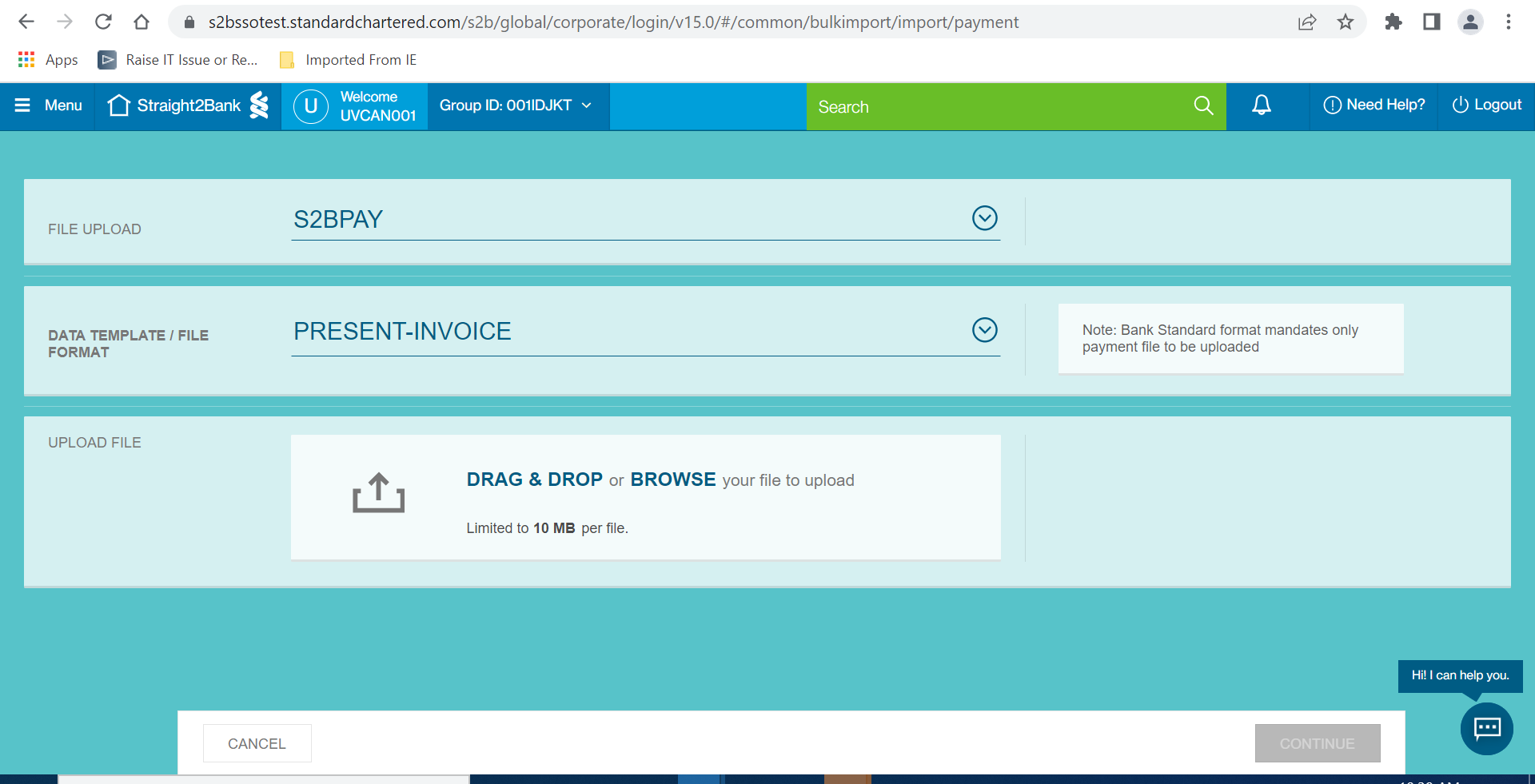
- Enter the Challenge Code into Vasco token and enter the
Response code back on the screen as shown below.
eMandate Report
This report can be configurable at Merchant Profile level with a timing, to generate a report with the details of eMandate authorized via Straight2Bank Pay.
| Seq Num | Field Name | M/O/C | Type & Length | Column Title | Remarks |
|---|---|---|---|---|---|
| D1 | Record | M | X(1) | Record Identifier | "M" |
| D2 | Corp ID | M | X(8) | Corp ID | Corp ID of Merchant |
| D3 | Payer ID | M | X(50) | Payer ID | Payer ID to uniquely identify the payer in merchant's system |
| D4 | Type | M | X(30) | Mandate Type | Possible value: MANDATE |
| D5 | Reference 1 | O | X(250) | Ref 1 | Reference 1 as provided by Merchant. |
| D6 | Reference 2 | O | X(250) | Ref 2 | Reference 2 as provided by Merchant. |
| D7 | Reference 3 | O | X(250) | Ref 3 | Reference 3 as provided by Merchant. |
| D8 | Reference 4 | O | X(100) | Ref 4 | Reference 4 as provided by Merchant. |
| D9 | Reference 5 | O | X(250) | Ref 5 | Reference 5 as provided by Merchant. |
| D10 | Reference 6 | O | X(250) | Ref 6 | Reference 6 as provided by Merchant. |
| D11 | Reference 7 | O | X(250) | Ref 7 | Reference 7 as provided by Merchant. |
| D12 | Reference 8 | O | X(250) | Ref 8 | Reference 8 as provided by Merchant. |
| D13 | Reference 9 | O | X(250) | Ref 9 | Reference 9 as provided by Merchant. |
| D14 | Reference 10 | O | X(250) | Ref 10 | Reference 10 as provided by Merchant. |
| D15 | Transaction Reference | M | X(100) | Transaction Reference | Transaction reference created by Straight2Bank Pay for this mandate |
| D16 | Country Code | M | X(2) | Country Code | 2-character country code. |
| D17 | Currency Code | M | X(3) | CCYCODE | 3-character currency code. |
| D18 | Payment Method | M | X(8) | Payment Method | Payment Service Provider ID. S2BPay assigns 8 characters code for each Payment Method. Eg: SG: SGPAYNOW, SGENETS1, SGFDMS01 |
| D19 | Mandate Reference | M | N(14) | Mandate Reference | Mandate Reference created by Straight2Bank Pay for this mandate |
| D20 | Maximum Amount | O | N(18,5) | Maximum Amount | Maximum Amount authorised by user for this mandate |
| D21 | Mandate Valid From | O | X(10) | From Date | Date from which this mandate is valid Format: YYYY-MM-DD |
| D22 | Mandate Expiry Date | O | X(10) | To Date | Date till which this mandate is valid Format: YYYY-MM-DD |
| D23 | Segment | O | X(50) | Segment | "Retail" or "Corporate" |
| D24 | Payer Name | O | X(50) | Payer Name | Payer Name if available. |
| D25 | Payer Bank Code | O | X(50) | Payer Bank Code | Payer Bank Code if available. |
| D26 | Payer Account | O | X(35) | Payer Account | Payer Account if available. |
| D27 | Status | M | X(50) | Status | Possible values: PENDING, SUCCESS, CANCELLED, FAIL, AUTHORIZED |
| D28 | Status Remarks | O | X(250) | Status Remarks | Remarks on status if available. |
| D29 | Default Flag | M | X(1) | Default Flag | Possible values: Y, N Default flag chosen by user in case of multiple mandates for a payerid In case of only one mandate present for a payerid, that mandate will have value as Y by default |
| D30 | Created Date Time | M | X(19) | Created Date | Date Time on which the Mandate is created. Date is in GMT+08:00 time zone. Format : YYYY-MM-DD HH:Mi:SS |
| D31 | Updated Date Time | M | X(19) | Updated Date | Date Time on which the Mandate is updated recently. Date is in GMT+08:00 time zone. Format : YYYY-MM-DD HH:Mi:SS |
Sample eMandate Report:
"Record","Corp ID","Payer ID","Type","Reference 1","Reference 2","Reference 3","Reference 4","Reference 5","Reference 6","Reference 7","Reference 8","Reference 9","Reference 10","Transaction Reference","Country","Currency Code","Payment Method","Mandate Reference","Maximum Amount","Mandate Valid From","Mandate Expiry Date","Segment","Payer Name","Payer Bank Code","Payer Account","Status","Status Remarks","Default Flag","Created Date Time","Updated Date Time"
M,S2BPAY03,2023020902,MANDATE,2023020902,Ploen02,2023020902,,,,,,,,BODHL0524Z01DHL20230210022130000214,SG,SGD,SGRTDDI1,2023020902,3,2023-02-10,2023-03-31,Retail,Ploen02,SCBLSG22XXX,6209564988,SUCCESS,,N,2023-02-10 02:21:30,2023-02-10 02:25:08
M,S2BPAY03,2023020902,MANDATE,2023020902,Ploen02,2023020902,,,,,,,,BODHL0524Z01DHL20230210055841000259,SG,SGD,SGRTDDI1,2023020902,3,2023-02-10,2023-04-30,Retail,Ploen02,SCBLSG22XXX,0128034688,CANCELLED,,N,2023-02-10 05:58:41,2023-02-10 06:01:33
Appendix
Possible Values for 'status'
| Service | Possible Status |
|---|---|
Notification Request (Straight2Bank Pay to Merchant Server) |
For NEW Transaction:
For REFUND Transaction:
|
|
bCollect Response (Straight2Bank Pay to Merchant Server via user's browser) Or Possible value as part of browser re-direction to rurl (applicable for bcollect and s2bpay.js) |
For NEW transaction:
|
|
For NEW Transaction:
For REFUND Transaction:
For VOID Transaction:
|
|
|
For NEW Transaction:
|
|
|
For REFUND Transaction:
|
|
|
For NEW Transaction:
|
Generation of Digital Signature
In all Request message from Merchant Server, digital signature is mandatory as part of the payload, payload needs to be signed using Merchant's private key using RS256 algorithm. This section provides how to create digital signature for Query API as an example:
- Form the key-value pair for all non-empty field values and sort the key-value pair based on the key in alphabetical order. Then concatenate the sorted key-value pair with a delimiter "&". corpid=CUIMOMO1&corpref=9999999991&datetime=10012018103420
- Pass this string to RS256 algorithm to get the value that needs to be populated for key 'sign' in all API request.
corpid=CUIMOMO1&corpref=9999999991&datetime=10012018103420&sign=u3nTf91HKNLzJrDhnglqUb58bknWLhxcyxyDAcYKOaGhGiCVuaFSBCvtjzekA112n7Akpdzxt2ZjFA93UY4dw9X5x1MiKn2ZXZNV5pZbyCaWX/id0SYGNbi11nWleSsNJ8qwHlpHz4yvrCuvTJlWTdG4kVHFFaQJ1S1Tyz98rF6tSAuF/N1DBTD2GvENA4xyhnhp0B41vsqCBVHWIyt6pSj71hIpo0dmPj1Kpywt2O1SySDQr/bxCOFN1iNWcr1/RgPASlM1id9oxyuRF5zNmRyQfLMwGuCg42KqGF1WUSZGZt4Ma40dYzxaLDfjJTM038doIDeaKKIeeW7H6Xmq9w==
Sample Java Code to generate digital signature:
							//sort the key value pair
public static String sortParameterString(String args[]){
  StringBuilder parameterString = new StringBuilder("");
  try{
       Arrays.sort(args);
       for (int counter=0; counter < args.length; counter++) {
              parameterString.append(args[counter]);
              if (counter != args.length-1) parameterString.append("&");
       }
  }
  catch(Exception e){
      //do catch code
  }
  return parameterString.toString();
}
//RS256 Signing
public static String doRSASHA256Signing(String plainText, String privateKeyStr, String password) throws Exception {
   EncryptedPrivateKeyInfo ePKInfo = new EncryptedPrivateKeyInfo(Base64.decodeBase64(privateKeyStr.getBytes()));
   Cipher cipher = Cipher.getInstance(ePKInfo.getAlgName());
   PBEKeySpec pbeKeySpec = new PBEKeySpec(password.toCharArray());
   SecretKeyFactory skFac = SecretKeyFactory.getInstance(ePKInfo.getAlgName());
   Key pbeKey = skFac.generateSecret(pbeKeySpec);
   AlgorithmParameters algParams = ePKInfo.getAlgParameters();
   cipher.init(Cipher.DECRYPT_MODE, pbeKey, algParams);
   KeySpec pkcs8KeySpec = ePKInfo.getKeySpec(cipher);
   PrivateKey privateKey = KeyFactory.getInstance("RSA").generatePrivate(pkcs8KeySpec);
   Signature signature = Signature.getInstance("SHA256withRSA");
   signature.initSign(privateKey);
   signature.update(plainText.getBytes());
   return new String(Base64.encodeBase64(signature.sign()));
}
Verification of Hash Value
In all notification and response messages from Straight2Bank Pay, security attribute 'hash' key is included as part of payload. Merchant is expected to validate the hash value to make sure no one has tampered with the payload during transmission.
Steps to be followed to validate the 'hash' value:
- Decrypt the payload using random key that has been sent in the message. After decryption, ensure that the resultant key value pair is sorted in alphabetical order.
- Pass the above string to HMAC-SHA256 algorithm (with Shared Secret Key) to get the value of hash value. Compare this hash value against the hash-value received in the payload from Straight2Bank Pay server. If both are not the same, then the message needs to be rejected and response message needs to be sent back to Straight2Bank Pay server as 'Hash Error'.
Encrypted
vYusFLuU5LtOwTU1GOVz58xFvbxnCC3Gw/vk67zzGQe3MW4iE5fsDSmVcCp3CIktHaGD7ud3uN+1UMhTiPxJmxvGmcVwSrCo3GNXmFnhxyMyAk8hF87P5ixEZXVvTzZTnzKvJOrocaNvy6z8rcgao5L11v7lyLuxEmqI0VMTMiBuethINqdLw4Gvl+pYma4mpLyvR63xczQleSQEeLhseVBowKIcA37XLggUVZL04f/zLVGI7WurX96sNfqCXQDrud08K6G+Xb4eR3COjhd1UIWmkoUwUpDqmCCZfi/Ybys4ft/o9WPzYIkzmUQIOn1YHsLeU7DN5jLNzdcWjvLAahXcz+aQDa1JkuJVqzaw2L2GrJOt3hISxsh4A9pOV0KpFZh+qb/I+UHbWiCRBDksdQ==
Decryptedack=PASS&amt=10000.00&ccy=VND&corpid=CUIMOMO1&corpref=7000082842&ctry=VN&date=10012018104609&optxnid=131761303&ref1=test1&ref2=test2&ref3=test3&ref4=test4&status=SUCCESSFUL&statusdesc=RECONCILED&txnid=7000082842&txntype=NEW&hash=563A18112C42882DA15ADDF5AC22E4CCA6B3CC1E42C09A8BB01C4E66D1E5E714
String to be used for hash verification (same as decrypted string except hash key and its value):
ack=PASS&amt=10000.00&ccy=VND&corpid=CUIMOMO1&corpref=7000082842&ctry=VN&date=10012018104609&optxnid=131761303&ref1=test1&ref2=test2&ref3=test3&ref4=test4&status=SUCCESSFUL&statusdesc=RECONCILED&txnid=7000082842&txntype=NEW
AES256 encryption/decryption
In all Request and Response message of each API or Java Script Plugin, the payload is encrypted using 'Secret Key' or random key. Merchant needs to build a function to decrypt a payload that comes from Straight2Bank Pay server and also encrypt the payload that needs to be sent to Straight2Bank Pay.
Sample Java code to do encrypt and descript using AES-256 CBC algorithm:
							public class EncryptUtil {
       static final int gcmIVSize = 12;
       public static String doAES256CBCEncryption(String raw, String key) throws InvalidKeyException,
                     NoSuchAlgorithmException, NoSuchPaddingException, InvalidAlgorithmParameterException,
                     IllegalBlockSizeException, BadPaddingException, UnsupportedEncodingException {
              byte[] ivBytes=new byte[gcmIVSize];
                                    new SecureRandom().nextBytes(ivBytes);
                                    final Cipher cipher = generateCBCCipher(key, 1, ivBytes);
                                    byte[] enc = cipher.doFinal(raw.getBytes(StandardCharsets.UTF_8));
                                    byte[] combined= ArrayUtils.addAll(ivBytes,enc);
                                    return Base64.encodeBase64String(combined);
       }
       public static String doAES256CBCDecryption(String encrypted, String key) throws InvalidKeyException,
                     NoSuchAlgorithmException, NoSuchPaddingException, InvalidAlgorithmParameterException,
                     IllegalBlockSizeException, BadPaddingException, UnsupportedEncodingException {
              byte[] combined= Base64.decodeBase64(encrypted);
                                    byte[] ivBytes= ArrayUtils.subarray(combined,0,gcmIVSize);
                                    byte[] enc=ArrayUtils.subarray(combined,gcmIVSize,combined.length);
                                    final Cipher cipher = generateCBCCipher(key, 2, ivBytes);
                                    return new String(cipher.doFinal(enc));
       }
       private static Cipher generateCBCCipher(String key, int mode,byte[] IV)
                     throws NoSuchAlgorithmException, NoSuchPaddingException, InvalidKeyException,
                     InvalidAlgorithmParameterException, UnsupportedEncodingException {
              GCMParameterSpec iv = new GCMParameterSpec(128,IV);
              String newKey = key.toUpperCase();
              Cipher cipher = Cipher.getInstance("AES/GCM/NoPadding");
              SecretKeySpec secretKeySpec = new SecretKeySpec(newKey.getBytes(), "AES");
              if (mode == 1)
                     cipher.init(Cipher.ENCRYPT_MODE, secretKeySpec, iv);
              else if (mode == 2)
                     cipher.init(Cipher.DECRYPT_MODE, secretKeySpec, iv);
              return cipher;
       } }
Sample Codes for Python can be retrieved from:
https://test-s2bpay.sc.com/s2bpaysit/resources/merchant/samples/python
Sample Codes for 'C Sharp' - C# can be retrieved from:
https://test-s2bpay.sc.com/s2bpaysit/resources/merchant/samples/csharp
RSA 2048 encryption/decryption
For the payloads sent by S2BPAY, the string is encrypted with AES-256 Algorithm using Random Key. The Random key is encrypted with RSA 2048 using Merchant's Public Key.
Sample Java code to do encrypt and descript using RSA 2048 algorithm:
							public static String encryptRsaWithPublicKey(String plainText, String publicKeyString) {
	try {
		X509EncodedKeySpec keySpecPv = new X509EncodedKeySpec(Base64.decodeBase64(publicKeyString.getBytes()));
		PublicKey publicKey = KeyFactory.getInstance("RSA").generatePublic(keySpecPv);
		final Cipher cipher = Cipher.getInstance("RSA/ECB/OAEPWithSHA-256AndMGF1Padding");
		cipher.init(Cipher.ENCRYPT_MODE, publicKey);
		byte[] enc = cipher.doFinal(plainText.getBytes());
		return DatatypeConverter.printBase64Binary(enc);
	} catch (Exception e) {
		System.out.println(e);
		throw new RuntimeException();
	}
}

public static String decryptRsaWithPrivateKey(String encryptedString, String privateKeyString, String password) {
try {
      EncryptedPrivateKeyInfo ePKInfo = new EncryptedPrivateKeyInfo(Base64.decodeBase64(privateKeyString.getBytes()));
      Cipher cipher = Cipher.getInstance(ePKInfo.getAlgName());
      PBEKeySpec pbeKeySpec = new PBEKeySpec(password.toCharArray());
      SecretKeyFactory skFac = SecretKeyFactory.getInstance(ePKInfo.getAlgName());
      Key pbeKey = skFac.generateSecret(pbeKeySpec);
      AlgorithmParameters algParams = ePKInfo.getAlgParameters();
      cipher.init(Cipher.DECRYPT_MODE, pbeKey, algParams);
      KeySpec pkcs8KeySpec = ePKInfo.getKeySpec(cipher);
      PrivateKey privateKey = KeyFactory.getInstance("RSA").generatePrivate(pkcs8KeySpec);
      final Cipher cipher1 = Cipher.getInstance("RSA/ECB/OAEPWithSHA-256AndMGF1Padding");
      cipher1.init(Cipher.DECRYPT_MODE, privateKey);
      return new String(cipher1.doFinal(DatatypeConverter.parseBase64Binary(encryptedString)));
      } catch (Exception e) {
             System.out.println(e);
	      throw new RuntimeException();

      }
}
Key Pair Generation
As part of on-boarding process or testing process, Merchant is expected to generate key pair using the following steps:
Command to generate the private key:
openssl genrsa -aes256 -passout pass:{password to protect the Private Key} -out {location of private key file} 2048
Following command to generate private key in pkcs8 format which needs to be used in the coding:
openssl pkcs8 -in {location of private key file} -topk8 -out {location of pkcs8 private key file} -v1 PBE-SHA1-3DES
- Enter the password used in Command 1 when prompted : Enter pass phrase for privatekey file.
- Then Enter a new password to encrypt this pkcs8 private key file when asked: Enter Encryption Password, and Confirm the password. This password to be used every time this private key is used via code.
Following command to generate public key from pkcs8 private key:
openssl rsa -pubout -in {location of pkcs8 private key file} -out {location of output public key file}
- Enter the password used to encrypt pkcs8 private key when prompted : Enter pass phrase for "pkcs8 private key file"
Public Key:
- Public key to be shared with Bank to configured in Merchant's Profile.
- Straight2Bank Pay will make use of this key to verify the digital signature that is received as part payload in request message from Merchant.
- Straight2Bank Pay will make use of this key to encrypt the random key and populate in 'enc_key' element of the message in response or notification messages from Straight2Bank Pay server to Merchant server.
Private Key:
- Merchant needs to maintain private key safely within their application. It should not be shared with any party and it should not be made public.
- Merchant needs to use private key to generate digital signature in all Request message to Straight2Bank Pay server.
- Merchant needs to use private key to decrypt 'enc_key' element of the message from Straight2Bank Pay server, to obtain the random key.
Browser Support
Straight2Bank Pay supports the following browser versions:
| Browser | Version |
|---|---|
| Internet Explorer | 11+ |
| Chrome | 36+ |
| FireFox | 27+ |
| Opera | 23+ |
| Safari | 9+ |
| Android Webview | Android 4.4.2 or higher |
JWE Encryption and Decryption
For APIs where JWE security is used, clients to encrypt using Straight2Bank Pay's public key for encryption. Upon receiving the response, JWE string to be decrypted using Merchant's Private Key.
Sample Java code to Encrypt JWE and Decrypt JWE:
								import org.jose4j.jwa.AlgorithmConstraints;
import org.jose4j.jwa.AlgorithmConstraints.ConstraintType;
import org.jose4j.jwa.AlgorithmConstraints;
import org.jose4j.jwe.ContentEncryptionAlgorithmIdentifiers;
import org.jose4j.jwe.JsonWebEncryption;
import org.jose4j.jwe.KeyManagementAlgorithmIdentifiers;

       public static String getEncryptedJWE(String scbPublicKey, String jws) {
             try {
X509EncodedKeySpec keySpecPv = new X509EncodedKeySpec(Base64.decodeBase64(scbPublicKey.getBytes()));
                  RSAPublicKey publicKey = KeyFactory.getInstance("RSA").generatePublic(keySpecPv);
                    JsonWebEncryption jwe = new JsonWebEncryption();
                    jwe.setEncryptionMethodHeaderParameter("A256GCM");
                    jwe.setKey(publicKey);
                    jwe.setAlgorithmHeaderValue("RSA-OAEP-256");
                    jwe.setPayload(jws);
                    return  jwe.getCompactSerialization();
             } catch (Exception e) {
                    log.error("Error encrypting JWS...");
             }
       }

       public static String doJWEDecrypt(String payload,String  privateKeyStr) {
             try {

                    KeyFactory keyFactory = KeyFactory.getInstance("RSA");
                    byte privateKeyBytes[] = Base64.decodeBase64(privateKeyString);
                    PKCS8EncodedKeySpec keySpec = new PKCS8EncodedKeySpec(
                                 privateKeyBytes);
                    RSAPrivateKey  rsaPrivateKey = (RSAPrivateKey) keyFactory.generatePrivate(keySpec);

                    JsonWebEncryption receivedJwe = new JsonWebEncryption();
                    AlgorithmConstraints algConstraints = new AlgorithmConstraints(ConstraintType.WHITELIST, KeyManagementAlgorithmIdentifiers.RSA_OAEP_256);
                    receivedJwe.setAlgorithmConstraints(algConstraints);
                    AlgorithmConstraints encConstraints = new AlgorithmConstraints(ConstraintType.WHITELIST, ContentEncryptionAlgorithmIdentifiers.AES_256_GCM);
             receivedJwe.setContentEncryptionAlgorithmConstraints(encConstraints);

                    receivedJwe.setKey(privateKey);
                    receivedJwe.setCompactSerialization(payload);
                    log.info("Decrypted text: "+receivedJwe.getPayload());
                    return receivedJwe.getPayload();
             } catch(Exception e) {
                    log.error("Error decrypting JWE message.." + e.getMessage());
             }
       }
Generation and Verification of JWS:
Merchant to generate the JWS when preparing payload to send to Straight2Bank Pay. JWS contains 3 Parts - Header.Payload.Signature (delimited by dot(.)). The below codes are used to create Signature when preparing payload and to verify Signature when validating the response from Straight2Bank Pay.
Sample Java Code to Generate Signature:
								private String doRSASHA256Signing(String plainText, String privateKeyString) {
             try {
                    //Here plaintext is URL-Base64 encoded Header. URL-Base64 encoded Payload
KeyFactory keyFactory = KeyFactory.getInstance("RSA");
                    byte privateKeyBytes[] = Base64.decodeBase64(privateKeyString);
                    PKCS8EncodedKeySpec keySpec = new PKCS8EncodedKeySpec(
                                 privateKeyBytes);
                    RSAPrivateKey  rsaPrivateKey = (RSAPrivateKey) keyFactory.generatePrivate(keySpec);
                    Signature signature = Signature.getInstance("SHA256withRSA");
                    signature.initSign(rsaPrivateKey);
                    signature.update(plainText.getBytes());
                    return new String(Base64.encodeBase64URLSafe(signature.sign()));
             } catch (Exception e) {
                    logger.error(e.getMessage());
             }
       }
Sample Java Code to Verify Signature:
								private boolean doRSASHA256Verifying(String plainText,
                    String signatureString, String scbPublicKey) {
             try {
                    //Here plaintext is Header.Payload value received
                    //Here signatureString is the signature received
X509EncodedKeySpec keySpecPv = new X509EncodedKeySpec(Base64.decodeBase64(scbPublicKey.getBytes()));
                  RSAPublicKey publicKey = KeyFactory.getInstance("RSA").generatePublic(keySpecPv);
                    Signature signature = Signature.getInstance("SHA256withRSA");
                    signature.initVerify(publicKey);
                    signature.update(plainText.getBytes());
                    return signature.verify(Base64.decodeBase64(signatureString));
             } catch (Exception e) {
                    logger.error(e.getMessage());
             }
       }
Public Key of Straight2Bank Pay
Test:
MIIBIjANBgkqhkiG9w0BAQEFAAOCAQ8AMIIBCgKCAQEA3fPMGgPN79lmrN8P6OegcY9Z2QnM0C8UuVlZzFc4VPyQwzUlRY1UtENxb4g5QjqXu/MyH3F18mFss8u9ZI3o748+cyRwmY6Ru2JgRTYZczUine+nycWz41fJLNrqktAYQPGFTnWUTzd7c+Cv3CSVt4LKSxH1wVUlqeXTUiQGcw4haTawx56MaEHrjcx1dXMHT3VnaVdjoY2uSd9RKlN5wH51re3bUqKugAj06kjWKLXNyg2steYSWXEJ0i+uAD8j0t9umbSml8Pyaz8CBigMP+FGwdmYXvRxej7iL9DPGkklF+rbGHoBbvh48hJJoyrXAd0NFRCcfoCpAYMpexRE2wIDAQAB
Prod:
MIIBIjANBgkqhkiG9w0BAQEFAAOCAQ8AMIIBCgKCAQEArV40/7K7VlLpfnEZjqAX3LAlnPvjSRSAHcX6cLIxN3YRL/l834Tfg4EyLG/qEHEy6t4gyxcU7k1DTQhGLriRSKPcR36ZOZJBZs9G2wZZJDsgO172Fq6nBnzajUwBjNhuTCDoqFDLN+Rxo9hDSif3ogGnEptJe6iAemHKHSECuu0IEteqHVO1+GZehK4DZy4OdJffgqRi31lvJD8NKoWzCjwqxrZ5dPCv5EcBa6sbwhb+nnHh5/LLoiPYfT75J67/FCzcE0rVy+ePzbMPXxueG8TeKdA6l5BgiFuBetBuQn/3g+4aqHfrE/YLIVcMsPyRxKs5Iw1epuaUSGx6KU3TrQIDAQAB